

3175x175(CURRENT).thumb.jpg.b05acc060982b36f5891ba728e6d953c.jpg)
Microsoft has confirmed that enrolling a Windows 10 PC into the Extended Security Updates program by paying $30 still requires a Microsoft Account, but that one ESU license covers up to 10 devices.
Microsoft has confirmed that paying $30 to enrol a Windows 10 PC into the Extended Security Updates (ESU) program will also require a Microsoft Account to complete the transaction. The good news is that one ESU license will cover up to 10 devices signed into the same account, meaning you don't need to pay $30 per device like originally thought. Strangely, this was not made clear in Microsoft's original announcement.
This is both good and bad news. It's good news as it means the $30 license is now much more reasonable, but bad news as it means you will still need to register a Microsoft Account to receive continued security updates beyond Windows 10's end of support date of October 14, 2025.
Originally, it sounded like the Microsoft Account requirement only applied to the free enrollment option when signing up for the ESU program. This method involves syncing your PC settings with OneDrive in exchange for free access to updates. Users thought they might be able to avoid registering a Microsoft Account by paying the $30 fee.
But now, the company has confirmed that all enrollment options require a Microsoft Account, regardless of if you're paying $30 or not. A Microsoft support document makes it abundantly clear:
"All enrollment options provide extended security updates through October 13, 2026. You will need to sign into your Microsoft account in order to enroll in ESU. You’ll be given these options to choose from when you enroll in the ESU program. You can use your existing ESU license on up to 10 devices."
The enrollment options the above mentions are as follows:
- One-time purchase of $30 USD
- 1,000 Microsoft Reward points
- Free if you sync your PC settings to OneDrive
This news is likely going to upset many Windows 10 users who have avoided registering a Microsoft Account up until now. At the same time, this should appease those who are already using a Microsoft Account and have more than one device they need to protect.
It appears that reason for this requirement is that it allows Microsoft to bind the ESU license to your Microsoft Account, enabling the ability for said license to be applicable on up to 10 devices. Whatever Windows 10 devices you sign into, the first 10 will be covered by that one $30 ESU license.
Most consumers likely don't have 10 devices lying around that they need protecting with security updates, but it's nice to have the option for those that do. You will still need to manually enroll each PC into the ESU program, but you won't need to pay $30 each time.
You can enroll your Windows 10 PC from today
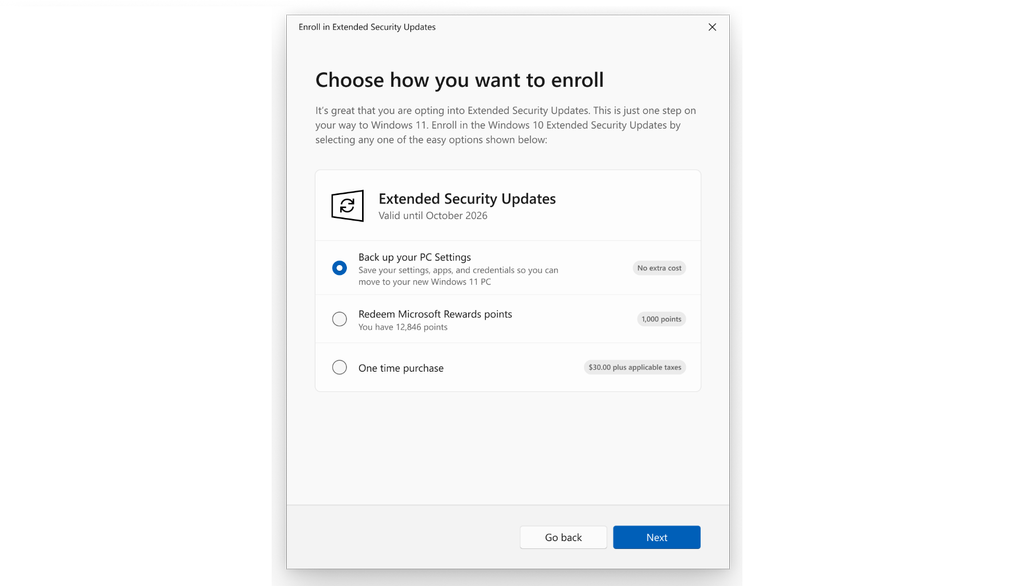
The ESU enrollment window is now rolling out. (Image credit: Microsoft)
The window for enrolling Windows 10 PCs into the ESU program opened in July, and it's now slowly rolling out to all users on Windows 10 that are running the latest updates. You can enroll your PC into the ESU program by heading to Windows Update and clicking the "Enroll now" button that will appear there.
If you don't see the button just yet, don't worry. The enrollment process is rolling out in waves and so it might not have reached you just yet.
Here are the steps to enroll your PC:
- Go to Settings > Update & Security >Windows Update. If your device meets the prerequisites, you’ll see a link to enroll in ESU.
- Once you select Enroll now you’ll start the ESU enrollment. If you are signed into Windows with a local account, you will be prompted to sign into your Microsoft account. If you are already backing up your PC Settings, you will see a prompt to enroll your device.
- If you aren’t backing up your Windows settings, you can choose if you want to begin backing up your settings, redeem Rewards, or make a one-time purchase to enroll in ESU.
What are your thoughts on Windows 10's ESU program? Let us know in the comments.
Thanks for the tip, Robert!
Hope you enjoyed this news post.
Posted Friday 8 August 2025 at 2:42 am AEST (my time).
News posts... 2023: 5,800+ | 2024: 5,700+ | 2025 (till end of July): 3,458
RIP Matrix | Farewell my friend
Recommended Comments
There are no comments to display.
Join the conversation
You can post now and register later. If you have an account, sign in now to post with your account.
Note: Your post will require moderator approval before it will be visible.