

3175x175(CURRENT).thumb.jpg.b05acc060982b36f5891ba728e6d953c.jpg)
This week's news recap is here, with a lot of Windows 11 preview builds with some interesting features, Patch Tuesday updates with fixed bugs, reviews, gaming news, and more.
Quick links:
Windows 11 and Windows 10
Here, we talk about everything happening around Microsoft's latest operating system in the Stable channel and preview builds: new features, removed features, controversies, bugs, interesting findings, and more. And, of course, you may find a word or two about older versions.
The September 2025 Patch Tuesday updates are now available. Windows 10 received KB5065429, while Windows 11 received KB5065426 for version 24H2 and KB5065431 for versions 22H2 and 23H2. This month's Patch Tuesday updates brought back a long-requested feature that lets you have a clock in the calendar flyout, and many users are very happy to get this feature back. They also fixed the bug impacting NDI streaming performance and app installs.

Additionally, Microsoft announced that legacy web components are being discontinued. Those include Legacy Web View, Windows 8/8.1/UWP HTML/JavaScript apps (also known as Hosted Web Applications and Windows Web Applications, Legacy Progressive Web Apps (PWA), and Legacy Microsoft Edge (EdgeHTML) DevTools. Besides that, Microsoft is phasing out VBScript, and to help you move, the company published details about what you should do with your legacy VBA projects.
Finally, Microsoft lifted an upgrade block preventing users from installing Windows 11 version 24H2 due to bugs with Dirac Audio.
The saga about broken SSDs continues, and we have more information about what is going on. Phison revealed that troubles were caused by the preview firmware, and systems with consumer firmware were not affected by the problem.

If you want to install Windows 11 on an unsupported PC, check out the updated hardware requirement bypass app, Flyoobe, which received a big update with better AI blocks, new extensions, and more. Interestingly, the app briefly disappeared from GitHub after that update, but then it was brought back with a new version and additional improvements.
Speaking of unsupported PCs, there is a new tool for debloating Windows 11 to some extreme levels. A new version of nano11 is out, and this thing can get you a Windows 11 installation that takes less than 3GB of disk space.
On the trivia side, check out an interesting story by a Microsoft veteran, Raymond Chen, that detailed why Windows 95 did not have instructions for energy saving back in the day.
Windows Insider Program
Here is what Microsoft released for Windows Insiders this week:
| Builds | |||
|---|---|---|---|
| Canary Channel |
This build, released on Monday, has a bunch of new features for File Explorer, the ability to enable a clock for the calendar flyout, and more.
The second Canary build of this week brought fixes for stuck temporary file scanning, taskbar bugs, HDR issues, and other problems in the operating system. |
||
| Dev Channel |
Emoji 16.0, new accessibility features for Copilot+ PCs, Click to Do improvements, Copilot recommendations in the Start menu, full-screen Microsoft 365 ads, and more. |
||
| Beta Channel |
This build is identical to 26220.6682 from the Dev Channel |
||
| Release Preview Channel |
This build has plenty of interesting changes and fixes, such as new features for Click to Do, the ability to change where hardware indicators appear, File Explorer improvements and more.
This build has the same changelog as 26200.6713.
This build fixes sign-in issues, input bugs, printing problems, and other instabilities ahead of this month's non-security updates. |
This update includes a small set of general improvements and fixes that improve the overall experience for customers and their devices on Windows 10. |
|
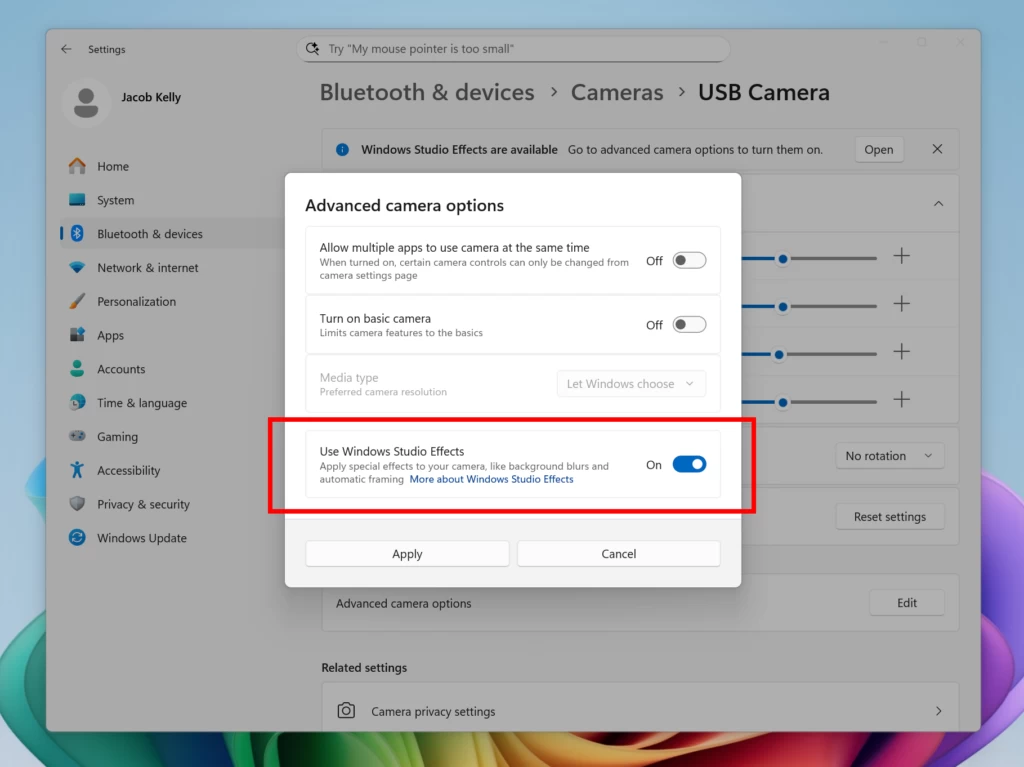
If you have a Copilot+ PC with an external camera, you will soon be able to apply Windows Studio Effects to it. Microsoft is testing a new feature in the latest preview builds, which allows Windows Studio Effects on rear-facing cameras and USB webcams in Windows 11. Keep in mind that Windows Studio Effects are still exclusive to Copilot+ PCs with Intel, AMD, and Qualcomm processors.
Additionally, Microsoft is further improving copy/paste dialogs in Windows 11. In addition to giving them the long-requested dark mode support, Microsoft dropped the green status bar in favor of a more fitting blue one. Improvements are also coming to the taskbar, which should be more reliable and display smoother animations. As for not-so-welcome changes, the Start menu will soon display Copilot recommendations, and the operating system itself will show you full-screen Microsoft 365 ads.
A new Microsoft Store update is also available for Windows Insiders, offering them an easier way to launch downloaded apps and an overview of available Microsoft 365 Copilot agents in the AI Hub.
Finally, Microsoft released the long-promised ISOs for Windows 11 version 25H2.
Updates are available
This section covers software, firmware, and other notable updates (released and coming soon) delivering new features, security fixes, improvements, patches, and more from Microsoft and third parties.
Google recently released Chrome 140, and with it, the company made it harder to install Manifest V2-based extensions, such as the popular content blocker uBlock Origin. However, it is still possible to make the beloved extension run, so check out this guide if you are not ready to bid it adieu.
Microsoft is making it easier to write formulas in Excel using AI. Copilot no longer uses state-of-the-art models to complete your formulas, suggest improvements, and auto-fill formulas as soon as you type =.
For Word Online, Microsoft is introducing new grammar features. You can now ask Copilot to fix all grammar and spelling mistakes in one click. Simply highlight some text that you want to proofread and press Alt + I.

The Microsoft Store received a few important updates this week. For one, individual developers can finally submit apps without paying Microsoft a $19 fee. Also, Microsoft updated the Store policies to clarify important topics, such as child safety and generative AI use.
Here are other updates and releases you may find interesting:
- VirtualBox 7.2.2 arrived with fixes for TPM, Windows on ARM, and more
- Rufus 4.10 beta is out with dark mode and Windows 11 25H2 support
- Senator blames Microsoft for weak security in Windows despite having an enterprise monopoly
-
Microsoft is simplifying its Copilot offerings with reduced prices
-
Microsoft unveiled the breakthrough Live Interpreter API for instant, multilingual communication
-
Microsoft committed to European interoperability in a groundbreaking agreement
Here are the latest drivers and firmware updates released this week:
- AMD Radeon Software 25.9.1 with FSR 4 support for over 85 games
- Nvidia 581.29 with optimizations for Borderlands 4 and Dying Light: The Beast
- Intel 32.0.101.7029 non-WHQL with optimizations for Borderlands 4, Dying Light: The Beast, FC 26, Hollow Knight: Silksong, and more
Reviews are in
Here is the hardware and software we reviewed this week
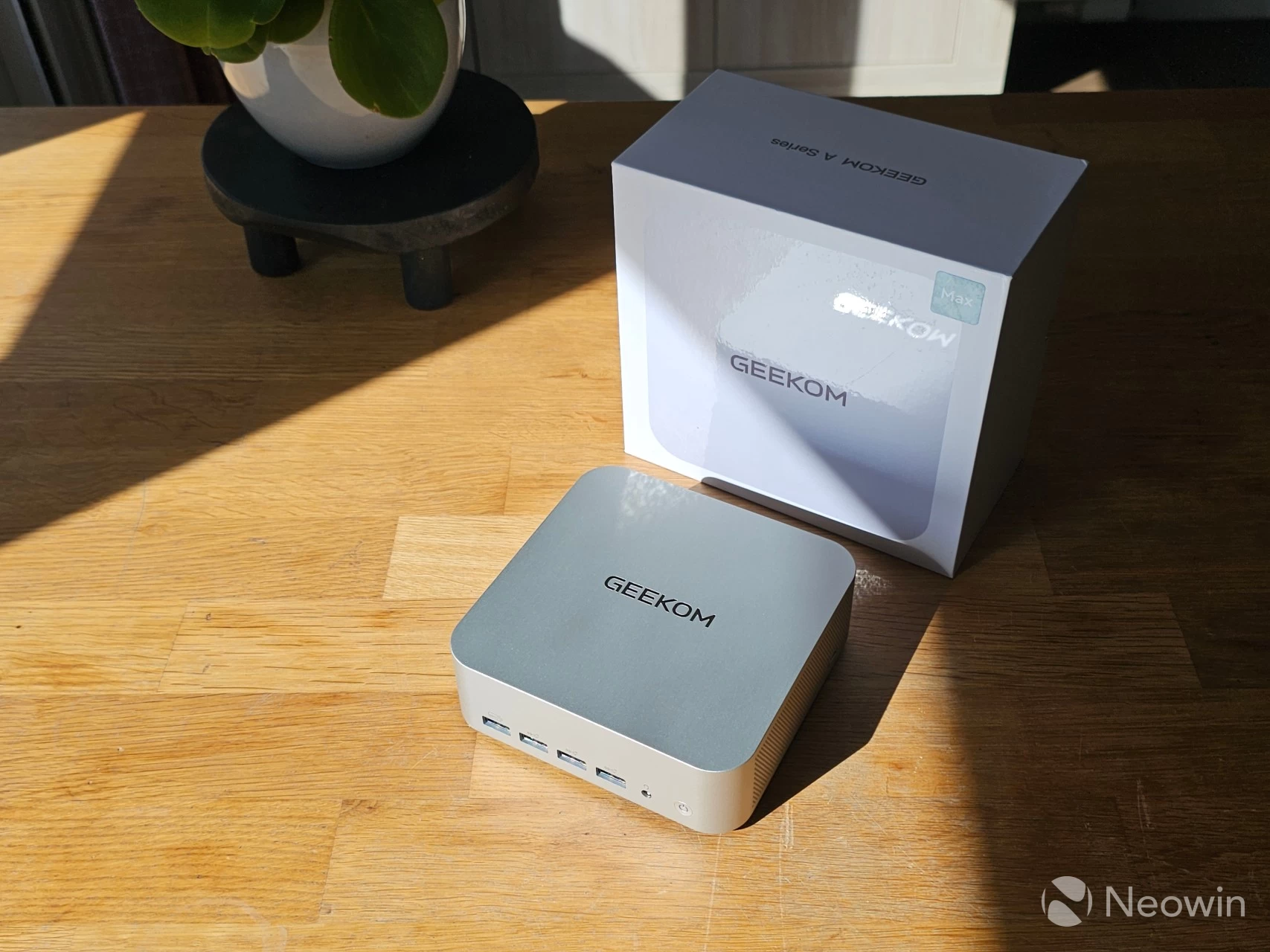
Steven Parker reviewed the GEEKOM A9 Max, a mini PC with an affordable price tag, which also qualifies as a Copilot+ PC, thanks to having the AMD Ryzen AI 9 HX 370 processor. It is a fantastic compact computer with only a couple of minor issues, such as the lack of front-facing USB-C ports and a more challenging way to get to the memory and SSD ports.
On the gaming side
Learn about upcoming game releases, Xbox rumors, new hardware, software updates, freebies, deals, discounts, and more.
Microsoft is changing how the Xbox button on controllers works on Windows 11. The company is introducing a new long-press that lets you open Task View. Now, the button supports three features: single press to open Game Bar, long press to open Task View (should be handy on handhelds), and press-and-hold to turn off the controller.

Xbox Cloud Gaming is coming to more devices. This week, Microsoft announced a new partnership with LG, which will bring cloud streaming to cars so that your passengers can play Xbox games on rear seats.
Nvidia GeForce NOW received a big update this week. Nvidia started rolling out RTX 5080-class servers, giving users access to much more powerful cloud PCs. However, this caused a tidal wave of users who wanted to try it out, resulting in the service going down big time.

Deals and freebies
The Epic Games Store is giving away three games this week. They include Ghostrunner, Monument Valley 2, and The Battle of Polytopia. All three games are available for free until next Thursday. You can always find more deals and specials in our Weekend PC Game Deals article.
Other gaming news includes the following:
-
Valve updated the Steam client with better performance, a new customization tab, and more
-
Ara: History Untold v2.0 update will introduce culture and influence systems to the 4X game
Hope you enjoyed this news post. Feedback welcome.
Posted Monday 15 September 2025 at 4:23 am AEST (my time).
News posts... 2023: 5,800+ | 2024: 5,700+ | 2025 (till end of August): 4,048
Recommended Comments
There are no comments to display.
Join the conversation
You can post now and register later. If you have an account, sign in now to post with your account.
Note: Your post will require moderator approval before it will be visible.