

3175x175(CURRENT).thumb.jpg.b05acc060982b36f5891ba728e6d953c.jpg)
In a move to improve interoperability between Google Workspace and Microsoft Office, Google has baked a new feature that lets you edit Microsoft Office files locked behind a password with minimal effort.
The feature works with password-protected Microsoft Word, Excel, and PowerPoint files stored in your Google Drive, so that you can edit them without leaving Google Drive. The search giant notes that its new feature should make life a bit easier for those users who have to download a protected file on their device and use third-party apps to remove passwords or edit password-protected MS Office files.
Google explained in a blog post that when you try to open a protected file in Google Drive, you will be prompted to enter the password with options to View or Edit the file.
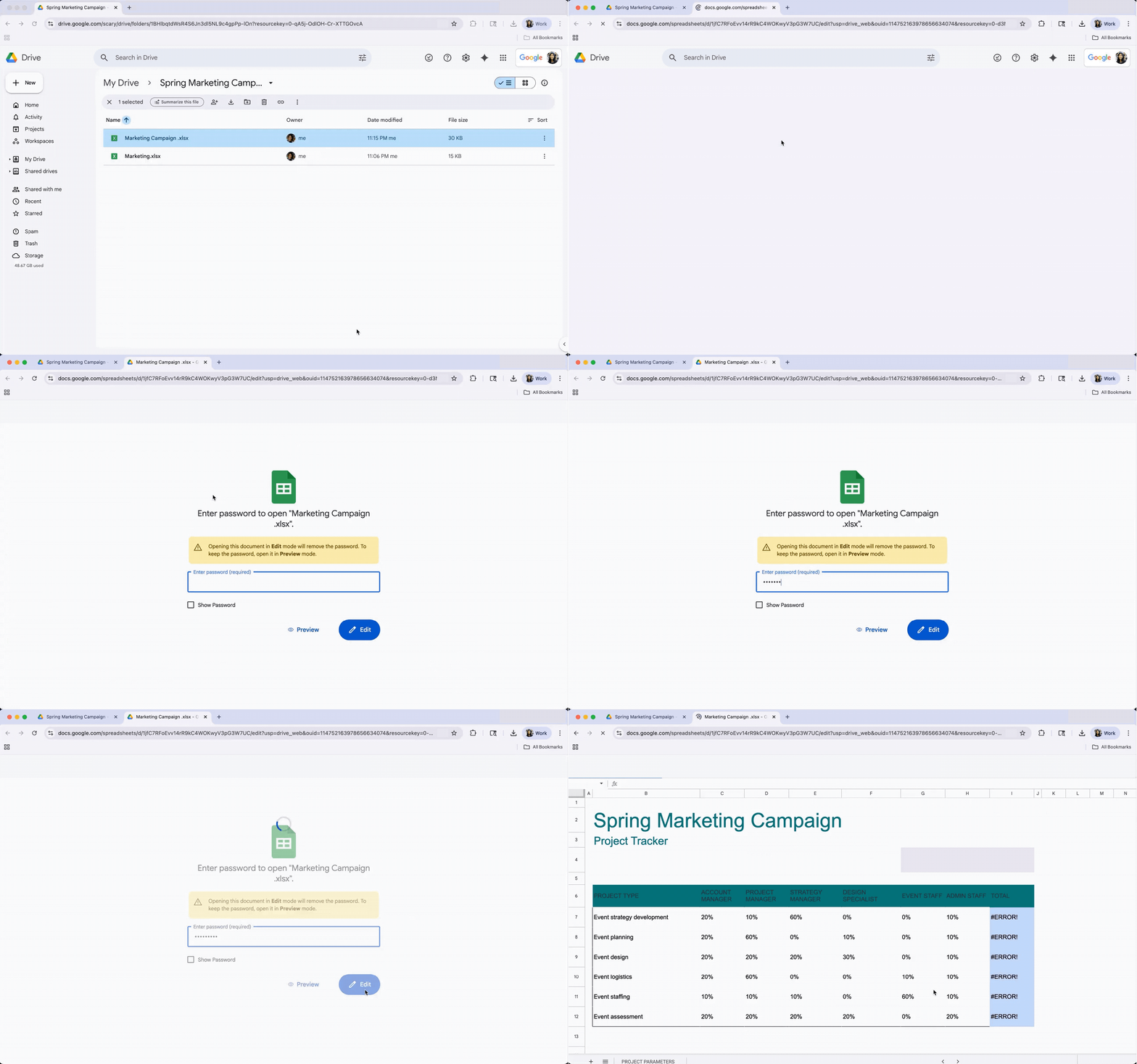
If you don't have access to the password, you can click on the "Preview" option to open the password-protected MS Office file in read-only mode. When you choose the Edit option, the file opens in Docs, Sheets, or Slides, respectively, depending on its type. This process will remove the password from the file.
Google announced that the feature has started rolling out to users, and it will take about a week to complete. It will be available to all Google Workspace customers, individual subscribers, and users with a free Google account.
Time and again, Google has tried to make its apps and services interoperable with others. In recent months, it opened the gates for migrating Dropbox files to Google Drive and made Google Chat interoperable with Microsoft Teams.
Besides this, Google has also launched a new Personal Intelligence feature for Google Drive, which was among the most requested, according to the company. Personal Intelligence allows users to connect Gemini with Google Drive and other apps to get more personalized responses.
Image via DepositPhotos.com
Hope you enjoyed this news post. Feedback welcome.
Posted Thursday 15 January 2026 at 6:46 pm AEST (my time).
News posts... 2023: 5,800+ | 2024: 5,700+ | 2025: 5,700+
Recommended Comments
There are no comments to display.
Join the conversation
You can post now and register later. If you have an account, sign in now to post with your account.
Note: Your post will require moderator approval before it will be visible.