

3175x175(CURRENT).thumb.jpg.b05acc060982b36f5891ba728e6d953c.jpg)
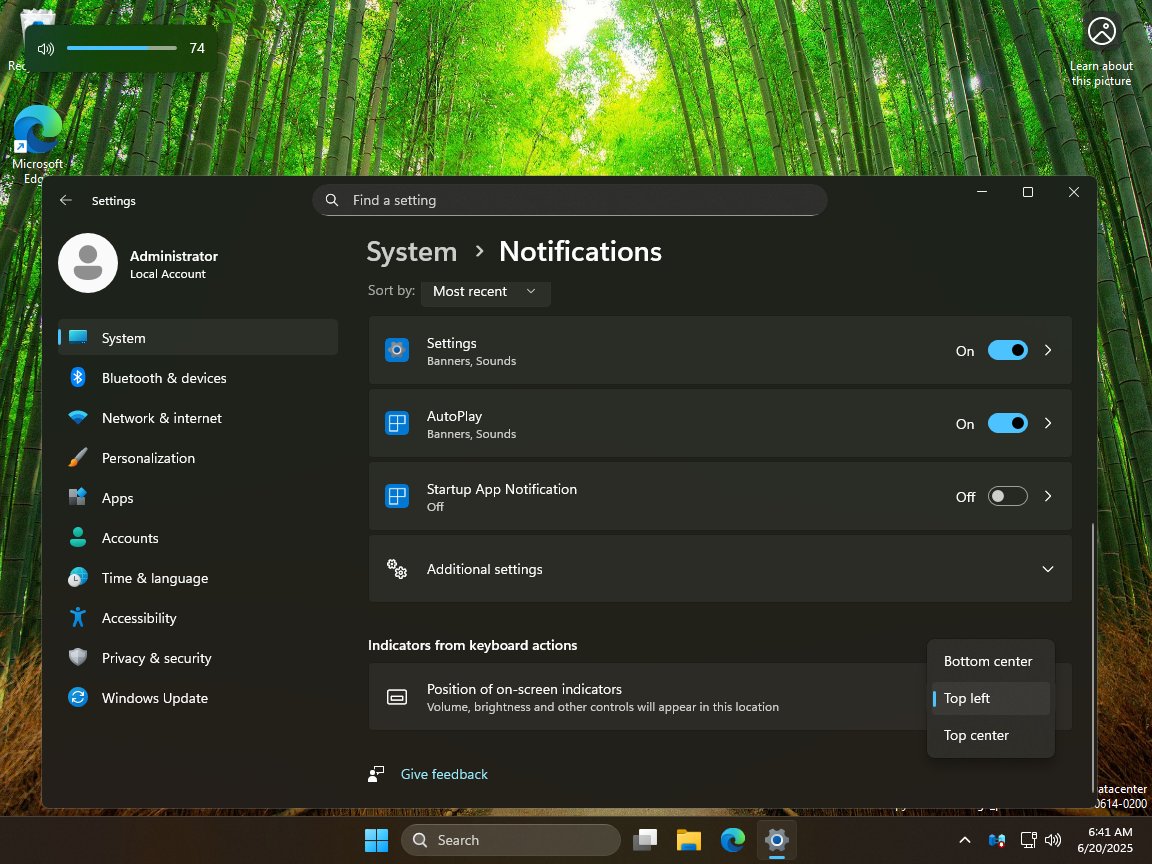
Microsoft is testing new options that will allow you to choose where on-screen indicators appear in Windows 11. Welcome back, top left volume bar!
Phantom Of Earth has shared some screenshots that showcase the changes. Before you get too excited, I must point out that it doesn't look similar to the one on Windows 10. In case you've forgotten, Windows 10 has a vertical on-screen indicator (OSD) for the volume control, the upcoming OSD on Windows 11 uses a horizontal design. This horizontal volume slider was introduced about 3 and 1/2 years ago. The new bar looks exactly the same as it does now, but you can move it to the top left, or top center. It is a welcome change, especially as the volume bar appears in the bottom center of the screen, right where the subtitles or playback bar usually appear, which can be a little annoying. Moving it to the top or the corner of the screen could fix the problem.
According to the leaker, the option to customize the OSD location will be available under the Settings > System > Notifications page. The setting is under a section that is labeled "Indicators from keyboard actions", and is called "Position of on-screen indicators". It also changes the location of the OSDs for brightness, and other controls.
On a sidenote, Microsoft is also adding some options to the Settings app such as displaying additional clocks in the system tray, which might be useful who want to know the time in different time zones. Microsoft is also said to be testing a Dynamic Background, which will automatically update the wallpaper based on your selections. Yes, this is an AI-powered feature.
Do you remember Quick Machine Recovery? It is a feature will automatically fix boot failures on Windows 11. Well, XenoPanther says that this option is being enabled by default on Windows 11. All these changes are currently being tested in the Windows Insider Program, but haven't been announced by Microsoft yet. So it may take a while before they make their way over to the stable channel.
Hope you enjoyed this news post.
Thank you for appreciating my time and effort posting news every day for many years.
News posts... 2023: 5,800+ | 2024: 5,700+ | 2025 (till end of May): 2,377
RIP Matrix | Farewell my friend
Recommended Comments
There are no comments to display.
Join the conversation
You can post now and register later. If you have an account, sign in now to post with your account.
Note: Your post will require moderator approval before it will be visible.