

3175x175(CURRENT).thumb.jpg.b05acc060982b36f5891ba728e6d953c.jpg)
Just a few days after the previous update, version 1.25, which introduced more optimization for Windows 11 version 25H2 and new Windows Update controls, the Flyoobe developer published a new update. This time, version 1.30 is introducing improved app navigation and Winpilot, a guide that will help newcomers during the setup process.
The biggest change in Flyoobe 1.30 is the reworked navigation, which, according to the developer, now follows Microsoft's UI guidelines. It is now split into two major sections: "Install Operating System" and "Setup Operating System." The latter houses all the useful stuff, like setting up your default browser, personalizing the system, configuring updates, and more.
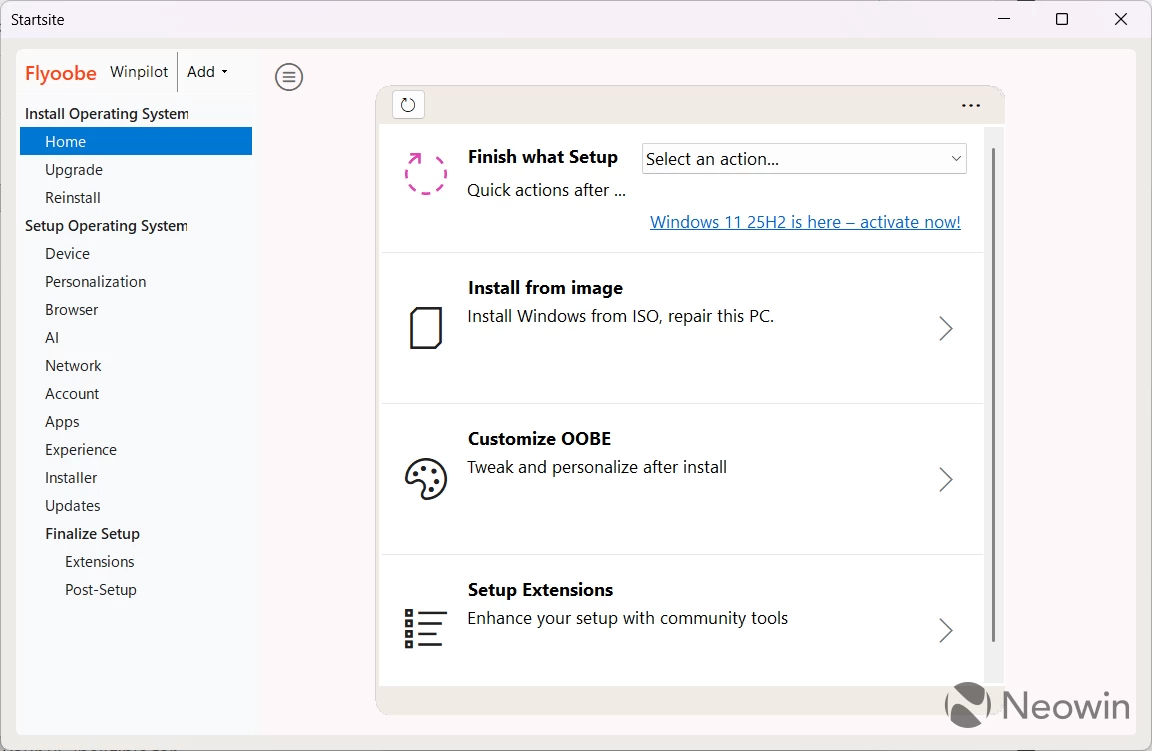
The second big update is Winpilot (do not confuse it with the old Winpilot app, which has long been dead now). You can launch it by clicking the corresponding button next to the Flyoobe logo so that it can offer guided help for inexperienced users. While it is not fully automated, the developer says such an option might arrive in future updates.
Finally, in Flyoobe 1.30, extensions are now organized by category, with the post-setup section having its own extension group. As usual, the update fixes a bunch of bugs and tweaks things here and there. Here is the rest of the changelog:
- Fixed a network OOBE bug where more than one network could be marked as connected
- Fixed an installer issue that could prevent some apps from installing correctly
- Fixed two small DPI scaling issues.
- Removed several test flags used for Nightly builds
- (The next Nightly is coming soon)
- Various small UI fixes and layout adjustments
- Minor efficiency improvements and smoother navigation
You can download Flyoobe 1.30 from its GitHub repository. While the app mostly targets users with unsupported PCs (you can use this handy app to determine what exactly makes your PC ineligible for Windows 11), it is also useful for supported devices, as it provides additional tweaks and debloat capabilities.
Hope you enjoyed this news post. Feedback welcome.
Posted Thursday 9 October 2025 at 3:06 am AEST (my time).
News posts... 2023: 5,800+ | 2024: 5,700+ | 2025 (till end of September): 4,533
Recommended Comments
There are no comments to display.
Join the conversation
You can post now and register later. If you have an account, sign in now to post with your account.
Note: Your post will require moderator approval before it will be visible.