


3175x175(CURRENT).thumb.jpg.b05acc060982b36f5891ba728e6d953c.jpg)
The latest builds in the Experimental and Beta channels brings some welcome improvements to the operating system.
It is Friday, which means Microsoft has a couple of new Windows 11 preview builds for Windows Insiders to try. In the Experimental channel, Microsoft is rolling out build 26300.8346, while the Beta channel offers build 26220.8340. Today's updates bring a redesign to a very old piece of Windows UI, the Run dialog, less annoying Windows Widgets, more File Explorer improvements, new features for the magnifier, and more.
Here is what is new:
[Widgets are quiet by default]
We’re working to make Widgets feel less distracting and overwhelming by making the experience quiet by default.
To do this, we’re testing a new set of default settings designed to reduce unexpected alerts and visual interruptions. These changes include:
- Disabling Open on hover by default
- Turning off taskbar badging by default
- Opening the widgets experience on first launch
- Limiting taskbar alerts until you choose to open and engage with the Widgets experience
If you prefer more proactive updates, you can easily turn features like taskbar badging back on through Widgets settings.
[File Explorer]
- We’ve eliminated a grey flash on load and unexpected scrolling to the top on the Home page in certain cases.
- We’ve cleaned up the Favorites section, so OneDrive files no longer appear duplicated in some cases.
- We’ve sharpened file thumbnails in the Recommended section on the Home page so they’re crisper and easier to read.
[Run dialog update]
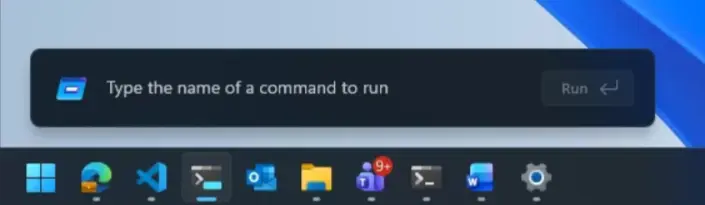
We’re rolling out a refreshed Run dialog experience designed to bring a more modern look and improved usability. This update introduces updated visuals and a cleaner interface, along with new controls that make it easier to manage the experience from within Settings. The refreshed Run dialog is currently available as an opt-in experience for Windows Insiders on the Experimental channel, where you can enable it by going to Settings > System > Advanced and turning on the new Run dialog option.
[Windows Share] - also available in the Beta build
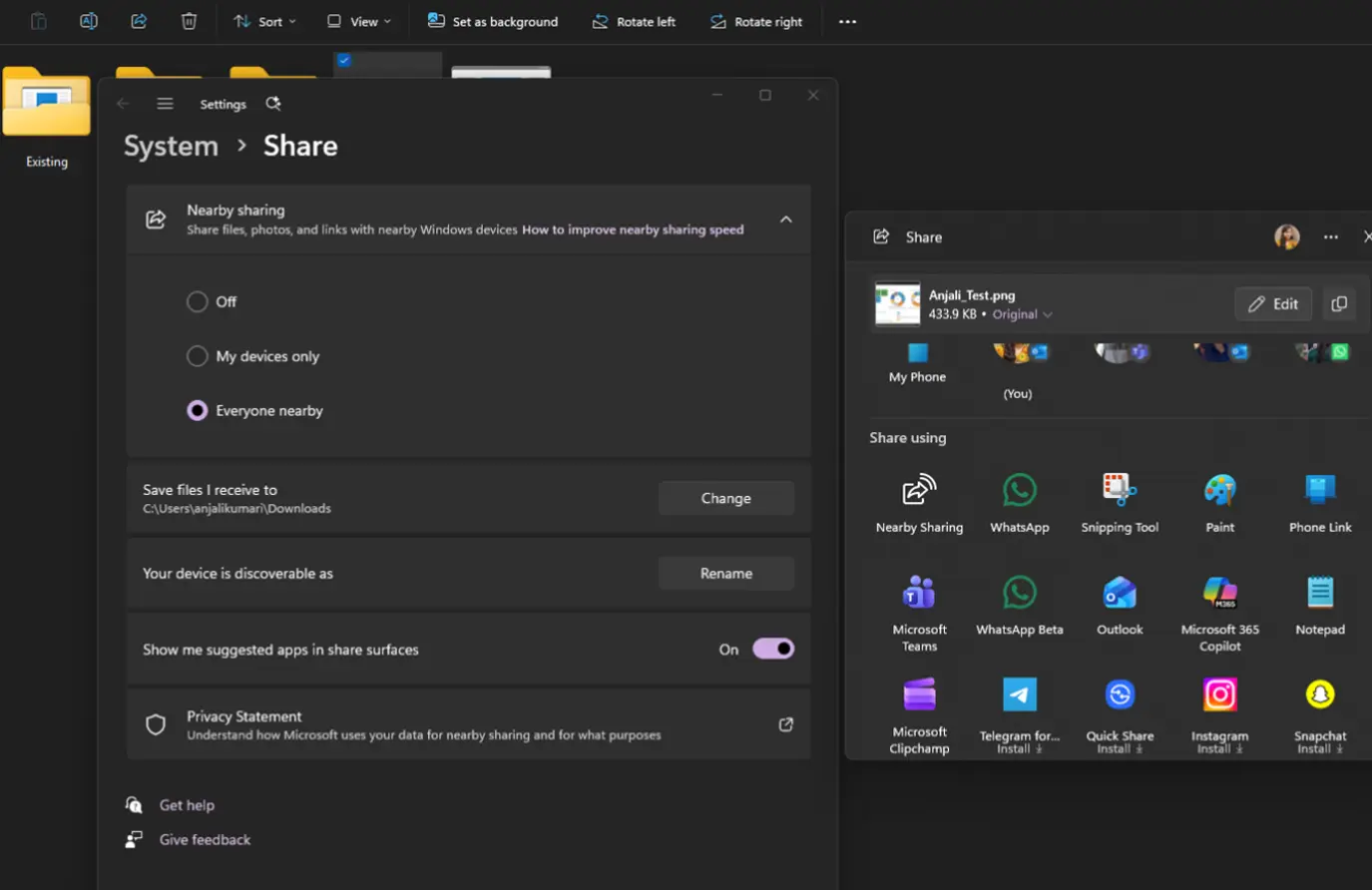
- The Windows ShareSheet just got smarter for AAD users. You can now discover and install relevant apps right where you share - no need to jump to the Microsoft Store or interrupt your flow.
- Previously available only to MSA users, this experience now extends to AAD accounts, bringing greater flexibility and convenience. You’re also in control, with a simple setting to turn promotional app recommendations on or off. The result is a faster, more seamless, and user-controlled sharing experience with helpful app suggestions exactly when you need them.
[Windows Magnifier]
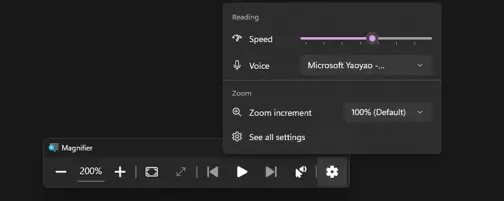
- Magnifier now gives you more control over how you zoom. You can type an exact zoom percentage directly in the magnifier toolbar to land on precisely the level you need.
- We've also added preset step increments (5%, 10%, 25%, 50%, 100%, 150%, 200%, and 400%) to the Settings dropdown, so you can jump to common levels in a single click. Whether you need a subtle boost or a dramatic close-up, Magnifier adapts to how you want to zoom.
[Storage] - also available in the Beta build
- In the latest Insider builds, we’ve updated the dialog when creating a Dev Drive to now support specifying the size in GB instead of only MB. This has also been added when changing the size of volumes under Settings > System > Storage.
[Other]
- If you were seeing a large number of APISet events in Event Viewer after the latest Insider builds, that should no longer occur after today’s flight.
- [Also in Beta] Task Scheduler will now persist column width adjustments in task list view across sessions.
- [Also in Beta] Fixed accuracy of CPU speed display on the Performance page of Task Manager for VMs after resume from hibernate, so it doesn’t sometimes show unexpectedly high unrealistic numbers.
Known issues in the Experimental build include the following:
[WIP settings]
- Users who enable the Release Preview toggle may notice that it does not allow Release Preview to be selected. If this is the case, exit out of WIP settings and come back.
[Feature flags]
- Insiders who use Feature flags to enable the new WIP experience may see the feature state incorrectly marked as current. However, changing state and applying changes will work as expected.
You can find the official release notes for the Experimental build here and the Beta build here.
Hope you enjoyed this news post. Feedback welcome.
Posted Saturday 2 May 2026 at 7:52 am AEST (my time).
News posts: 2023 5,800+ | 2024 5,700+ | 2025 5,700+ | 2026 (to end of April) 1,700
Recommended Comments
There are no comments to display.
Join the conversation
You can post now and register later. If you have an account, sign in now to post with your account.
Note: Your post will require moderator approval before it will be visible.