


3175x175(CURRENT).thumb.jpg.b05acc060982b36f5891ba728e6d953c.jpg)
A duo of new Windows 11 builds is now rolling out to Windows Insiders in the Dev and Beta Channels. Build 26300.7877 is out for Windows Insiders in the Dev Channel, while build 26220.7872 is available in the Beta Channel. Both updates have similar hangelogs, which include improvements to the context menu, reworked PC spec cards in the Settings app, and more.
[Context Menu]
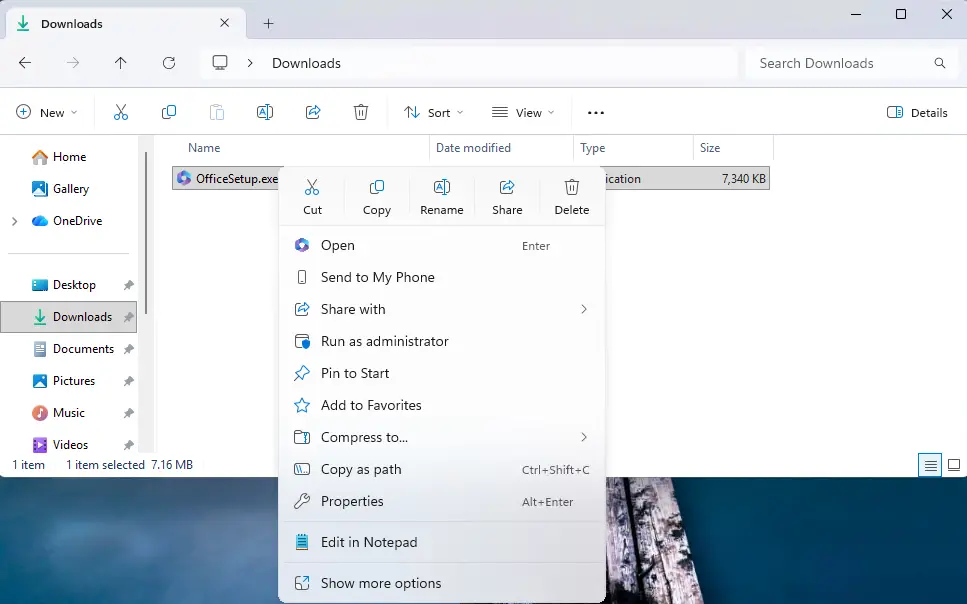
- When right clicking on a .exe, .bat, or .cmd file, the context menu’s “Open” verb will now match the icon associated with the file’s default app.
[Settings]
Device Cards:
-
Previously released to WIP channels June 2025, the ‘Device info’ Card on the Settings Home page has been refined based on early learnings. This update simplifies key device specifications and improves consistency across the end to end flow from the Home Card to the Settings > System > About page, making information easier to scan and understand. This consumer experience is currently rolling out to Insiders in the United States.
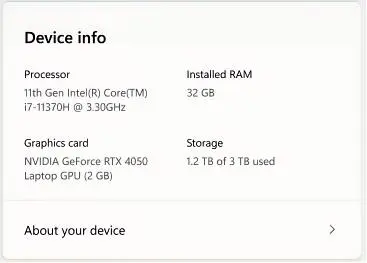
- A version of the Device info Card intended for enterprise users on IT managed devices continues to be available.
- In Settings > System > About, based on early customer feedback, key device hardware details are once again prominently displayed at the top of the page, making it easy to understand your device at a glance. The Device information section now brings together additional system details such as graphics and storage information in a single location, with easy copy/paste support to simplify sharing or support scenarios. Device related frequently asked questions are not currently surfaced as we continue iterating the best way to deliver contextual help across Settings.
[Taskbar & System Tray]
- We have improved the animations for mousing over app groups on the taskbar.
The Dev build has a couple of extra changes that are not available in the Beta build:
[Taskbar & System Tray]
- Improved reliability of showing app icons in the system tray when the taskbar was set to autohide.
[File Explorer]
- Addressed an issue where all File Explorer open windows and tabs might unexpectedly jump to Desktop or Home.
[Nearby Sharing]
- Improved the reliability of sending larger files using nearby sharing.
You can find the announcement post here (Dev build) and here (Beta build).
Hope you enjoyed this news post. Feedback welcome.
Posted Saturday 21 February 2026 at 6:22 am AEST (my time).
News posts: 2023 5,800+ | 2024 5,700+ | 2025 5,700+ | 2026 (to end of January) 461
- jenyco2
-
 1
1
Recommended Comments
There are no comments to display.
Join the conversation
You can post now and register later. If you have an account, sign in now to post with your account.
Note: Your post will require moderator approval before it will be visible.