

3175x175(CURRENT).thumb.jpg.b05acc060982b36f5891ba728e6d953c.jpg)
Windows 11 Build 26220.7051 is now rolling out to testers in the Insider Program, and there are at least three new features, including Ask Copilot on the taskbar.
Up until now, you could access Copilot on Windows 11 via the app or browser, but now you can use a new taskbar-based 'Ask Copilot' to interact with the AI.
My understanding is that this new Copilot taskbar search experience will replace the existing Windows Search UI at some point.
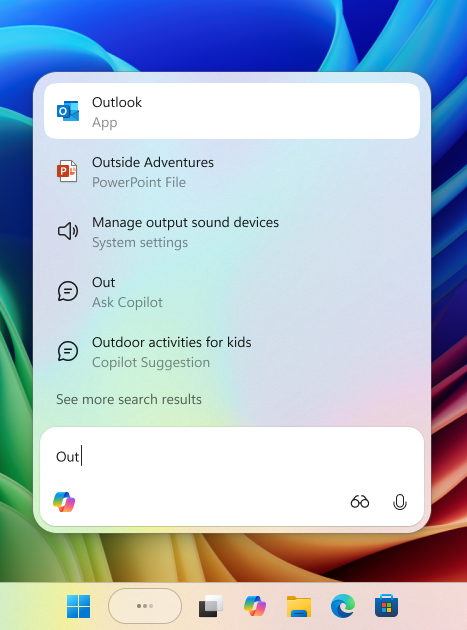
For now, Ask Copilot will remain an optional feature that you need to opt into.
You can use Copilot on the taskbar to search the internet, local files and AI using text and voice.
"You’re always in control. As you type, results appear and update instantly, making it easier than ever to find what you need," Microsoft explained in a blog post.
Microsoft says it's hopeful Copilot will eventually become a natural way of using PC.
To turn on the feature, open Settings > Personalization > Taskbar > Ask Copilot.
New Xbox experience rolls out to everyone
If you own a handheld device, you can now try the new full-screen experience (FSE), which was previously exclusive to the ASUS ROG Xbox Ally and ROG Xbox Ally X.
With full-screen experience (FSE), Microsoft says Windows performs better and allows you to focus only on gaming.
To enable FSE, go to Settings > Gaming > Full screen experience, then select Xbox as your home app.
Once enabled, you can access FSE from Task View and Game Bar or configure your handheld to enter full screen experience on startup.
Shared audio support for Bluetooth
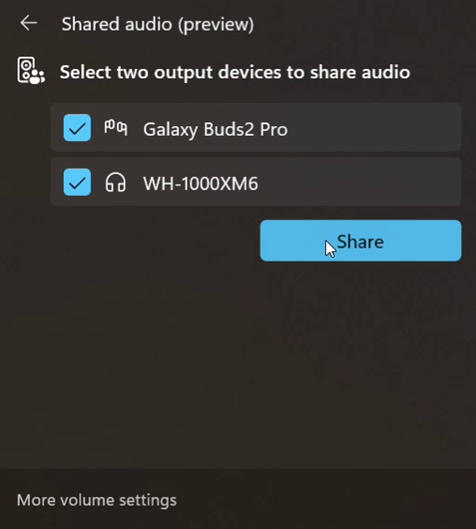
Microsoft is rolling out a new "shared audio," which is built on top of Bluetooth LE Audio broadcast technology.
Windows can now transmit an audio stream to two Bluetooth devices.
You can turn on the new “Shared audio (preview)” shortcut in quick settings to start sharing audio.
Last but not least, ARM PCs now have better performance after this update.
Microsoft has enabled support for more 64-bit x86 (x64) applications to run under emulation by adding support for more CPU features under emulation. This leads to better performance.
These features will roll out to everyone in the coming weeks.
If you want to try them today, join the Beta or Dev Channel of Windows Insider Program.
Hope you enjoyed this news post. Feedback welcome.
Posted Sunday 2 November 2025 at 3:42 am AEST (my time).
News posts... 2023: 5,800+ | 2024: 5,700+ | 2025 (till end of October): 5,009
Recommended Comments
There are no comments to display.
Join the conversation
You can post now and register later. If you have an account, sign in now to post with your account.
Note: Your post will require moderator approval before it will be visible.