


3175x175(CURRENT).thumb.jpg.b05acc060982b36f5891ba728e6d953c.jpg)
Thunderbird 145 has been released with full native support for Microsoft Exchange email via the Exchange Web Services (EWS) protocol.
This means that Thunderbird users in Microsoft Exchange environments (e.g., Microsoft 365, Office 365) no longer need third-party add-ons and benefit from seamless message synchronization and folder management locally and on the server.
Migrating from Outlook to Thunderbird is also easier, as Mozilla's email client automatically detects the settings and uses Microsoft’s OAuth2 authorization protocol.
“Until now, Thunderbird users in Exchange-hosted environments often relied on IMAP/POP protocols or third-party extensions,” reads Thunderbird’s announcement.
“With full native Exchange support for email, Thunderbird now works more seamlessly in Exchange environments, including full folder listings, message synchronization, folder management both locally and on the server, attachment handling, and more.”
Thunderbird is a free, open-source email application developed by Mozilla, and Microsoft Exchange is an email and collaboration server broadly used by businesses to handle communications, calendars, and contacts.
Typically, organizations either use Outlook as the email client app to connect to an Exchange server or the Microsoft 365 cloud service. However, any app with EWS support, now including Thunderbird, can connect to it.
To move from Outlook to Thunderbird, users have to add the account in version 145 or later of the email client, head to Account Hub > Exchange/Exchange Web Services, and let the application guide them through the rest of the process.
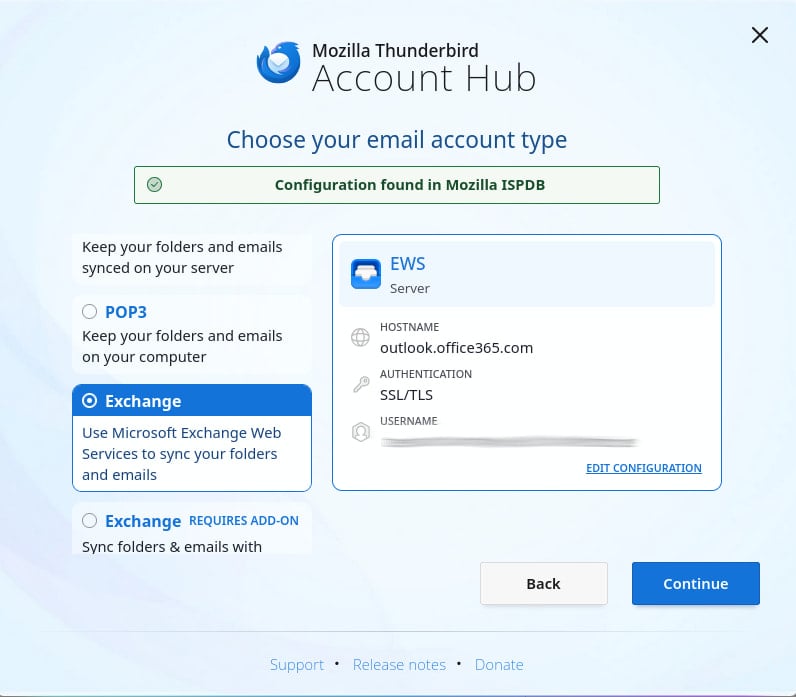
Source: Mozilla
Currently, the following features are supported:
- Exchange email setup and folder access
- Viewing, sending, replying/forwarding, moving/copying/deleting messages
- Attachments (save, display, detach/delete)
- Search (subject, body) and quick filtering
- Microsoft 365 domains using standard OAuth2
- On-premise Exchange with basic password authentication
The Thunderbird development team also plans to add support for Calendar syncing, Address book/contacts, Filter actions requiring full-message content, Microsoft 365 domains requiring custom OAuth2 app/tenant IDs, On-premise NTLM and OAuth2 authentication, and Microsoft Graph integration.
No specific timelines were provided for when these will land on Thunderbird, and implementation times may vary per item.
Mozilla notes that EWS is still widely used, and Microsoft has promised to continue supporting it “for the foreseeable future,” even as the tech giant is transitioning to the Microsoft Graph interface as the main method to connect to Microsoft 365 services.
While support for the Microsoft Graph API is in the plans, the Thunderbird team considers EWS a priority right now to meet the needs of a larger user base.
More information about Thunderbird’s Exchange support is available on this wiki page, while the support portal provides instructions for account porting.
Hope you enjoyed this news post. Feedback welcome.
Posted Wednesday 19 November 2025 at 4:37 pm AEST (my time).
News posts... 2023: 5,800+ | 2024: 5,700+ | 2025 (till end of October): 5,009


Recommended Comments
Join the conversation
You can post now and register later. If you have an account, sign in now to post with your account.
Note: Your post will require moderator approval before it will be visible.