

3175x175(CURRENT).thumb.jpg.b05acc060982b36f5891ba728e6d953c.jpg)
Microsoft recently killed a simplified taskbar clock for Windows 11, citing negative feedback from users. As such, Windows 11's clock will remain unchanged, unless you use some custom software to upgrade with additional features. This Windhawk mod might be just what you need.
The Taskbar Clock Customizer is a Windhawk mod that allows tweaking the taskbar clock to your heart's content and displaying additional useful information. Custom date/time format, including simplified clock, processor/memory/network usage, weather, news headlines, or additional timezones, just to name a few, of what you can place there.
The mod can also adjust the size and position of the clock, display extra information in the tooltip, change fonts, and more. Additionally, the mod is compatible with the "previous-gen" taskbar, which is useful if you use apps like ExplorerPatcher.
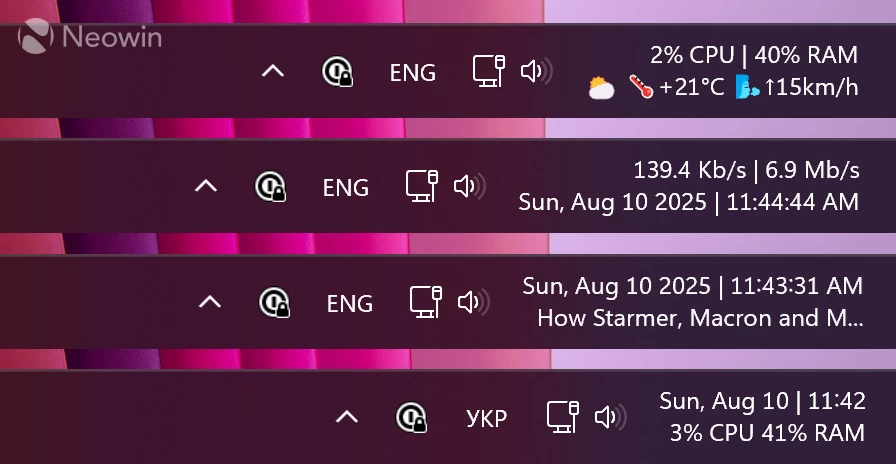
What I also like about the Taskbar Clock Customizer is that it does not look out of place. It retains Windows 10 or 11's visuals, and you can still press the clock to open the notification center and the calendar flyout. If you feel extra fancy, you can add emojis, custom fonts, change colors, etc.
Like other Windhawk mods, Taskbar Clock Customizer does not have a very user-friendly interface. Although there is no need to edit complex text files to make them work, you still have to figure out the syntax and how to properly customize each setting. Fortunately, every change applies with a single button click, and there is no need to restart explorer.exe or the entire system. To me, the perfect setup is day of the week, month, date, clock, and CPU/RAM usage in the second line. A more complex variant might take a bit more time to set up, but it is still no rocket science, and the mod has links to Microsoft's official documentation with detailed syntax.
You can try Taskbar Clock Customizer by downloading Windhawk from the official website. After installing the app, go to the "Explore" tab, find Taskbar Clock Customizer, and click "Install." Once the mod is installed and running, switch to the Settings tab to customize it.
Hope you enjoyed this news post.
Posted Monday 11 August 2025 at 2:31 am AEST (my time).
News posts... 2023: 5,800+ | 2024: 5,700+ | 2025 (till end of July): 3,458
RIP Matrix | Farewell my friend


Recommended Comments
There are no comments to display.
Join the conversation
You can post now and register later. If you have an account, sign in now to post with your account.
Note: Your post will require moderator approval before it will be visible.