

3175x175(CURRENT).thumb.jpg.b05acc060982b36f5891ba728e6d953c.jpg)
With Windows 10 support winding up soon, users are probably starting to upgrade. Sadly, for those on unsupported PCs, there is no official way to do it. That is where unofficial apps like Flyby11 and Flyoobe come in.
The developer of the apps, Belim, has released Flyoobe version 1.2, adding preview “Out-of-Box Experience” (OOBE) windows and under‑the‑hood changes aimed at cleaner installs and upgrades. If you have been reading Neowin, you are probably aware of the software as it is a very popular app for bypassing Windows 11 system requirements like CPU and TPM.
The project is based on Flyby11, a lightweight bypass utility that is for upgrades only. Over time, it expanded into Flyoobe, which adds OOBE customization on top of installer bypass routines. The author notes that Flyby11 and Flyoobe are planned to merge into a single codebase after additional cleanup and refactoring. The standalone Flyby11 app, though, is still available for those who only wish to upgrade and are not in need of an OOBE option
As mentioned above, version 1.2 introduces preview OOBE windows designed to work with Microsoft’s Media Creation Tool (MCT) and Rufus, the latter of which is another third-party app that is extremely popular. The changelog describes limited command‑line support at this stage.
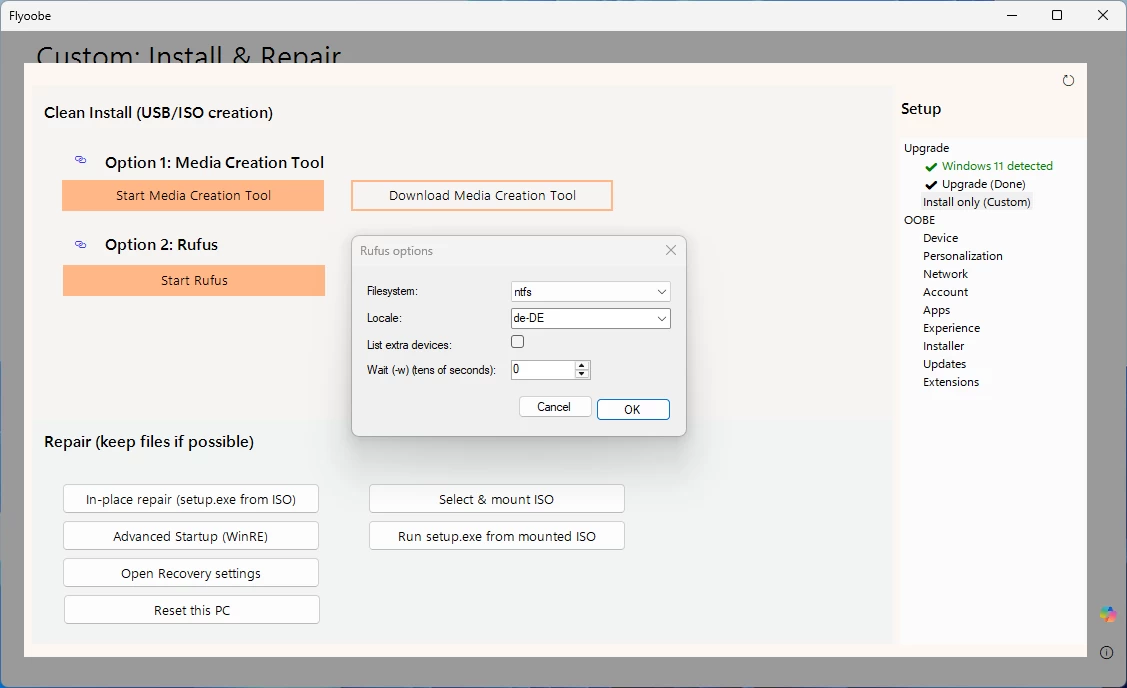
Aside from that, ISO mounting behavior has been adjusted to filter only volumes with assigned drive letters, and there are also some performance gains to be had as the developer notes "reduced RAM usage."
The full changelog is given below:
New "OOBE" windows for custom Windows 11 installs and repairs. Currently rolled out in Preview with support for MCT and Rufus (limited CLI, no stable automation yet). Still considering whether to add a native solution, similar to the very first Flyby11 builds, holding off until future releases. Flyoobe now already covers the full spectrum: upgrades, clean installs, and the complete out-of-box experience
Improved ISO mounting now filters volumes to only those that actually have a drive letter
Minor performance optimizations and reduced RAM usage.
To download the app, head over to its official GitHub repo here, where you can find individual download links for both Flyoobe and Flyb11.
Hope you enjoyed this news post. Feedback welcome.
Posted Sunday 17 August 2025 at 7:17 am AEST (my time).
News posts... 2023: 5,800+ | 2024: 5,700+ | 2025 (till end of July): 3,458


Recommended Comments
Join the conversation
You can post now and register later. If you have an account, sign in now to post with your account.
Note: Your post will require moderator approval before it will be visible.