


3175x175(CURRENT).thumb.jpg.b05acc060982b36f5891ba728e6d953c.jpg)
Microsoft released two new builds for for Windows Insiders in the Beta channel. The new builds introduce numerous new features and improvements.
Microsoft has released two new Beta channel builds for Windows Insiders. Build 26220.8925 lands on the standard Beta channel and brings a fairly substantial batch of changes, including new precision touchpad gestures, a reorganized Start menu with resizing options, and more. Build 28020.2539, released for the Beta (26H1) channel, is a smaller update focused mainly on the same Narrator braille improvements, along with new Voice Access languages and a few Settings fixes.
Here's the full Windows 11 Insider Beta Preview Build 26220.8925 changelog:
[Touchpad]
- We're adding new gesturing-related functionality to precision touchpads in Settings. These features should be widely available across applications. WinUI3-based UI requires new WinAppSDK versions for complete functionality, and we're in the process of bringing the necessary changes to versions 1.8 and 2.0.
- Scroll and zoom speed: control the baseline speed for these gestures.
- Accelerated scrolling: repeatedly scrolling increases speed, allowing quick traversal of long documents.
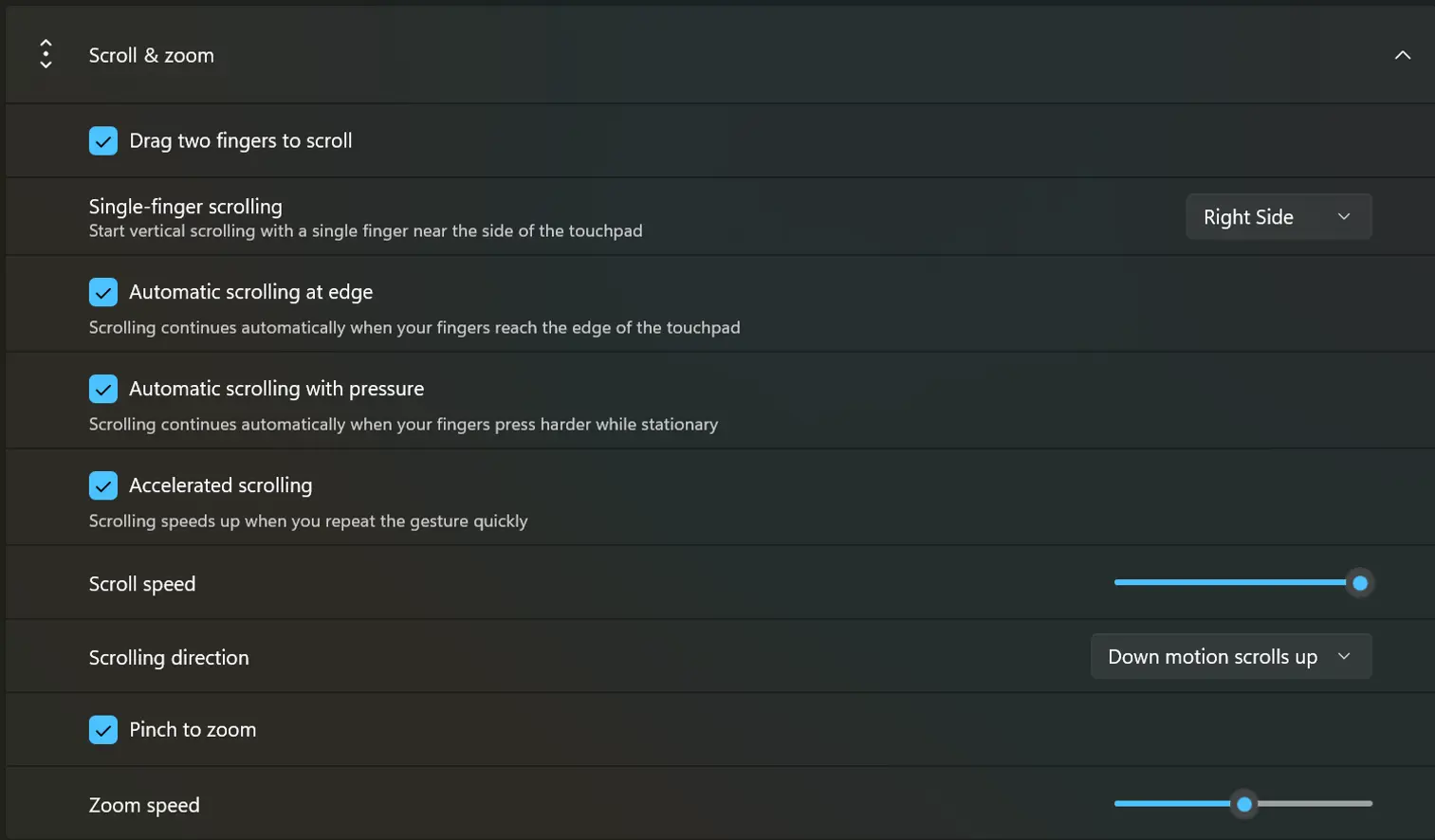
- Touchpad improvements bring new gesture capabilities including automatic scrolling, gesture speed controls, accelerated scrolling, and optional single-finger scrolling support.
[Start menu]
- This update brings a number of improvements for the Start menu as first outlined in the Making Taskbar and Start more personal Insider blog.
- Renamed Recommended to Recent in Start and the Settings page.
- Added section-level toggles to independently show or hide Pinned, Recent, and All.
- Added the option to choose between a small and large Start menu, in addition to the Automatic (default) option that is already available.
- Added the option to hide your name and profile picture in Start.
- Redesigned the Start menu settings page.
[File Explorer]
- File sizes in the Details view now display appropriate units (KB, MB, and GB) instead of KB-only, making them easier to understand at a glance.
- Middle-click to open a folder in a new tab is now supported in the address bar and Home page for a more consistent and efficient tabbed navigation experience across File Explorer.
- Improved screen reader announcements when resolving file conflicts during move and copy operations.
[Narrator]
- Braille displays now connect instantly with Narrator.
- We're making refreshable braille displays easier to use in Windows. Narrator now supports displays that use the HID standard. If your display supports HID, connect it with USB and start reading with no additional setup required.
- For Bluetooth, pair your HID braille display in Settings > Bluetooth & devices like any other accessory, and then use it wirelessly.
- Compatible HID displays include Orbit Reader 20, Orbit Slate 340, Freedom Scientific Focus 40, and APH Mantis Q40.
- HID braille displays now work during the initial Windows setup experience (OOBE) over USB, which means users who are deaf-blind can set up their PC independently from the first screen.
- You can customize braille input and output options in Settings > Accessibility > Narrator > Braille.
[Account Control]
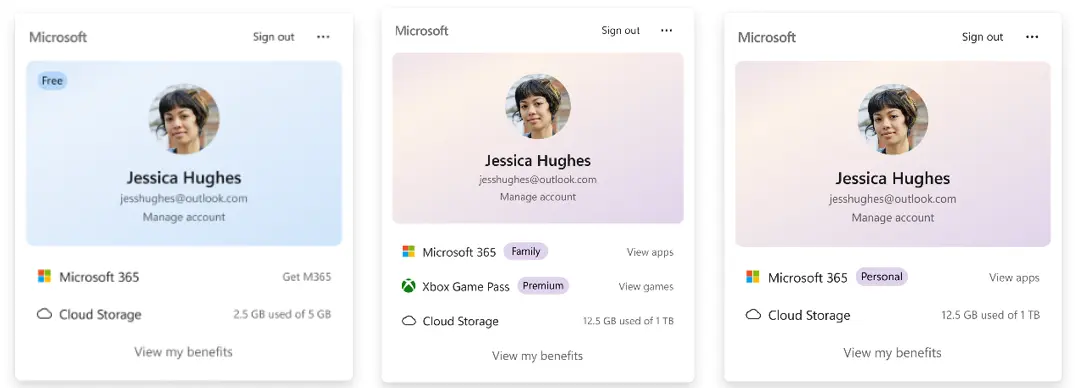
- The Windows 11 Account Control flyout has a refreshed, modern design and a clear subscription badge to make account status instantly visible. This helps users identify their plan, discover benefits, and explore upgrades.
[Windows Update]
- Fixed an issue that could result in recent Insider flights failing to install with error 0xc0000409.
[Input]
- Improved persistence of mouse cursor size.
Here's the full Windows 11 Insider Beta (26H1) Preview Build 28020.2539 changelog:
[Narrator]
- Braille displays now connect instantly with Narrator.
- We're making refreshable braille displays easier to use in Windows. Narrator now supports displays that use the HID standard, an open industry standard for braille displays. If your display supports HID, simply connect it via USB and start reading with no additional setup required.
- For Bluetooth, pair your HID braille display in Settings > Bluetooth & devices just like any other accessory, and you can work wirelessly without being tethered to your PC.
- Compatible HID displays include Orbit Reader 20, Orbit Slate 340, Freedom Scientific Focus 40, and APH Mantis Q40.
- HID braille displays now work during the initial Windows setup experience (OOBE) over USB, meaning users who are deaf-blind can set up their PC independently right from the first screen.
- You can customize braille input and output options anytime in Settings > Accessibility > Narrator > Braille.
[Voice Access]
- Voice Access now supports Portuguese (Portugal), Portuguese (Brazil), and Korean (South Korea).
[Settings]
- The Bluetooth quick settings page is now navigable using gamepad input.
- Fixed an issue causing the Graphics page in Settings to crash for Insiders after the latest updates.
[Sounds]
- Improved system sounds when using Windows in dark mode.
You can find the release notes for build 26220.8925 here, and build 28020.2539 here.
Hope you enjoyed this news post. Feedback welcome.
Posted Tuesday 21 July 2026 at 11:15 am AEST (my time).
News posts: 2023 5,800+ | 2024 5,700+ | 2025 5,700+ | 2026 (to end of June) 2,475
Recommended Comments
There are no comments to display.
Join the conversation
You can post now and register later. If you have an account, sign in now to post with your account.
Note: Your post will require moderator approval before it will be visible.