

3175x175(CURRENT).thumb.jpg.b05acc060982b36f5891ba728e6d953c.jpg)
Microsoft's latest Windows 11 update improves security, but it’s breaking backups for many users.
On Windows 11, the security update KB5083769 introduces a new behavior using the psmounterex.sys driver that causes third-party backup solutions to fail, and Microsoft recommends updating your backup software since this isn't a bug with the operating system.
On April 14, 2026, the software giant made available the "2026-04 Security Update (KB5083769) (Build 26200.8246)" for Windows 11 with , improvements, and security fixes. However, Microsoft also introduced a change that adds known "vulnerable kernel drivers" to the driver blocklist to improve system security.
Microsoft's recommendation to resolve the issue
Since this problem is not a bug in the April update, Microsoft recommends simply updating to the latest version of the backup solution that uses the newer drivers.
The problem is not limited to a specific backup solution. You may encounter it with Macrium Reflect, Acronis Cyber Protect Cloud, UrBackup Server, and NinjaOne Backup on Windows 11, 10, and Windows Server.
How to check if a driver is blocked
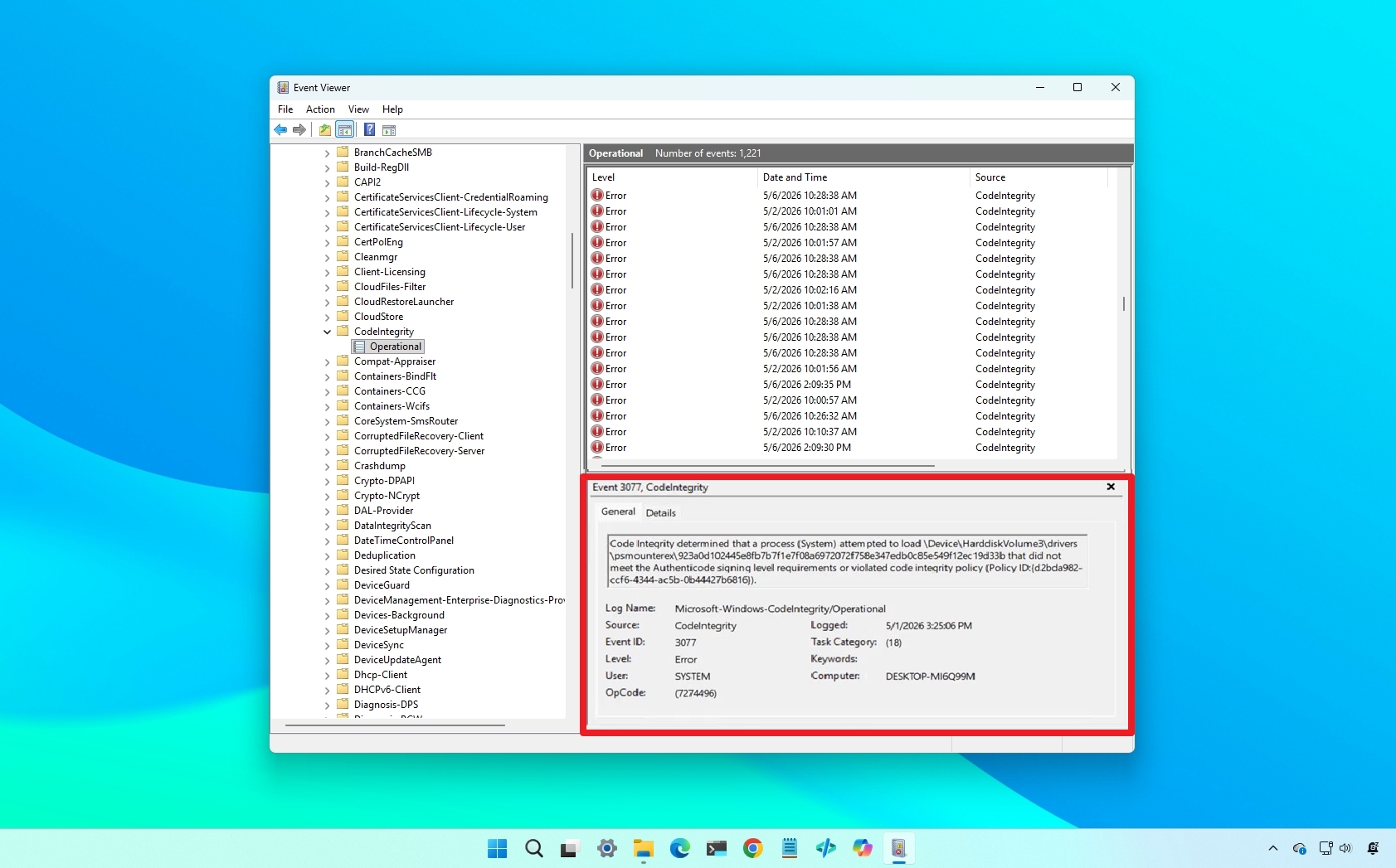
If you want to confirm whether a specific driver is being blocked, Bleeping Computer notes that you'll have to use the Event Viewer.
First, open the Event Viewer, and navigate to Applications and Services Logs > Microsoft > Windows > CodeIntegrity > Operational, and then event's view, find the "Event ID 3077" with "Policy ID {D2BDA982-CCF6-4344-AC5B-0B44427B6816}."

(Image credit: Microsoft)
If the entry exists, then it indicates that the driver was added to the system's blocklist.
Windows Central's Take
I get why the company is doing this, but it still feels like one of those updates that quietly breaks something important for many people.
Blocking vulnerable drivers is the decision from a security standpoint. I'd rather see Microsoft take an aggressive approach here than leave the door open to exploits. However, backup tools are critical, and when they stop working, that's not a minor inconvenience.
Personally, I wouldn't skip the update, but I'd be cautious. If you rely on third-party backups, and you haven't installed the update yet, make sure your software is fully updated and double-check that jobs are still running.
This is also a pattern with updates. Security improvements come first, compatibility gets sorted out later. It makes sense long term, but in the short term, it puts more responsibility on users to stay on top of their tools.
Have you seen this issue on your PC? Let me know in the comments.
Hope you enjoyed this news post. Feedback welcome.
Posted Friday 8 May 2026 at 7:19 am AEST (my time).
News posts: 2023 5,800+ | 2024 5,700+ | 2025 5,700+ | 2026 (to end of April) 1,700
Recommended Comments
There are no comments to display.
Join the conversation
You can post now and register later. If you have an account, sign in now to post with your account.
Note: Your post will require moderator approval before it will be visible.