I feel like a dunce for not using this app a lot sooner.
Since the demise of Windows Phone nearly a decade ago, I've been bouncing between Android and iOS, attempting to settle into one ecosystem. I'm currently in an iPhone cycle, complete with a set of AirPods Pro that I actually enjoy using.
Well, I enjoy using them most of the time, anyway. You probably already know where this is going. Connecting AirPods to a Windows PC is not always a fun experience. While they seemed to work fairly well on Windows 10, changes to the audio codec in Windows 11 have created some annoying issues. Slow or failed connections, lagging audio, unwanted idling; that sort of thing.
It's not entirely Microsoft's fault, of course. Apple's hardware is designed to work with other Apple hardware, at least if you want the full experience. Many of the perks I enjoy when my AirPods are connected to my iPhone, like immediate pairing, adaptive audio, and noise cancellation control, are missing when I'm using them with my Windows 11 PC.
A look at the initial app launch with AirPods Pro animated widget that pops up when connected.
(Image credit: Future)
After downloading the MagicPods app from the Microsoft Store, I grabbed the community-signed MagicAAP driver (which doesn't require Windows to be put into test mode) and installed it using the official instructions from the MagicPods website.
I then launched the MagicPods app, clicked Connect (my AirPods were already paired to my laptop), and let the app take over. An immediate connection? Yup. A little animated window showing battery status for the AirPods and case? You bet.
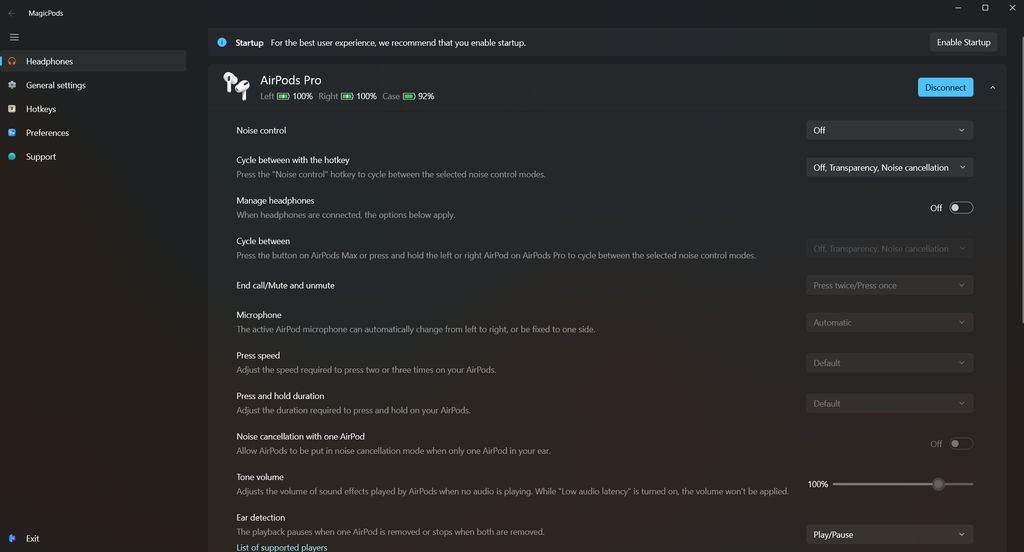
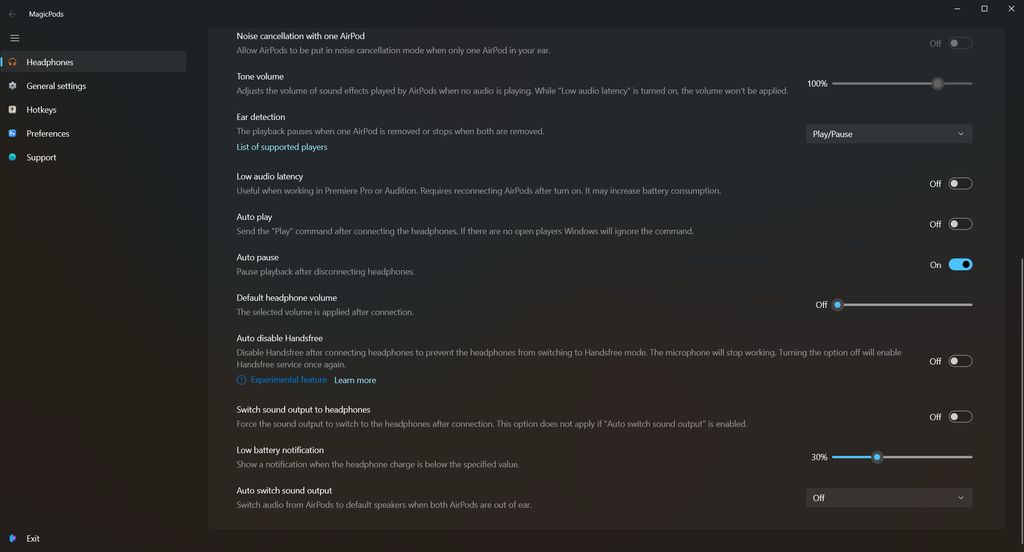
I was expecting these changes; what I wasn't expecting were the myriad customization options available through the app. Practically every setting I care about is here and can be tweaked, including the press speed of the physical buttons, noise cancellation, ear detection behavior, and low battery warning threshold.
Perhaps the most noticeable change is that there's no longer that awful audio delay when you hit play on your music or video, something I've put up with for far too long. My AirPods immediately begin sounding off when I click Play. Awesome.
A look at the MagicPod app's primary audio controls.
(Image credit: Future)
A look at the rest of the MagicPod app's primary audio controls.
(Image credit: Future)
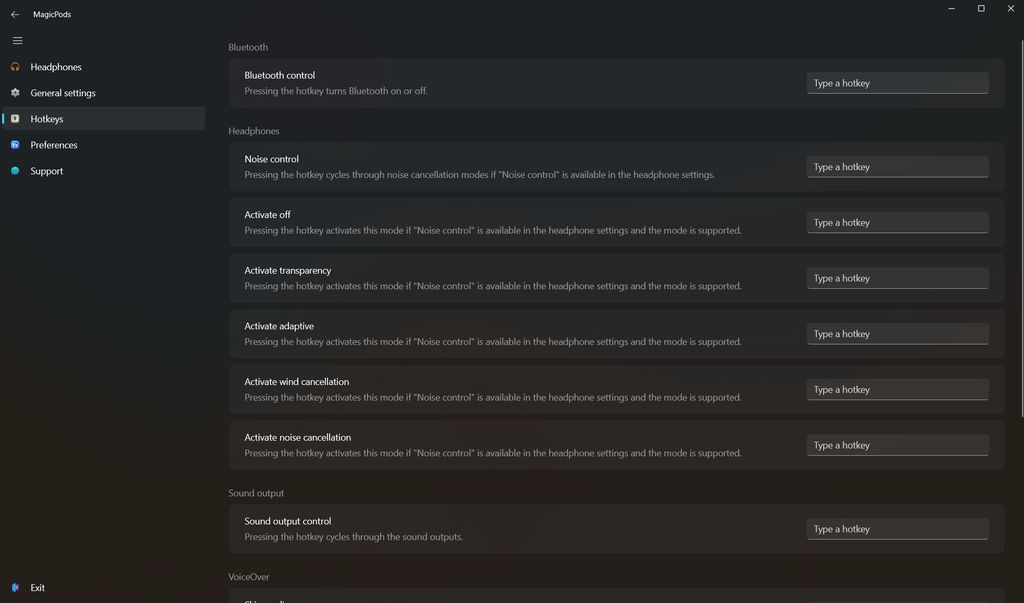
A look at the customizable hotkey options in the MagicPods app.
(Image credit: Future)
Putting my AirPods back in the case and pulling them out again saw them reconnect to my PC almost immediately, even with my iPhone at my side. There's still a bit of a delay as my laptop's Bluetooth abilities catch up, but it's better than what I used to experience: failed connections, painfully slow connections, etc.
The app has a built-in dark mode, which I love, and there's a long list of customizable hotkeys you can set up for easier control over your wireless audio setup. Whether or not you enable hotkeys, the app's most important controls can all be handled from the tray icon.
Is the MagicPods app worth $1.99?
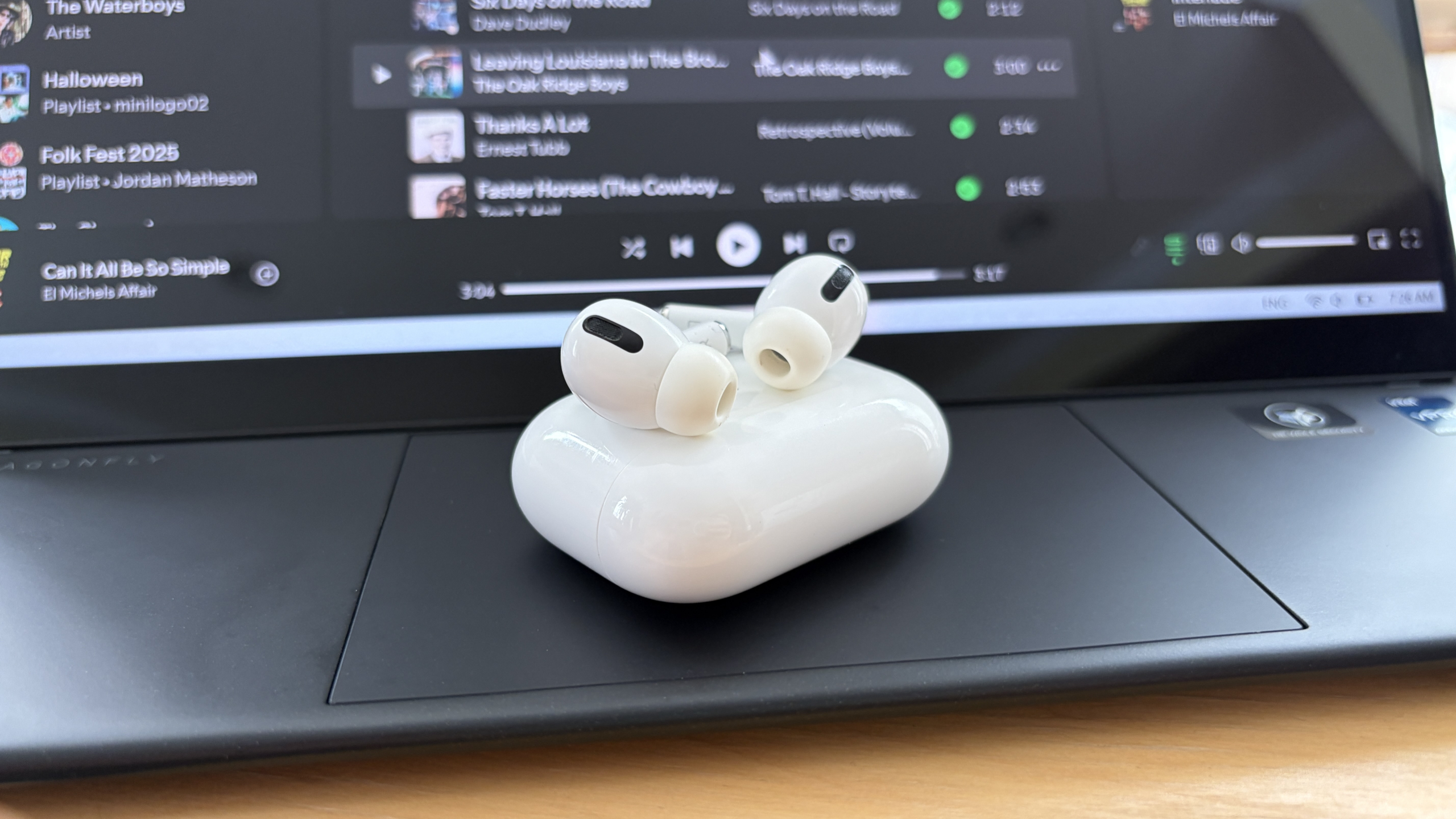
My AirPods Pro sitting on an HP laptop's palmrest.
(Image credit: Future)
The creator of the app, Aleksandr Maslov, says the app works with AirPods, Beats, "fake AirPods with Airoha chips," a handful of Sony models, and some other headphones. I haven't tested anything other than my AirPods, but you might have some luck elsewhere. The app can work on a Steam Deck via the Decky Loader, which I'm sure a lot of people will love.
The creator also adds that the app involves "no data collection, no ads, no subscriptions, no paid content. Just a convenient tool that works offline. And yes—no AI."
With these promises in mind, and with my own experience coming out quite smoothly, MagicPods is absolutely an app I can recommend to most people who hate how AirPods function with Windows 11.
The only qualm I have with the app is its unsigned driver and community-signed alternative. I don't recommend you use the app on a company- or school-managed laptop, nor do I recommend using it on a gaming PC lest your anti-cheat throws up a false positive.
Now, excuse me while I go listen to the new Johnny Blue Skies album while further tweaking my audio setup via the MagicPods app.
What do you think about the MagicPods app?
Is the MagicPods app something you can see using with your Windows PC? Are you already using it? Why or why not? Let me know in the comments section!
You can post now and register later.
If you have an account, sign in now to post with your account.
Note: Your post will require moderator approval before it will be visible.


3175x175(CURRENT).thumb.jpg.b05acc060982b36f5891ba728e6d953c.jpg)


Recommended Comments
There are no comments to display.
Join the conversation
You can post now and register later. If you have an account, sign in now to post with your account.
Note: Your post will require moderator approval before it will be visible.