

3175x175(CURRENT).thumb.jpg.b05acc060982b36f5891ba728e6d953c.jpg)
By Susan Bradley
It’s a little rocky.
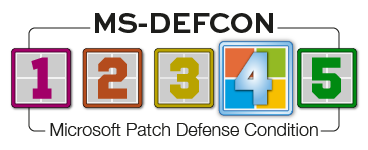
For the most part, the November updates have gone well, albeit with a few expected hiccups. That includes the first suite of updates that are included with the Windows 10 ESU enrollment. A lowering of the MS-DEFCON level to 4 is warranted. Spend some holiday time this weekend installing updates!
One problem that I didn’t expect was somewhat self-inflicted on machines that Microsoft upgraded from Windows 10 Professional to Windows 10 Enterprise and Education. On November 17, KB5072653 was released to fix the problem. The KB states:
Note this preparation package must be installed after the October 2025 security update (KB5066791) is installed.
KB5072653 provides a fixed version of the ClipSp.sys file and is being offered up to all machines already participating in the ESU process and with already installed November Windows updates.
What is ClipSp.sys? A Talos Intelligence Vulnerability Deep Dive blog post describes it:
ClipSp is a first-party driver on Microsoft Windows 10 and 11 that is responsible for implementing licensing features and system policies, and as such it is one of the main components of the Client Licensing Platform (CLiP). Little is known about this driver; while most Microsoft drivers and DLLs have publicly available debug symbols, in the case of ClipSp, those were removed from Microsoft’s symbol server. Debug symbols provide function names and other related debug information that can be leveraged by security researchers to infer the intent behind the many functions of a binary; their absence hinders that. Surprisingly, the driver is also obfuscated, a very rare occurrence in Microsoft binaries, likely to deter reverse engineering even further. Limited public research exists, much of which either predates our findings or was released in response to our reports. The latter research also shares symbols from an older version of ClipSp, which could be a useful springboard for anyone wanting to research this driver. The most interesting aspect of this software involves implementing features related to licensing Windows applications from the Windows App store and activation services for Windows itself.
So in addition to the November security updates, I’ll recommend that you install KB5072653 as it will replace the ClipSp.sys with the final build that works with the ESU process. Then go ahead and install KB5068781, which is the November security update.
For users of Windows 11 24H2 and 25H2, I’ve not been tracking any major issues with the cumulative update for Windows 11, versions 25H2 and 24H2 (KB5068861). Now, that’s not to say that you can’t go out to various forums or AI-generated recaps and think that this update is causing horrific issues. Whenever any update is released, at least one person may report issues.
But I don’t see widespread issues that will impact all of us. Rather, I see reports of issues that often can be fixed with a repair install over the top. Some of the symptoms make me wonder what is going on. I see some reports that the patch took a long time to download, but in my testing on several platforms, I’m not seeing this issue. Once again, be wary of clickbait headlines that are not representative of what’s really going on.
In my testing, I see no major issues and thus recommend installing KB5068861. That said, I urge you to ensure your video-card drivers are up to date because NVIDIA is warning that some gaming performance issues may occur if you don’t update your drivers.
File corruption in Windows is something that you have probably dealt with at some point in time if you are a system administrator. In the consumer world, doing an in-place repair over the top is a relatively easy way to fix the problem without damaging the system. But if you are a system administrator and you patch servers, you might hesitate — especially if that server holds a special role. You can attempt to fix the issue by using DISM commands tto repair the operating system. In my experience, that hasn’t always worked.
There is another way to repair a server, especially if it’s suffering from the error evidenced by the following message in CBS.log:
- ERROR_SXS_ASSEMBLY_MISSING] / 0x800f0831 [CBS_E_STORE_CORRUPTION]
The PowerShell script shown in Figure 1 will mark the corrupted packages as absent.

Figure 1. Mark_Corrupted_Packages_as_Absent.ps1 Source: Reddit
Microsoft is working on integrating these processes into future wizards. It can’t occur soon enough.
Resources
- Susan’s Master Patch List
- The MS-DEFCON System explained
- BlockAPatch — Tools to help you hide or block updates
- Steve Gibson’s excellent InControl to manage feature releases
Hope you enjoyed this news post. Feedback welcome.
Posted Thursday 27 November 2025 at 6:01 am AEST (my time).
News posts... 2023: 5,800+ | 2024: 5,700+ | 2025 (till end of October): 5,009
Recommended Comments
There are no comments to display.
Join the conversation
You can post now and register later. If you have an account, sign in now to post with your account.
Note: Your post will require moderator approval before it will be visible.