

3175x175(CURRENT).thumb.jpg.b05acc060982b36f5891ba728e6d953c.jpg)
By Susan Bradley
July has been a cooler weather month than usual for my little corner of California. But I’m still getting the heat — from updates.
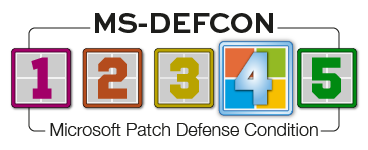
I’ve been blistered by the number of vulnerabilities that were patched this month, along with some unique bugs that were seen only in the cloud. Nevertheless, things have settled down, and I’m lowering MS-DEFCON to 4.
Microsoft is once again experiencing some bugs unique to its cloud desktop platform. As noted in KB5064489 for an out-of-band update to OS Build 26100.4656:
[Fix for Azure Virtual Machines with Trusted Launch disabled] This update addresses an issue that prevented some virtual machines (VMs) from starting when Virtualization-Based Security (VBS) was enabled. It affected VMs using version 8.0 (a non-default version) where VBS was offered by the host. In Azure, this applies to standard (non–Trusted Launch) General Enterprise (GE) VMs running on older VM SKUs. The problem was caused by a secure kernel initialization issue.
Note that this was not seen on desktops, only on hosted virtual machines. That’s why I’m recommending that you go ahead and install updates to your Windows 11 24H2 machines. Note you will not be offered that particular update, but rather the normal released patch of KB5062553.
KB5062553 also included several bug fixes:
[Graphics] Fixed: This issue occurs only if the June 2025 non-security update (KB5060829) is installed. Game content might become out of sync with the cursor position after using Alt+Tab to switch away and back from certain games running in full screen exclusive mode, when the game resolution doesn’t match the desktop resolution.
[Multimedia] Fixed: This update addresses an issue where notification sounds didn’t play. Affected sounds included those for on-screen alerts, volume adjustments, and sign-in.
I’m always amazed that so many little bugs get introduced into what should be a stable and boring platform.
I have yet to see the offer to receive extended security updates on my other two Windows 10 machines at home, but we are still in the “dribble phase” of the rollout and I’m not concerned. We have plenty of time to worry about Windows 10 before October. For those of you in business, don’t expect to see the ESU offering for businesses sooner than September. I’m watching this closely and will report on both the consumer and business situations as soon as I know.
Consumers
Those of you with Windows 11 24H2 may see a cosmetic error in your System event logs after the installation of KB5062553. It will read Event 2042, Windows Firewall with Advanced Security and indicate Config Read Failed (Figure 1).
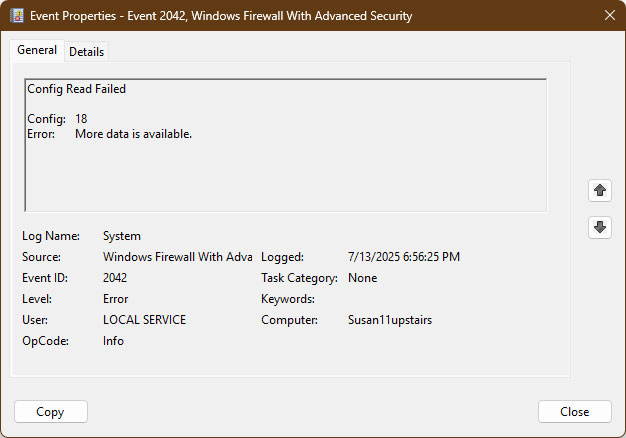
Figure 1. A typical event description for Event 2042
Don’t worry — nothing is wrong, and everything is working as it should. Microsoft plans to come out with a new feature related to the firewall; this is a merely cosmetic bug impacting some machines. Unfortunately, logged error messages such as this one (and others) are not helpful at all — can you see anything in the dialog above that gives you any clue about what’s going on?
If you check your logs and see messages such as this one, ask yourself a simple question: Is your system working as you expect? If so, it is almost always the case that the log entry is meant to help the folks at Microsoft diagnose behaviors — rather than a bona fide warning that something is seriously wrong.
If you are still on the fence about Windows 11 on an older computer, a tool on GitHub called Flyby11 allows you to install Windows 11 on unsupported hardware. I will once again warn — based on my direct experience — that, although you can force Windows 11, the next feature release will not automatically download and install. You’ll have to do that work manually.
We’ve spent a lot of time over the past year talking about Windows 11 24H2. I’m sure we’ll have much more to say, but a few weeks ago Microsoft posted Get ready for Windows 11, version 25H2 to its Windows IT Pro blog. This time around, the 25H2 feature release will be pushed to us in pieces that are part of the monthly Latest Cumulative Updates (LCUs) for 24H2, but the pieces will not be enabled. Later this year, an enablement package (which Microsoft calls an “eKB”) will be part of an update but will not be installed automatically. When you elect to install it, the update will simply enable the previously delivered pieces and update the Windows version. As Microsoft put it:
New features we develop for Windows 11, version 25H2 are part of the version 24H2 branch. When the new code is complete, we include it in the monthly LCUs for Windows 11, version 24H2 in a Disabled state. Think of it as having the new feature code slowly staged on devices running version 24H2—yet another reason to stay up to date with monthly Windows updates!
The code remains disabled on the device until it receives the eKB. The eKB changes flags in the staged code from Disabled to Enabled. When you restart the device, the new features become enabled, and you’re officially on Windows 11, version 25H2!
From all the exclamation points in that excerpt, you can tell that Microsoft is very excited. That aside, it does make the update to 25H2 less bulky and thus faster to download and install, because parts of it have already been staged on the PC. Microsoft claims that this method, based upon its shared servicing model (described in a 2024 PDF), reduces the size of the ultimate update by 40%. This method is not new and was first used with Windows 10.
I have been picking up some bargain PCs on Amazon — HP EliteDesk computers designed for Windows 11 with support for multiple monitors — that in general make for a very nice Windows PC. They definitely would not be good candidates for gaming machines, but they are more than enough for boring folks like me who use a PC for some streaming entertainment, emails, photos, and a bit of light work. I mention this because if your current, aging PC doesn’t have at least 16GB of RAM (and probably more), your experience with Windows 11 will be, shall we say, suboptimal. It may be time for a fresh start.
I’m not tracking any major issues with Windows 11 24H2 KB5062553, Windows 11 23H2 KB5062552, or with KB5062554 for Windows 10 22H2. Mind you, I don’t use the Windows Emoji Panel (Win+. or Win+;) feature — I didn’t know it existed. If you do use it, rest assured that Microsoft is aware that it broke and is working on a fix.
Businesses
We had a bumpy start to patching due to issues with Microsoft WSUS sync servers. No updates were released to businesses. Those running virtual servers may also be impacted by the bug introduced in KB5062553, as described above. To fix the issue, apply KB5064489 from the Microsoft catalog.
Plus member Michael S. McElrath pointed out a fix for an issue that had plagued him for several weeks. He would attempt to open Classic Outlook but instead get this error message:
- Could not start Microsoft Outlook. Cannot open the Outlook window. The set of folders cannot be opened. There is not enough memory available to perform the operation.
Initially, he thought it was due to an update, However, not enough folks were reporting the issue to allow the problem to be traced back to an update. As the Microsoft Learn post You cannot start Outlook in cached mode or create a new cached mode profile notes:
This problem occurs because the hidden PR_OST_OSTID property in your mailbox is larger than 32 kilobytes (KB).
This property is located on Top of Information Store in the default store. Every time that you create a new cached mode profile for the mailbox, approximately 20 bytes of data is added to this property. Eventually, the size of the data in the property exceeds approximately 32,720 bytes, and you start to receive the error.
The resolution, as noted in the article, was to download a special tool, select the Outlook cached mode profile, and then delete the data noted in the post.
This is one of those issues you may want to bookmark for the future. Even the Microsoft tech support folks McElrath contacted didn’t point him to this post.
Resources
- Susan’s Master Patch List
- The MS-DEFCON System explained
- BlockAPatch — Tools to help you hide or block updates
- Steve Gibson’s excellent InControl to manage feature releases
Hope you enjoyed this news post.
Posted Wednesday 23 July 2025 at 2:37 am AEST (my time).
News posts... 2023: 5,800+ | 2024: 5,700+ | 2025 (till end of June): 2,864
RIP Matrix | Farewell my friend
Recommended Comments
There are no comments to display.
Join the conversation
You can post now and register later. If you have an account, sign in now to post with your account.
Note: Your post will require moderator approval before it will be visible.