

3175x175(CURRENT).thumb.jpg.b05acc060982b36f5891ba728e6d953c.jpg)
By Susan Bradley
I’m not a superstitious person.
But there are times — especially around printers, copiers, or other technology devices — when I jokingly say, “Shush, don’t talk about how they are working. It will jinx them.” And there are times I talk about how well the devices are working — just as they begin to misbehave.
February patching is like that. So far, the updates’ side effects have been minimal for consumers but expected for businesses. The most reported issue has been BitLocker recovery key requests on certain PC models, such as Microsoft Surfaces and some Lenovo laptops. Even though the reports are not widespread, this reminds me to remind you to always know where your BitLocker recovery keys are saved. If random problems like this crop up, and you don’t have the keys, you’ve got a hassle on your hands.
You may recall that recent updates began the process of rolling out fixes to Secure Boot. Businesses may want to consider disabling BitLocker on any PCs that have not yet received these updates. It can be easily scripted and implemented firm-wide.
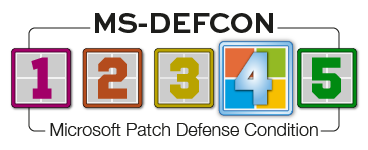
Aside from BitLocker, Secure Boot matters, and superstition, the risk level of the updates is low. I’m lowering the MS-DEFCON level to 4.
Consumers
Speaking of Secure Boot, remember that consumers can ignore a lot of the hype and headlines about your machine’s not getting the Secure Boot certificates updated. Your device will still boot. Chances are good that you already received the update. And remember: If you do not have Secure Boot enabled, you won’t be impacted.
To see whether you have Secure Boot enabled, run msinfo32 from a command prompt or by pressing Win+R, typing msinfo32, and pressing Enter. In the System Summary, find Secure Boot State in the right pane. The value will be On (enabled), Off (Disabled), or Unsupported.
If you still have questions after applying this month’s updates, please post in our forum section Secure boot certificate updating – February 2026.

Figure 1. Check the status of Secure Boot in the msinfo32 app.
The biggest patching-related issue this month is not with Windows updates (which is a good thing). Instead, it’s Firefox’s ending support for Windows 7, 8, and 8.1 by the end of February. As Will reported yesterday, fewer than 1.5% of our readers are using Windows 7, and almost none are using 8/8.1. Microsoft dropped support for 8.1 in 2023.
Apple is also affected; Firefox 115 will no longer be supported on macOS 10.12, 10.13, and 10.14. However, 10.14 (Mojave) fell out of Apple support in 2021, over four years ago. No other browser for macOS, including Apple’s own Safari, is still supported, and now Firefox is dropping out, too.
Once again, I’ll repeat my advice about Web browsers: Don’t use unsupported versions, and update your browsers at every opportunity. If you must continue to use an older OS lacking supported browsers, get your hands on a modern, inexpensive alternate device (e.g., an iPad or Android tablet) and use it for browsing. Browsers are major attack vectors for the bad guys, so keeping them as modern and secure as possible is essential. Of course, be sure your browsing behavior avoids obvious pitfalls — anything that might be a trick to get you to click through.
Some folks report that issues with stuttering and gaming speed finally got fixed in a Preview update (KB5077241) whose code contents won’t be out into the production channel for another month, but the fact that I’ve seen no issues with non-gaming machines is a good sign. As a result, I’m giving the approval to install updates this month. It’s the first time in several months that updates are solid enough to recommend installation.
I have not yet made an official recommendation regarding updating Windows 11 to 25H2. For those of you on 24H2 and wishing to make that upgrade, it’s an easy installation with the Windows 11 enablement package. Merely download the file, click to run it, and follow the prompts. You’ll reboot and will be on Windows 11 25H2in nothing flat. This is because you already have the parts under the hood — they are just not enabled.
Links for the enablement package are in the Microsoft Catalog: Arm 64, Intel x64.
Businesses
The decision to defer updates is harder for businesses, especially those with legal mandates or insurance requirements to install updates within a specified time frame. This may also be influenced by government requirements to install updates — even those with known issues.
If your business doesn’t have the resources for detailed study of updates, I recommend waiting. Defer any updates. If I’m still warning about issues at the end of the month, and you are affected by external mandates, set up a test group to experiment with the updates on just a few PCs. This limits your exposure. You’ll see the effects and can thus decide, based on your own tests.
When I elevate the MS-DEFCON level to one of its more severe settings, such as 2, it means the situation is unclear — the updates might or might not be okay. It’s a mixed bag. Some may see issues, and others will not. If I set MS-DEFCON to its highest level — 1 — it means the number of problems is also very high and applying updates is at its riskiest. That’s when I say, “Don’t patch.” No matter what your situation, let the fallout settle before taking the risk.
I often base my MS-DEFCON settings on what I would recommend to my father or sister, because I have high confidence that they are not being targeted for attacks. And, of course, they are not constrained by outside requirements. Then I look at what’s happening in my business. I must dig deeper to determine whether the updates, especially security updates, are providing fixes to problems that could expose the firm to risk. I also keep in mind that sophisticated attackers try to exploit vulnerabilities in the wild and then choose big targets with potentially the highest gain — such as governments, big enterprises, or wealthy individuals. In other words, the highest return is worth the risk of being detected.
Smaller businesses are thus less likely to be targets, and I take that into consideration when deciding upon an appropriate MS-DEFCON level.
If your firm is like mine, phishing is the biggest threat. That’s why I often mention “patching” humans with good education and steady communication that teaches them how to recognize such threats and react properly to them. Will calls this the “two-second rule” — don’t just click something; wait two seconds to give yourself time to think. A moment’s hesitation can save the day.
Finally, make sure you have a process in place to uninstall updates or restore systems from backups. That gives you a fighting chance to back off problematic updates.
Microsoft has fixed the following issues:
- Boot failures triggered by January 2026 updates and later. Microsoft indicates that the issue has been fixed but does not point to a root cause. Fixed in the February updates.
- Failure to shut down should be fixed for all platforms.
And it has introduced a new one:
- Due to security hardening, you may have issues using autofill in remote sharing applications.
Here’s hoping that the quality czar is working madly behind the scenes to rebuild our trust. We sure need it.
Resources
- Susan’s Master Patch List
- The MS-DEFCON System explained
- BlockAPatch — Tools to help you hide or block updates
- Steve Gibson’s excellent InControl to manage feature releases
Hope you enjoyed this news post. Feedback welcome.
Posted Wednesday 25 February 2026 at 3:56 am AEST (my time).
News posts: 2023 5,800+ | 2024 5,700+ | 2025 5,700+ | 2026 (to end of January) 461
Recommended Comments
There are no comments to display.
Join the conversation
You can post now and register later. If you have an account, sign in now to post with your account.
Note: Your post will require moderator approval before it will be visible.