

3175x175(CURRENT).thumb.jpg.b05acc060982b36f5891ba728e6d953c.jpg)
By Susan Bradley
This month has been relatively quiet for Microsoft Windows updates.
Sure, there are the occasional “won’t install the update” situations that are usually fixed with a repair install over the top. I’ve become tired of seeing them.
And there were two out-of-band updates for Windows 11 Enterprise 25H2, but they impacted only those who had opted into hotpatching. Hotpatch KB5084597, released on March 13, fixed a problem where the prior patch had introduced a security issue into the Windows Routing and Remote Access Service management tool. Hotpatch KB5084897 on March 16 fixed an issue where Bluetooth devices might not appear on the Bluetooth and devices page in Windows Settings or in Quick Settings, even if the devices are connected and functioning as expected. This could also prevent users from adding new devices, because some available devices did not appear on the list for connection.
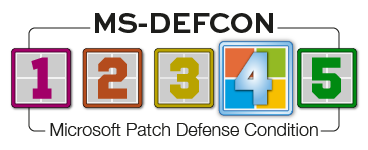
However problematic these issues were, Win11 25H2 Enterprise represents a minority of Windows 11 PCs. They are not material in the grand scheme of Windows updates. So all in all, this was a quiet, good month for releases and justifies lowering the MS-DEFCON level to 4.
There was a problem that prevented access to Microsoft online services. It has already been fixed in the out-of-band update KB5085516:
[Microsoft account sign in] Fixed: After you install the Windows update released on or after March 10, 2026, some users might experience an issue signing in to apps with a Microsoft account. Even when the device has a working Internet connection, a “no Internet” error appears during sign in and prevents access to Microsoft services and apps such as Microsoft Teams Free and OneDrive.
This impacts only Microsoft accounts, not business Entra accounts. If you do not log in with a Microsoft account and do not use Teams or OneDrive, you can skip the update.
The bug that triggered headlines and loss of access to the C drive turned out to be a result of a problem with the Samsung Galaxy Connect app. The fix was to the app, not to Windows.
The same can’t be said about the impact of Outlook bugs introduced during the month, some directly impacting consumers the hardest.
Consumers
I’m still a fan of the classic Outlook app, especially in business. I still use some third-party COM-based add-ins that allow me to tweak how I use Outlook and how I save emails. It’s thus great news to see that Microsoft is postponing the forced phase-out of classic Outlook. I take it as a sign that Redmond realizes work needs to be done. But this doesn’t mean that the issues introduced in this month’s classic Outlook releases should be ignored.
Starting off, we have Classic Outlook replaces accented and extended characters with question marks. Good grief. This was fixed in the updates released after March 10, 2026.
Then there is the more impactful Users get errors 0x800CCC0E & 0x800CCC0F synchronizing Gmail and Yahoo accounts in classic Outlook. Whenever Outlook tries to sync but the user is not logged in, it is supposed to prompt for credentials. This is not happening, so these errors appear in the Send/Receive Progress dialog. In an update to the above post made just yesterday, Microsoft reported that the problem had been fixed:
This issue was fixed by a change in the Microsoft 365 service on 3/20/23. It is possible that after the fix and you change your password, you may still see the same symptoms. After you change your password, it usually takes one hour for the OAuth token to expire. After the token expires you will get a sign in prompt from Outlook. If you do not want to wait on the hour you can do the workarounds below to force the sign in prompt.
The post goes on to provide some workarounds. My recommendation: If you’re having the problem, log in to the Web version, don’t try to redo anything, and wait until the fix kicks in for you.
One workaround is described in Microsoft’s support post How to revert to an earlier version of Office. I hesitate to recommend it because — and trust me on this — it is not a trivial procedure.
Businesses
An Outlook issue impacting businesses more than consumers is explained in the Microsoft support post Classic Outlook crashes and opens in Safe Mode starting March 12 2026:
Starting around March 12, 2026, classic Outlook might crash and then prompt to start in Safe Mode. This issue is happening when older builds of classic Outlook are using the newest version of the Teams Meeting Add-In build 1.26.02603. For example, this issue happens on Current Channel if the classic Outlook build is equal or lower than Version 2402 (Build 17328.20142).
The matter is currently under investigation, but the support post says:
Current Status: We’re continuing to work on deploying a fix to resolve the compatibility issue and anticipate that this should be complete by our next scheduled update.
Next update by: Monday, March 23, 2026, at 5:30 AM CDT.
That means the problem should have been fixed yesterday.
The Microsoft support post How to manage Kerberos KDC usage of RC4 for service account ticket issuance changes related to CVE-2026-20833, originally published in January, contains guidance on the procedures and timeline of updates related to Kerberos KDC. April begins the enforcement phase:
This update changes the default DefaultDomainSupportedEncTypes value for KDC operations to leverage AES-SHA1 for accounts that do not have an explicit msds-SupportedEncryptionTypes active directory attribute defined.
This phase changes the default value for DefaultDomainSupportedEncTypes to AES-SHA1 only: 0x18.
This phase also enables the manual configuration of the RC4DefaultDisablementPhase rollback value until programmatic enforcement in July 2026.
You can do a manual rollback, but only until July 2026. Test carefully after the April updates so that you’re prepared for July, when full enforcement goes into effect and rollback will no longer be available.
Also make sure you are in the thick of your Secure Boot updating plans, ensuring that workstations are on the latest firmware or you are planning to redeploy workstations accordingly.
If you use Intune in your business environment, make sure you are aware — and understand — that attackers came in through the Microsoft cloud management tool to gain access to a firm and then proceeded to remotely wipe devices, including personal Android and iPhones that were part of the managed Intune environment. Do what you can to beef up your admin accounts if you are an Intune administrator.
Microsoft’s cloud services are taking a bit of a beating lately — first with this attack method that many of us are exposed to, and then with a ProPublica article detailing how many government procureers did not recommend Microsoft’s cloud services but approved the contract anyway. The cloud is now, and has always been, simply servers in a different geographic location — one that you may not have control over unless you take the time to understand it.
Resources
- Susan’s Master Patch List
- The MS-DEFCON System explained
- BlockAPatch — Tools to help you hide or block updates
- Steve Gibson’s excellent InControl t to manage feature releases
Hope you enjoyed this news post. Feedback welcome.
Posted Tuesday 24 March 2026 at 5:51 pm AEST (my time).
News posts: 2023 5,800+ | 2024 5,700+ | 2025 5,700+ | 2026 (to end of February) 854
Recommended Comments
Join the conversation
You can post now and register later. If you have an account, sign in now to post with your account.
Note: Your post will require moderator approval before it will be visible.