

3175x175(CURRENT).thumb.jpg.b05acc060982b36f5891ba728e6d953c.jpg)
By Susan Bradley
As a result of researchers’ using AI to do more in-depth code reviews of operating systems and applications, expect to see more security updates and more vulnerability counts.
As Apple indicated to Reuters, the recent release of Apple security updates was done in an accelerated fashion because “… it was adapting to the reality that, given the ability of artificial intelligence to speed the development of malicious hacking tools, it needed to reduce the time between when updates were first made public and when they were put into customers’ hands.”
Adobe also posted that it will be accelerating its release schedule:
Effective July 14, 2026, Adobe is moving from monthly to twice-monthly publication of Adobe Security Bulletins and Advisories on the second and fourth Tuesday of each month. This applies to every bulletin and advisory that includes a formally published CVE requiring customer action.
Will I be speeding up my patching advice? Not yet. The risk of side effects from updates is not zero, and time is required to evaluate them. Even though I see Microsoft and many in the industry urging us to install immediately, at least for now there is a window during which we must look for side effects of updates in order to judge their validity and safety. Patches from Microsoft, with its huge market share and diverse ecosystem, require such close attention.
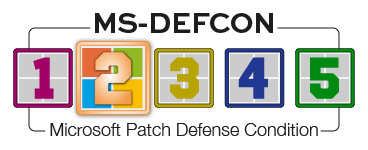
I’m raising the MS-DEFCON level to 2. Ensure you have a backup, make sure automatic updates are disabled, and look for side effects.
Consumers
I’ve been getting reactions to the dribbled changes in the Windows Start menu. We reported on this in March with Will’s article The new Windows Start menu:
The new Start menu rolled out in KB5074109, the January 13, 2026, cumulative update for Windows 11 versions 25H2 and 24H2. However, it is described in the earlier nonsecurity update KB5067036 from October of last year, in the section “Windows 11 PC experiences.”
Because these changes are being dribbled, we’ll undoubtedly have more to say about it. But if the style of the revised Start menu annoys you, adjustments can be made, as described in Microsoft Learn post Configure the Start menu. In addition, evaluate whether a third-party tool such as Fences or Start11 might be more pleasing to you.
Don’t forget: You should be running Windows 11 25H2 by now. 24H2 drops out of support in October; 23H2 reached end of support last November. Use Settings | System | About and look for Windows specifications to see which version you are running. If you are running 24H2, check to make sure 25H2 is not blocked. The easiest way to check that is with InControl, which will allow you to set your desired version to 25H2 and allow Windows Update to install it.
Another quick way to check the version is to click Start, type winver, and press Enter. This displays Windows’ About dialog.
As described in my June 29 On Security column, Microsoft’s Windows 10 Extended Security Updates (ESU) program has been extended for another year — until October 12, 2027. I guess we should call it the EESU program, for Extended Extended Security Updates. If you already opted in to the plan, you need do nothing further. If not, you can still sign up; most consumers will pay nothing.
As noted in the June preview update KB5095093, Microsoft is starting to dribble out some of the annoyances it introduced earlier.
[Point-in-time restore for Windows] New! This flexible recovery feature helps you quickly roll back your PC, including apps, settings, and personal files, to a recent automatic restore point. It helps reduce downtime and simplifies troubleshooting when issues occur. To learn more, see Point-in-time restore for Windows.
[Windows Update] New! A calendar experience in Windows Update Settings (Settings > Windows Update) lets you pause updates by choosing an end date, for up to 35 days. You can extend the pause by selecting a different end date and re‑pause updates as needed. For more information, see Pause updates in Windows.
Microsoft is still tracking a known issue in KB5094126, the June cumulative update for Windows 11 24H2 and 25H2. It affects certain accounting applications:
Microsoft has received reports of an issue in which certain third-party applications might be unable to launch Microsoft Office applications or open documents after installing the Windows updates released on or after June 9, 2026. This issue affects certain third-party applications that use OLE automation to interact with Microsoft Office applications. In some cases, the Office application or document might fail to open without displaying an error message.
Affected Microsoft Office applications might include Word, Excel, PowerPoint, Access, and other Microsoft Office applications when launched from within the affected third-party application.
Reports indicate that this issue may affect applications such as CCH Engagement, Workpaper Manager, dental software (such as Dentrix and Softdent), and Zotero; other similar applications might also be impacted.
To work around this issue, open the application or document directly instead of launching it from the affected third-party application.
Businesses
If I had one thing to say to a Microsoft patch — if it were an actual person — it would be “Don’t mess with my printers.” Learning that the July security update will include printing updates and changes makes me cringe. As noted in KB5094126:
[Printing] New! New printer installations use Internet Printing Protocol (IPP) by default when supported, simplifying setup and improving reliability. For details about third-party driver deprecation, see End of Servicing Plan for Third-Party Printer Drivers on Windows. To control this behavior, use the toggle in Settings > Bluetooth > devices > Printers & scanners > Default install printers using Windows Ready Print. For more information, see Introducing Windows Ready Print and Modernized Driver Selection.
Yet another fix in the list of nine issues addressed for File Explorer:
Fixes an issue where the OneDrive shortcut in File Explorer stops working when File Explorer is run with administrative mode.
So far, Microsoft is still sticking with its second-Tuesday-of-the-month patch-release schedule. Will it stay that way? Stay tuned. You’ll be among the first to know if that happens.
Resources
- Susan’s Master Patch List
- The MS-DEFCON System explained
- BlockAPatch — Tools to help you hide or block updates
Hope you enjoyed this news post. Feedback welcome.
Posted Thursday 9 July 2026 at 4:54 pm AEST (my time).
News posts: 2023 5,800+ | 2024 5,700+ | 2025 5,700+ | 2026 (to end of June) 2,475
Recommended Comments
There are no comments to display.
Join the conversation
You can post now and register later. If you have an account, sign in now to post with your account.
Note: Your post will require moderator approval before it will be visible.