

3175x175(CURRENT).thumb.jpg.b05acc060982b36f5891ba728e6d953c.jpg)
By Susan Bradley
Microsoft is starting to roll out its much-promised, dribbled fixes.
Included in the upcoming June updates — and already included in the preview updates released on May 26, 2026 — KB5089573 includes the Secure Boot fixes and the beginning of many changes about which you’ve complained.
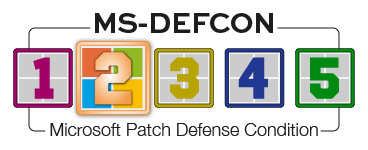
Nonetheless, it’s prudent to put a pause on Windows updates until we understand them and their side effects fully. Accordingly, I’ve raised the MS-DEFCON level to 2.
One update mentioned in KB5089573 that you’re probably looking for is:
[General Performance] This update accelerates app launch and core shell experiences such as Start menu, Search, and Action Center.
This promised change makes Windows briefly push the CPU to higher frequencies when it spots latency-sensitive actions. This means app launches that rely on accessing the shell should respond faster, including the Start menu and Search. When will you see it? I’m honestly not sure. You may experience it only by seeing the CPU usage spike to 100 percent right after boot. I’ve seen that behavior on my older Windows 10 computers when they get a bit long in the tooth and are unable to keep up.
Consumers
I’m more concerned about the vulnerabilities in our browsers these days. Google Chrome is rolling out updates but is keeping the details of the bugs under wraps until enough of us receive the fixes. There are 151 vulnerabilities; 22 are rated critical, and several have already attracted substantial bug bounties. The majority of the bugs could allow sandbox escapes, remote code execution, or data corruption — all of which can be triggered if a malicious user lures you to a malicious webpage.
As I’ve stated in prior newsletters, it’s important to review the tools you have to protect your operating system and browsers from online attackers. These days, you can install the major browsers on nearly any operating system you are running as your day-to-day platform. Look less at antivirus software and more at filtering platforms that may be activated in your ISP’s gateway or through your choice of a DNS provider. Even if you have a Gateway provided by the ISP, you can add a router between yourself and that device; then set up your router to have DNS settings that protect you better. OpenDNS is just one example. Firefox just recently updated to 151.0.2, fixing several issues and bugs.
Also take the time to review your extensions and ensure you have installed only what you intend. Just the other day, I had an issue that, though not a malicious application, still interfered with my day-to-day needs and caused me to stop and investigate why something wasn’t working. A colleague uses Chrome to open PDFs from a business website. Starting last week, the PDFs would no longer open and the site wouldn’t function as we required.
I applied my first rule of troubleshooting: Use another browser to see whether the bug was there, too. In that browser (Edge), the site opened up as it should have. I realized that an Adobe Acrobat PDF extension had been inserted into Chrome, but not into Edge. After removing the extension from Chrome, voilà! The site worked as expected. To examine the installed extensions, get into Chrome’s settings and click on the icon that looks like a tiny puzzle piece. Then document which extensions you have installed and note why they are installed.
Speaking of browser bugs, I use another line-of-business website that every now and then starts to misbehave. It uses a browser to launch a sign-in and then lets you have access to your on-premises software. At least once a year, the cookies need to be removed from the browser in order for the user to log in properly. Any time a vendor tells you to clear all cookies as a step of troubleshooting, I recommend that you not clear all cookies — just find the specific ones for that troublesome website and remove only that set of cookies. If that doesn’t work, remove all cookies. This is annoying and disruptive, because removing all cookies resets the browser for all your website visits. Instructions for Firefox are here.
Businesses
June means those Secure Boot certificates finally age out on our machines if those certificates have not been updated. I’m not as concerned about this for consumers because Secure Boot can always be disabled. Many businesses must deal with compliance issues, which require the most recent certs. Older hardware can be difficult to patch and especially difficult to make compliant with Intune reporting. Often you have to push out the certificates to the workstations by using PowerShell scripts.
HP, in particular, has made a mess of the Secure Boot patch process. In a recent tech note, it indicated that a BitLocker recovery screen may show up after updating a computer with BIOS updates released in early April. It notes that the certificate update process may fail, and it provides guidance on how to check the status of the installed certificates.
That guidance includes suspending BitLocker before installing the BIOS updates. You can suspend BitLocker using the GUI, the command line, or PowerShell. You can even suspend it for a certain number of reboots, after which BitLocker will resume.
Between the OEMs and Microsoft, this has been a real mess. I’ll be revisiting this topic again to ensure we’re all covered before the certificates expire on June 24, 2026, for the Microsoft Corporation KEK CA 2011, and June 27, 2026, for the Microsoft UEFI CA 2011.
Resources
- Susan’s Master Patch List
- The MS-DEFCON System explained
- BlockAPatch — Tools to help you hide or block updates
- Steve Gibson’s excellent InControl to manage feature releases
Hope you enjoyed this news post. Feedback welcome.
Posted Thursday 4 June 2026 at 6:01 pm AEST (my time).
News posts: 2023 5,800+ | 2024 5,700+ | 2025 5,700+ | 2026 (to end of May) 2,092
Recommended Comments
There are no comments to display.
Join the conversation
You can post now and register later. If you have an account, sign in now to post with your account.
Note: Your post will require moderator approval before it will be visible.