

3175x175(CURRENT).thumb.jpg.b05acc060982b36f5891ba728e6d953c.jpg)
 By Susan Bradley
Windows 11 24H2 is a large update that takes some time to install. Don’t do this close to Patch Tuesday.
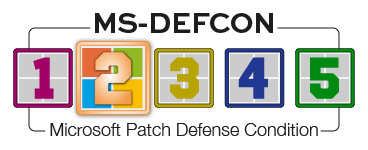
And because new patches are a mere five days away, it’s time to defer everything except critical or emergency patches until I’ve spent the time to understand any side effects. Accordingly, MS-DEFCON goes up to 2.
I’m still on the fence about 24H2. Unless you are fully embracing the cloud, it doesn’t bring a lot to Windows 11. However, it’s a necessary upgrade so that your systems stay up to date and supported. If 24H2 has not yet been offered to you via Windows Update (check Settings), you can use the ISO method by going to the Windows 11 download page to obtain the ISO file, clicking on setup.exe, and running the update.
Just don’t do it yet. Avoid inadvertently catching the August updates at the same time you are trying to do an upgrade. I always recommend installing feature releases toward the end of the month and not near Patch Tuesday. If you miss the window of opportunity, which is when I have the MS-DEFCON level set to 4 or lower (usually closer to the end of a month), wait for another patch cycle to complete.
Microsoft is making preparations to push the Windows 10 ESU service. You can tell. because it is fixing some of the bugs in the ESU, as noted in the end-of-July preview update (KB5062649😞
[Extended Security Updates] Fixed: An issue impacting the Windows 10 Extended Security Updates (ESU) enrollment wizard. Some users experienced a problem where clicking “Enroll now” caused the wizard window to open, begin loading, and then close unexpectedly. This occurred due to incomplete app registration, which prevented the wizard from loading correctly. This update addresses that issue to ensure a smoother enrollment experience.
KB5062649 also mentions another fix that will be coming to the August update:
[Core File Systems] Fixed: An issue observed in rare cases after installing the May 2025 security update and subsequent updates causing devices to experience stability issues. Some devices became unresponsive and stopped responding in specific scenarios.
Unfortunately, Microsoft offers no clue about exactly what these “specific scenarios” are.
Starting in August, Microsoft will begin to roll out Recall for Windows 11 24H2 to the European Economic Area (EEA). Specific to that region, you will able to export snapshots to share with trusted third-party apps and websites. When the saving snapshots feature is turned on for the first time, a unique Recall export code appears. This code is required to decrypt exported snapshots and is shown only once during initial setup. Microsoft doesn’t store or recover this code.
In addition, for all Recall users worldwide, Recall can be reset and all its data deleted if you have a Copilot+ PC. Go to Settings | Privacy and Security | Recall and Snapshots to find a new Advanced settings page. There, you’ll see a reset button that deletes all your snapshots and restores Recall to its default settings.

Figure 1. The Recall feature can be reset and all data deleted.
I remain unconvinced that Recall is a compelling feature.
Consumers
A month ago, we reported in our Unexpected Restarts post that the infamous blue screen of death was changing as part of Microsoft’s Windows Resiliency Initiative (WRI). WRI is focused on enterprises, but in August consumers will also get the change to the “Black Screen of Death.” The new BSOD provides more detail than we see now. WRI aims to make recovery from a catastrophic problem easier and faster with Quick Machine Recovery (QMR).
QMR is designed to avoid near-endless loops through the Windows Recovery Environment (WinRE). Instead, WinRE will connect to the Internet and Microsoft can deliver a targeted fix though Windows update. QMR will be enabled automatically on Windows 11 Home edition and can be turned on via Settings for Pro and Enterprise editions.
Businesses
Because QMR will not be enabled automatically in the Pro and Enterprise editions of Windows 11, businesses will need to take direct action to enable it. IT admins can enable or customize this experience for their organization through the Intune Settings Catalog UI using the RemoteRemediation CSP. There is also a dedicated QMR settings page available under System | Recovery | Quick machine recovery. You may already see this page, as shown in Figure 2:

Figure 2. Quick machine recovery in Settings
As you may recall, this is a direct result of the CrowdStrike issue last year that triggered BSODs and business disruptions when a faulty endpoint-detection update caused massive issues. Here’s hoping that problems such as this can be successfully prevented.
Resources
- Susan’s Master Patch List
- The MS-DEFCON System explained
- BlockAPatch — Tools to help you hide or block updates
- Steve Gibson’s excellent InControl to manage feature releases
Hope you enjoyed this news post.
Posted Thursday 7 August 2025 at 2:13 pm AEST (my time).
News posts... 2023: 5,800+ | 2024: 5,700+ | 2025 (till end of July): 3,458
RIP Matrix | Farewell my friend


Recommended Comments
There are no comments to display.
Join the conversation
You can post now and register later. If you have an account, sign in now to post with your account.
Note: Your post will require moderator approval before it will be visible.