


3175x175(CURRENT).thumb.jpg.b05acc060982b36f5891ba728e6d953c.jpg)
Almost three weeks ago, Mozilla released Firefox 141 that, among other features like memory optimizations for Linux and a built-in unit converter, brought controversial AI-enhanced tab groups.
Powered by a local AI model, these groups identify related tabs and suggest names for them. There is even a "Suggest more tabs for group" button that users can click to get recommendations.
Now, several users have taken to the Firefox subreddit to complain about high CPU usage when using the feature, as well as express their disappointment in Mozilla for adding AI to the browser.
When u/st8ic88 noticed their machine's CPU usage and battery life plummeting, they pulled up the task manager and saw that the "Inference" process was the culprit. As the comments pointed out, this is likely the process Firefox uses to handle AI stuff right on your device. But the Reddit user was not happy about this:
I don't want this garbage bloating my browser, blowing up my CPU, and killing my battery life. There is absolutely no reason for it, it's not a good feature, and it's absolutely humiliating for Firefox to be jumping on this bandwagon.
The point of a browser is to DOWNLOAD AND RENDER WEB PAGES.
Another user who checked their system's process manager with Conky confirmed the "Inference" process was a new, resource-hungry addition. Killing the process just made Firefox crash and require a restart.
Nearly three years after the release of ChatGPT, generative AI is still a trendy topic, with companies like Microsoft aggressively pushing Copilot to turn Edge into an AI browser, with features like page summaries and image generation.
For privacy-conscious users, the on-device model might be better than what Chrome offers, where its short-lived experimental Tab Organizer sends your data off to Google's servers for analysis.
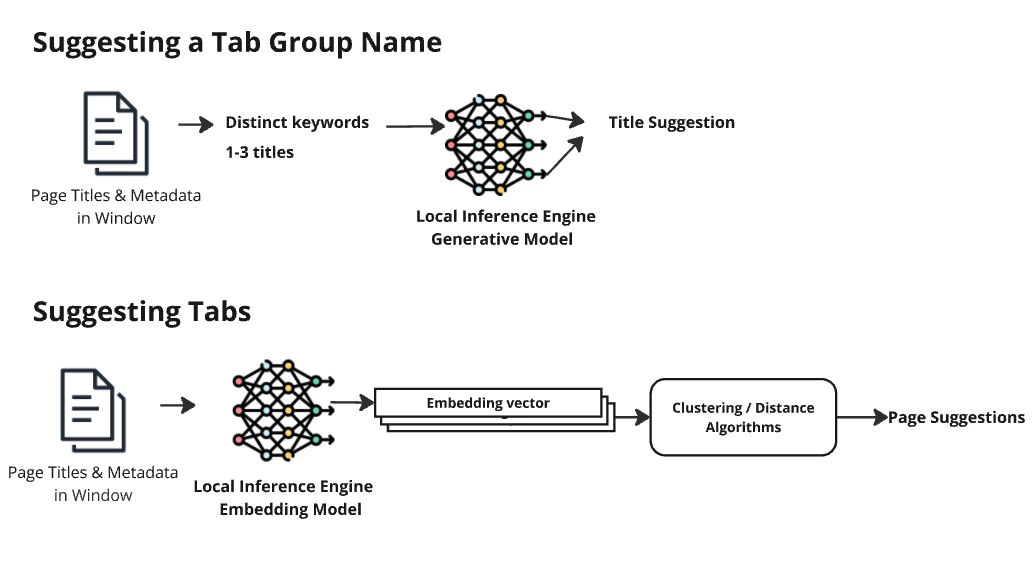
Firefox's implementation is a more private, two-part process that, as previously noted, happens locally. To suggest tabs for a group, it uses an embedding model to analyze your page titles and create a numerical "embedding vector" for each. Then, clustering algorithms compare these vectors to find related pages.
When suggesting a group name, the system takes the page titles and metadata from a window and feeds them to Mozilla's smart-tab-topic model (based on Google AI's T5) to come up with a suggestion.
Some pointed out that the spike in CPU usage could be related to Firefox using Microsoft's Open Neural Network Exchange (ONNX) format instead of the supposedly more efficient GGUF by Georgi Gerganov for running these local models.
Of course, if you have a lot of tabs open, this kind of feature could be useful, although there are certainly users who feel it's "egregiously stupid" to have a computer make "simple decisions" for them. Some people will prefer their tools without AI bolted on, which led companies like Zed Industries to provide a global switch to disable all AI within Zed Editor.
If you are also dealing with CPU spikes and battery drain from Firefox's new AI features, you can disable them through the browser's advanced settings. Head to about:config in a new tab, accept the risk warning, and use the search bar to find the controls. To kill the AI chatbot feature, search for browser.ml.chat.enabled and set it to false. To stop smart tab grouping, search for browser.tabs.groups.smart.enabled and set it to false.
You can also hide the chatbot from the sidebar in Settings or Firefox Labs, but it might pop back up after updates.
Hope you enjoyed this news post.
Posted Sunday 10 August 2025 at 3:47 am AEST (my time).
News posts... 2023: 5,800+ | 2024: 5,700+ | 2025 (till end of July): 3,458
RIP Matrix | Farewell my friend

Recommended Comments
Join the conversation
You can post now and register later. If you have an account, sign in now to post with your account.
Note: Your post will require moderator approval before it will be visible.