


3175x175(CURRENT).thumb.jpg.b05acc060982b36f5891ba728e6d953c.jpg)
A new card-based interface arrives in April, allowing users to quickly swipe through missed messages, meeting chats, and followed threads.
Microsoft has announced that it will be rolling out “Catch up” in Microsoft Teams mobile, first as a targeted release in April and then for general availability (Worldwide tenants) in early May. “Catch up” provides users with a summary of what’s going on across their chats so they can respond more quickly. The feature will pull in information from across chats, meeting chats, and followed channels or threads.
Anyone included in the targeted release will be able to experience this feature from early April, but for most people, it will become available in early May. This feature will also only affect you if you’re using Microsoft Teams on mobile. Admins do not need to take any action as the feature is enabled by default for everyone.
Once the feature lands, you will see a new card-based view in the Chat section of Teams mobile. Tap the “Catch up” button to see your latest messages on cards, which you can swipe right to “Mark as read” or swipe left to “Keep unread”.
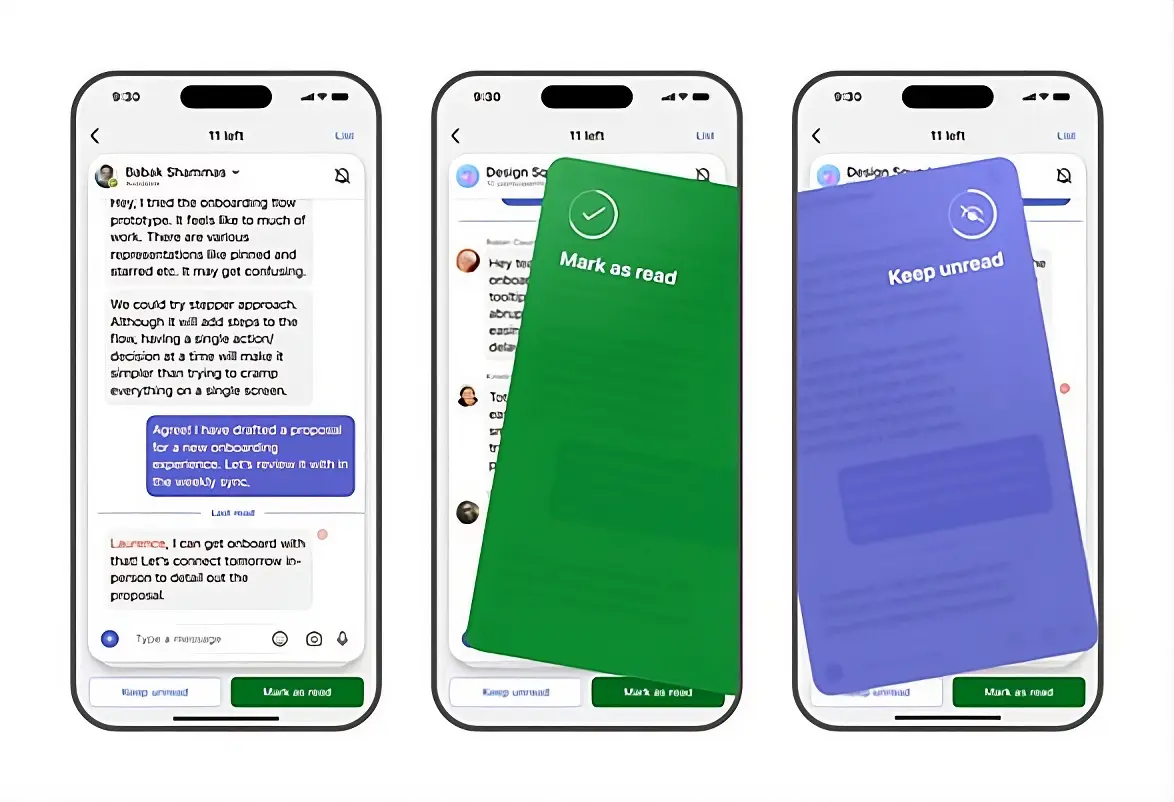
While users may find this feature annoying and gimmicky if they didn’t know about it, and it appeared by surprise, those who get comfortable using it can ensure they do not miss anybody’s messages. This is super useful if an important message gets sent while you are away, and then you don’t end up missing it.
To this end, Microsoft recommends that admins inform users about the new “Catch up” mobile view and how it can assist them day-to-day. It is also recommended that internal helpdesk or user-support documentation be updated if it references existing Teams mobile views. You can learn more in the Microsoft 365 Admin Center under Message ID MC1260707.
Let us know in the comments what you think of this feature. Will it make you more productive, or is it going to be a waste of space for you?
Hope you enjoyed this news post. Feedback welcome.
Posted Thursday 26 March 2026 at 5:08 am AEST (my time).
News posts: 2023 5,800+ | 2024 5,700+ | 2025 5,700+ | 2026 (to end of February) 854
Recommended Comments
There are no comments to display.
Join the conversation
You can post now and register later. If you have an account, sign in now to post with your account.
Note: Your post will require moderator approval before it will be visible.