


3175x175(CURRENT).thumb.jpg.b05acc060982b36f5891ba728e6d953c.jpg)
Microsoft Teams is a software that I use actively for five days a week. That is because it is a critical component of my workflows as the organizations I work with, including my own, are deeply entrenched in Microsoft's ecosystem and primarily use Redmond's tech stack for office use. This includes Microsoft 365, Teams, Active Directory, Copilot, and more. This is also why I regularly cover Teams news here at Neowin, because the changes also impact me directly, I understand them, and I want others to be aware of them too. Some of you may also remember an editorial I penned in the latter half of last year, explaining how I have a love-hate relationship with Teams.
Well, the balance may have recently tilted to the "love" side of the equation, because of a very simple feature that Microsoft recently introduced in Teams that was sorely needed. Without further suspense, this is the network strength indicator that began rolling out in the last couple of weeks.
Although it may be self-explanatory, the network strength indicator displays the connectivity status of people in a meeting. This is similar to the signal strength bar that you see on the status bar at the top of your phone screen, which is good because it means that it is intuitive and doesn't require separate training for its use.
During a meeting, Teams now displays the network strength of each participant through a three-bar system. If you get one bar, this indicates a weak/bad connection, two bars represent unstable/poor, and three bars highlight a good connection that is ideally having no issues during the call.

If you're getting less than three bars, Microsoft also highlights actions that you can take to mitigate issues and improve your call quality. These include turning off your camera and incoming video, moving closer to the router, and switching to a wired connection.
A good aspect of this implementation is also that the indicator is visible to all participants. So you don't need to spend time wondering during a call if it's because of your own network issue that you can't clearly hear someone or if it's something on the end of the other participants. Goodbye, "Am I audible?"
This works great for me because I work remotely and access Teams through an Amazon Workspaces virtual machine assigned to me by my client. This machine is hosted in Singapore while I am based in Pakistan, so optimizing signal strength and latency is an essential requirement for ensuring a smooth workflow and communication process. Network strength indicator is a godsent in this scenario, I no longer need to play a guessing game regarding call quality issues.
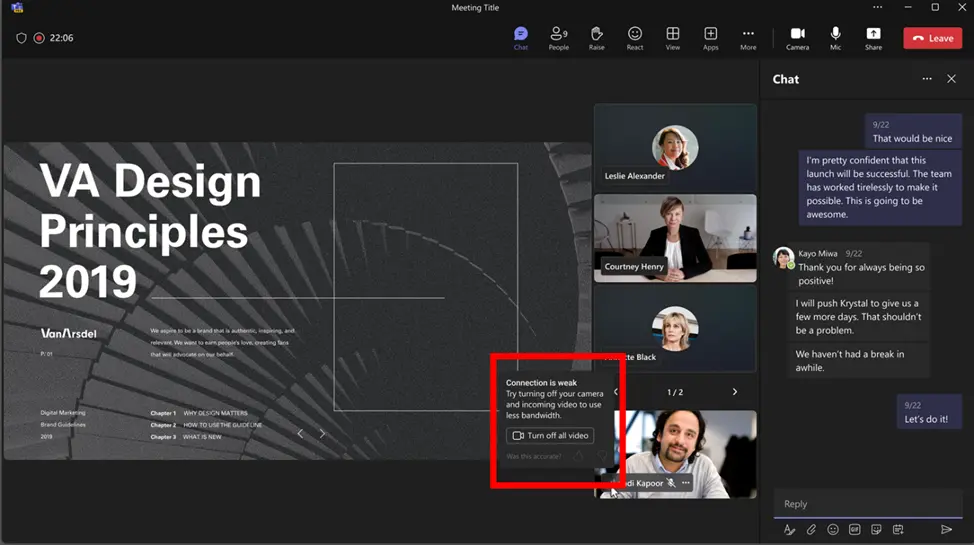
That said, I do believe that there are still some improvements that can be made. For starters, while the indicator is mostly sufficient, I do believe that it would be even more intuitive if it's color coded as red, yellow, and green. Of course, there are accessibility scenarios to keep in mind so I believe that this should only be added as an optional configuration that you can enable if desired.
Lastly, I do hope Microsoft documents this feature a bit better. I understand that it's a bit recent but perhaps if there was some guidance around what upload/download speed and other metrics constitute a bad, poor, and good connection, customers could proactively prepare and ensure that their network connectivity is optimal.
All in all, while the network strength indicator could use some improvements as highlighted above, I believe that this simple feature is an excellent addition, especially for customers who live in regions with unstable internet connections and/or those who actively work in remote conditions. This capability started rolling out a couple of weeks ago and should now be available to everyone. There is no admin control surrounding the network strength indicator and it cannot be disabled.
Hope you enjoyed this news post. Feedback welcome.
Posted Monday 2 March 2026 at 5:38 am AEST (my time).
News posts: 2023 5,800+ | 2024 5,700+ | 2025 5,700+ | 2026 (to end of February) 854
Recommended Comments
There are no comments to display.
Join the conversation
You can post now and register later. If you have an account, sign in now to post with your account.
Note: Your post will require moderator approval before it will be visible.