

3175x175(CURRENT).thumb.jpg.b05acc060982b36f5891ba728e6d953c.jpg)
Microsoft has new default settings for Modern Standby and S3. There are also several improvements under the hood on Windows 11 24H2 and 25H2.
Recently, Microsoft has been making active strides to improve Windows 11, the company finally announced many Windows Update features that have been requested by users for a very long time, and the performance of the OS will also see some big improvements, according to its internal plan supposedly called "K2" that leaked out today.
Aside from those, the Redmond giant has also made improvements to Windows 11 sleep. That's because last year, Microsoft quietly introduced updated default power and sleep settings in Windows 11, refining how devices transition into low-power states. The changes were published in a support article that Neowin spotted while browsing today.
These are new default settings that affect both systems that support Modern Standby as well as those that still rely on the legacy S3 or deep idle sleep state, and help to shorten the time it takes for a device to turn off its display and enter sleep when idle. On Modern Standby–capable devices, the display now turns off after three minutes on battery power and five minutes when plugged in, with the system entering sleep after the same intervals.
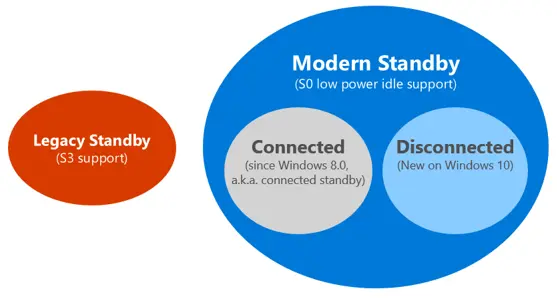
For those who may not be aware, Modern Standby, introduced on Windows 8, is a power model that differs significantly from traditional sleep states. It operates within the system’s active power state (referred to as S0 low-power idle), allowing the device to remain in a low-power condition while still performing limited background tasks. This enables near-instant wake and an “always-on, always-connected” experience similar to what happens on mobile devices like phones.
Modern Standby includes a range of substates that allow the system to scale power usage dynamically, balancing responsiveness with efficiency. Systems can transition between more active and deeper idle conditions depending on workload and hardware behavior. Microsoft also provides diagnostic tools such as SleepStudy, which help analyze power consumption and activity during such standby sessions.
Aside from new default sleep timers, Microsoft has introduced several targeted changes to how Modern Standby handles wake behavior so as to improve battery life and reduce unwanted activity during sleep. These changes were introduced on Windows 11 24H2 which means they apply to Windows 11 25H2 as well.
If the system now detects excessive battery drain while in Modern Standby, most wake sources are automatically disabled. In this restricted state, the device can only be woken through deliberate user actions, specifically by pressing the power button or opening the lid. This limits background or unintended wake events that could otherwise consume power.
Another important update involves input and display behavior. With input suppression, which now works on both DC and AC power, the power button no longer triggers a wake when the lid is closed and no external display is connected. Likewise, if an external display is connected while the lid is closed, input suppression does not apply and the external display may turn on. Microsoft also changed voice wake support as it is no longer supported as a wake source from sleep.
Despite the shift toward Modern Standby, the legacy S3 sleep state remains in use on some systems, particularly older hardware and certain desktop configurations. In S3 sleep, most components are powered off with only system memory retaining the current session. This results in lower power consumption compared to lighter sleep states but typically comes with slower wake times.
For devices using the older S3 sleep model, the timers remain longer but have still been reduced, with sleep occurring after 10 minutes on battery and 15 minutes when connected to power. The table below details the changes:
New default settings for modern standby devices
|
Screen and sleep setting for modern standby devices |
Original setting (in minutes) |
Adjusted setting (in minutes) |
|---|---|---|
|
On battery, turn my screen off after |
4 |
3 |
|
When plugged in, turn my screen off after |
10 |
5 |
|
On battery, make my device sleep after |
4 |
3 |
|
When plugged in, make my device sleep after |
10 |
5 |
New default settings for S3 devices
|
Screen and sleep setting for S3 devices |
Original setting (in minutes) |
Adjusted setting (in minutes) |
|---|---|---|
|
On battery, turn my screen off after |
5 |
3 |
|
When plugged in, turn my screen off after |
10 |
5 |
|
On battery, make my device sleep after |
15 |
10 |
|
When plugged in, make my device sleep after |
30 |
15 |
These adjustments are intended to reduce energy consumption and extend battery life by limiting idle power usage.
Source: Microsoft (link1, link2)
Hope you enjoyed this news post. Feedback welcome.
Posted Monday 27 April 2026 at 5:30 pm AEST (my time).
News posts: 2023 5,800+ | 2024 5,700+ | 2025 5,700+ | 2026 (to end of March) 1,297
Recommended Comments
There are no comments to display.
Join the conversation
You can post now and register later. If you have an account, sign in now to post with your account.
Note: Your post will require moderator approval before it will be visible.