


3175x175(CURRENT).thumb.jpg.b05acc060982b36f5891ba728e6d953c.jpg)
Microsoft is redesigning PowerToys Awake with simpler controls, custom durations, and more features.
Recently there have been a couple of positive developments regarding the Windows 11 Start menu. First, Microsoft finally managed to fix a major issue that affected all the core UI elements of the OS, not just the Start menu, with the recent update. Second, the company also released new customization policies for the Start menu this past week, which received a significant revamp recently.
Speaking of customization, if you follow Neowin you are more than likely aware of PowerToys. It is an official set of tools and utilities that's published by Microsoft itself, even though it is not natively part of Windows 11. As the name suggests, it is for the power users who cherish customizing, as it offers various utilities to improve productivity, usefulness, and so on. One such utility is Awake, and Microsoft is currently testing a redesign of this feature.
For those unfamiliar, Awake is designed to prevent a Windows PC from automatically going to sleep without requiring users to change the operating system's power plan. Instead, the utility temporarily overrides Windows' sleep behavior while it's active, making it useful for long downloads, software builds, presentations, rendering jobs, or other similar lengthy tasks. It supports several modes, including keeping a PC awake indefinitely, for a specified duration, or until a particular date and time, while also offering an option to keep the display turned on if needed.
Now Microsoft appears to be exploring a more streamlined experience for the utility. A newly opened PowerToys GitHub proposal outlines a redesigned Awake flyout, which is intended to make the feature easier to access and configure without having to go through the Settings app or system tray context menus. According to the proposal, the lightweight flyout would place all of Awake's key modes, including indefinite, timed, and passive modes, within a single interface for quicker access.
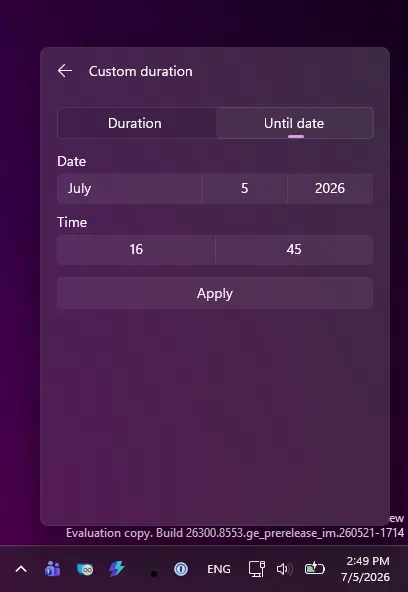
Aside from that, Microsoft is also considering several new capabilities for the tool. One of the more notable additions is support for custom durations, allowing users to specify any amount of time, such as 25 minutes or 1 hour and 30 minutes, instead of just relying on preset intervals.
|
|
|
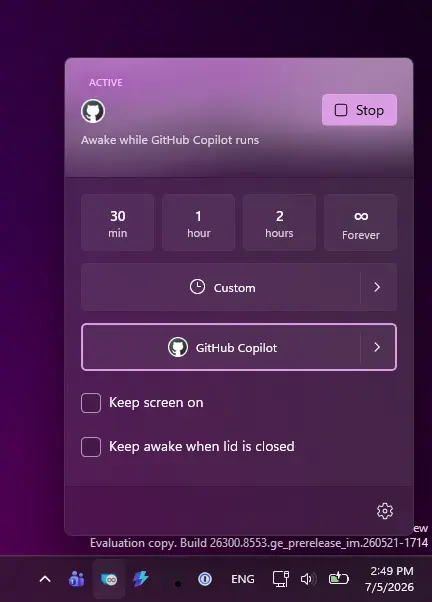
Another proposed feature is the ability to attach Awake to a specific process, which will let users keep their PC awake only while a selected app or process is running. Hence, once the chosen process exits, Awake should automatically stop overriding the system's sleep behavior and allow Windows to resume its normal power management.
As with many PowerToys features in testing, there is no confirmed timeline for when or if the redesigned Awake experience will make its way into a stable release. But regardless of that, it's great to see the effort from Redmond. Right now, Microsoft is primarily looking for community feedback regarding this proposal. And if the public shows support, there's a chance we'll see this feature in a public release sooner rather than later.
You can check out the proposal here on the official Microsoft PowerToys GitHub repo.
Hope you enjoyed this news post. Feedback welcome.
Posted Monday 6 July 2026 at 1:07 pm AEST (my time).
News posts: 2023 5,800+ | 2024 5,700+ | 2025 5,700+ | 2026 (to end of June) 2,475
Recommended Comments
Join the conversation
You can post now and register later. If you have an account, sign in now to post with your account.
Note: Your post will require moderator approval before it will be visible.