


3175x175(CURRENT).thumb.jpg.b05acc060982b36f5891ba728e6d953c.jpg)
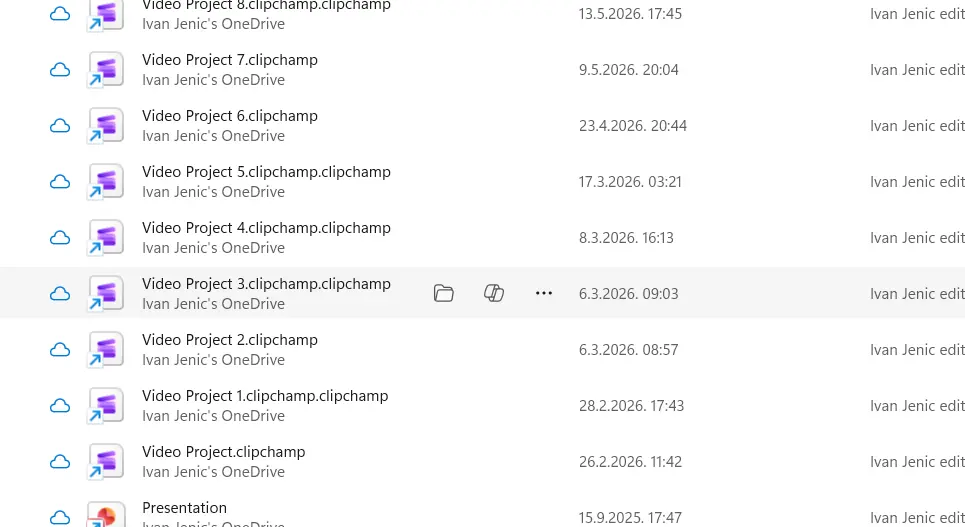
Microsoft is adding a dedicated Copilot button to File Explorer Home. Clicking that button automatically lets Copilot analyze the selected file.
Microsoft has made a lot of positive changes to the Windows 11 experience lately. In the span of just a week, we’ve seen improved Windows Search, more taskbar customization features, and streamlined Widgets. The company is even making an effort to cut back on how much AI gets pushed in front of users who don't want it.
Those are all genuinely welcome changes. But reducing AI exposure clearly doesn't mean walking away from new AI features altogether. One of the clearest examples is the addition of Copilot in File Explorer.
In the latest Windows 11 Release Preview build, Microsoft added dedicated Copilot and “Open file location” buttons to File Explorer Home. Hovering over a file in File Explorer Home now surfaces quick actions like Open file location and Ask Copilot, letting you jump straight from a file to an AI conversation about it without opening the file itself.
I tested this myself after spending time with the latest Release Preview build, and it didn’t work. Clicking the Copilot button did nothing more than open the Copilot app on its own, with no awareness of the file I'd actually clicked it from. That could just be a bug on my end, and to be fair, this is still a Release Preview build, so imperfect behavior isn't unexpected.
Still, I'm skeptical this feature has much of a future even once it's fully working. File Explorer surfaces every type of file imaginable, and Copilot simply can't reliably analyze all of them. It might handle a document or a photo reasonably well, but a large Excel spreadsheet is a different story. There's no realistic way it processes an entire large table through a quick hover action like this.
Now, the current implementation is minimal enough that it doesn't get in the way constantly, so it's not actively annoying to have around. But I also don't see the actual need for it here, and it would be a welcome addition if Microsoft added a simple way to turn it off entirely for anyone who'd rather not have it there.
The Copilot button in File Explorer is included in the latest Windows 11 Release Preview build on a gradual rollout schedule. That means it could make its way to the public soon, maybe as soon as the next Patch Tuesday.
Hope you enjoyed this news post. Feedback welcome.
Posted Wednesday 22 July 2026 at 7:42 am AEST (my time).
News posts: 2023 5,800+ | 2024 5,700+ | 2025 5,700+ | 2026 (to end of June) 2,475
Recommended Comments
There are no comments to display.
Join the conversation
You can post now and register later. If you have an account, sign in now to post with your account.
Note: Your post will require moderator approval before it will be visible.