

3175x175(CURRENT).thumb.jpg.b05acc060982b36f5891ba728e6d953c.jpg)
Microsoft has fixed a known issue causing Gmail and Yahoo email synchronization problems for classic Outlook users.
As the company explained earlier this month, the bug triggers 0x800CCC0F and 0x80070057 error codes when synchronizing Gmail and Yahoo accounts.
Microsoft said that this type of email account stopped syncing as of February 26, 2026, and that, in both cases, users were no longer prompted to sign in to their accounts when Outlook syncing stopped working.
In an update to the original support document, Microsoft says that although the issue was fixed in the Microsoft 365 service on Friday, some customers may still experience sync issues until their OAuth token expires.
"After you change your password, it usually takes one hour for the OAuth token to expire," the company explained on Monday. "After the token expires you will get a sign in prompt from Outlook. If you do not want to wait on the hour you can do the workarounds below to force the sign in prompt."
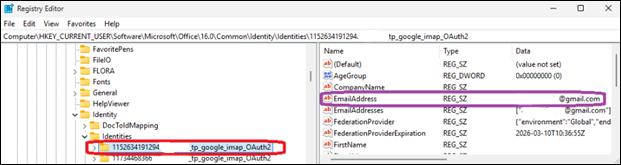
Customers who can't get their Outlook to sync can also use a temporary workaround shared by Microsoft before the fix rolled out, which requires them to delete the registry entries for the affected email address under the Identities key at Computer\HKEY_CURRENT_USER\Software\Microsoft\Office\16.0\Common\Identity\Identities in the Windows Registry Editor.
Microsoft is also investigating a bug that triggers "Can't connect to the server" errors when creating groups in classic Outlook when Exchange Web Services (EWS) is enabled for the tenant.
Another issue, acknowledged almost two months after the first user reports surfaced online, causes the mouse pointer to disappear for some users in classic Outlook, OneNote, and other Microsoft 365 apps.
Microsoft asked affected customers to submit diagnostic log files to assist the Outlook Support Team with analysis by opening a support case through their Microsoft 365 admin.
In January, it addressed another classic Outlook issue caused by the December 2025 updates that prevented Microsoft 365 customers from opening encrypted emails.
Microsoft is also working to address a known issue that will render the classic Outlook email client unusable for users who enable the Microsoft Teams Meeting Add-in.
Hope you enjoyed this news post. Feedback welcome.
Posted Wednesday 25 March 2026 at 5:28 am AEST (my time).
News posts: 2023 5,800+ | 2024 5,700+ | 2025 5,700+ | 2026 (to end of February) 854
Recommended Comments
There are no comments to display.
Join the conversation
You can post now and register later. If you have an account, sign in now to post with your account.
Note: Your post will require moderator approval before it will be visible.