


3175x175(CURRENT).thumb.jpg.b05acc060982b36f5891ba728e6d953c.jpg)
Microsoft just announced Cloud rebuild, a recovery option that reinstalls all your existing drivers.
Installing a fresh copy of Windows is often more trouble than it should be. Instead of getting a fresh, clean copy of the operating system, free of hidden scripts, files, and who knows what, you usually end up losing your entire day just trying to get your PC to work properly.
One of the biggest nuisances of a freshly installed Windows is definitely the lack of drivers. An average user doesn’t even know which drivers they should install. And even if they do, it always involves installing fresh drivers, which can cause their own set of issues. Especially if an NVIDIA driver is involved, which is notorious for causing headaches for users.
However, that entire driver trouble should end soon, at least in theory. Microsoft just announced a feature called Cloud rebuild. This recovery option is designed to reinstall both the target Windows image and the device's drivers from Windows Update. So, when you reset your PC, the fresh install comes with all the necessary drivers.
Cloud rebuild is currently available to Windows Insiders, starting from the Experimental Preview Build 26300.8772, and will be making its way to everyone in the coming months. Unless Microsoft changes its plans, but we’re hoping that won’t be the case.
If you’re a Windows Insider, and you’re willing to reset your PC, here’s how to do it with the new Cloud rebuild recovery option:
- Start it directly from the Windows Recovery Environment (WinRE) by selecting Troubleshoot > Recovery and uninstall > Cloud rebuild.
- Connect over wired Ethernet or a Wi-Fi network from within WinRE.
- Review the target Windows build, edition, and language, then confirm the data-loss warning before the rebuild begins.
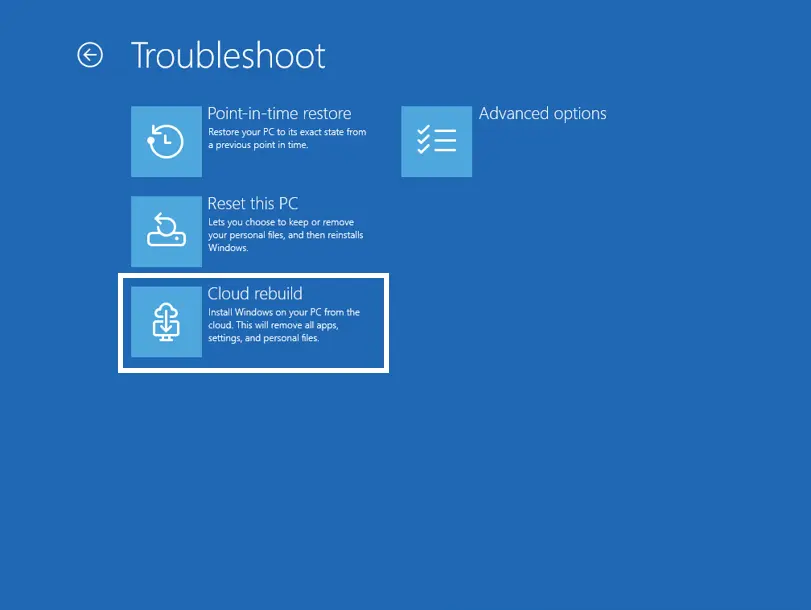
It’s worth mentioning that Cloud rebuild still requires an internet connection, so it doesn’t solve all the driver problems. But if you’re able to connect to the internet, you won’t have to worry about other drivers, at least.
For Insiders who try Cloud rebuild, you can submit your feedback to Microsoft through Feedback Hub, and help everyone get a functional feature once it comes out.
Hope you enjoyed this news post. Feedback welcome.
Posted Wednesday 8 July 2026 at 7:32 am AEST (my time).
News posts: 2023 5,800+ | 2024 5,700+ | 2025 5,700+ | 2026 (to end of June) 2,475
Recommended Comments
There are no comments to display.
Join the conversation
You can post now and register later. If you have an account, sign in now to post with your account.
Note: Your post will require moderator approval before it will be visible.