


3175x175(CURRENT).thumb.jpg.b05acc060982b36f5891ba728e6d953c.jpg)
Aside from that, there are multiple improvements in store for users with this new PowerToys v0.99.0 release.
Recently, we covered a third-party script for Windows 11 called WMT that can help fix or repair things. While such unofficial tools can prove helpful where there is no easy option on Windows, an official alternative exists in the form of Microsoft PowerToys too.
You probably already know what it is but for anyone who does not read Neowin regularly, Microsoft PowerToys is a free, open-source set of utilities for Windows 10 and 11 that are designed to help with customization that can also in turn boost your productivity. It offers tools such as FancyZones for window layouts, PowerToys Run for quick app launching, Color Picker, PowerRename, and more. The app is primarily meant for power users on Windows.
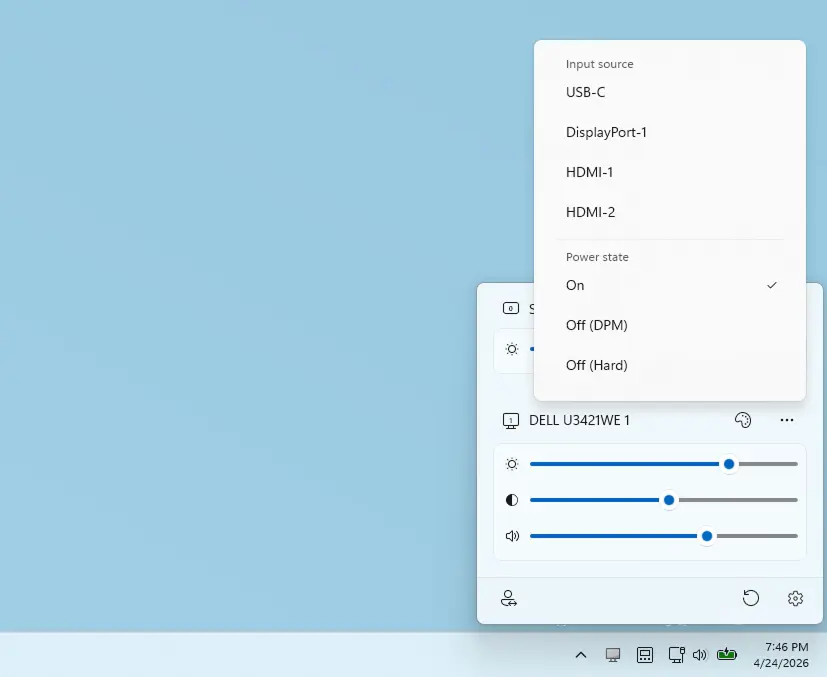
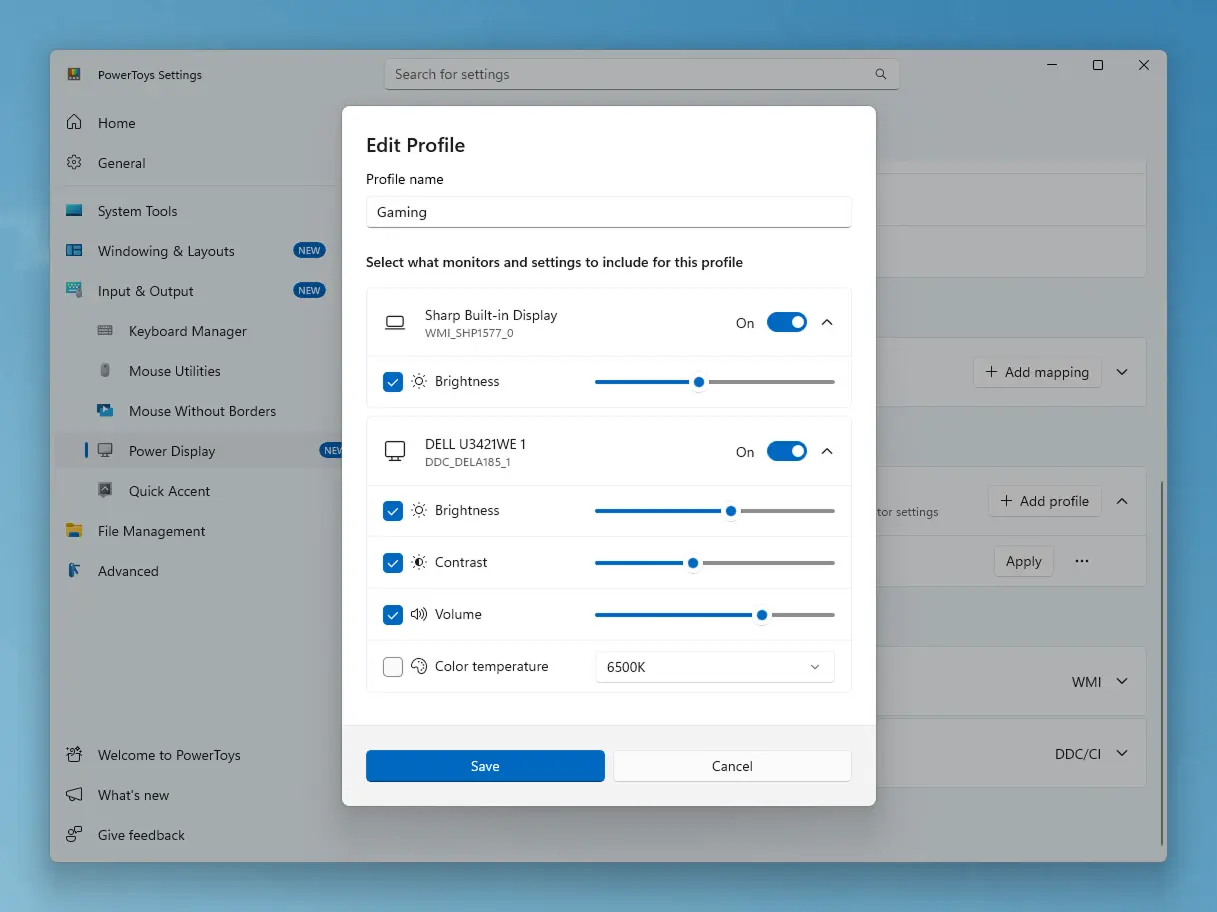
The Redmond giant has released PowerToys v0.99.0 today, bringing two new utilities and a series of improvements across the suite. The update introduces Power Display, a system tray tool that allows users to adjust monitor brightness, contrast, and color profiles directly from Windows. Custom profiles can be saved and switched with a single click, and integration with Light Switch enables automatic adjustments when themes change.
Perhaps the most interesting release is the new "Grab And Move", which brings a Linux-style window control to Windows. By holding the ALT key with the left mouse click, users will be able to drag windows from anywhere on the interface. Meanwhile, ALT key with right click can be used to resize it.

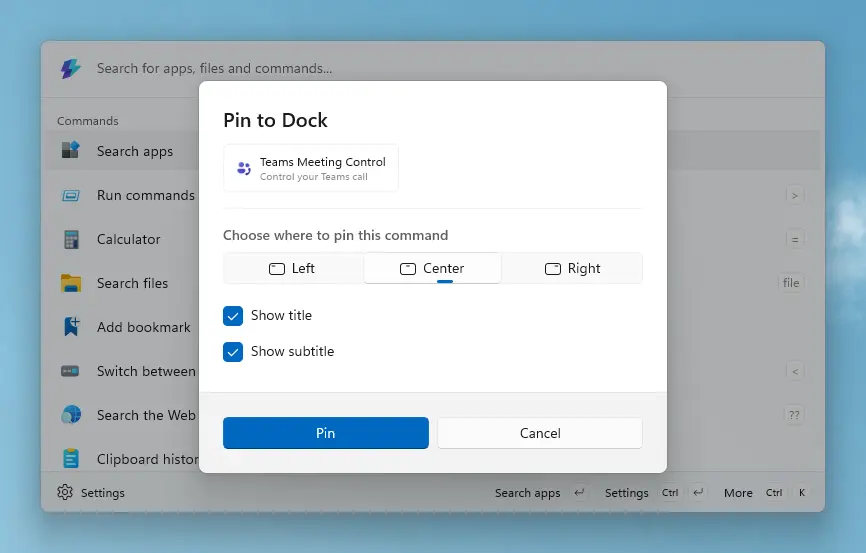
Command Palette and Dock have received improvements too. The latter now supports a compact mode, persistent calculator history, and better pinning options, while extensions for plain text and image viewing have been enhanced.
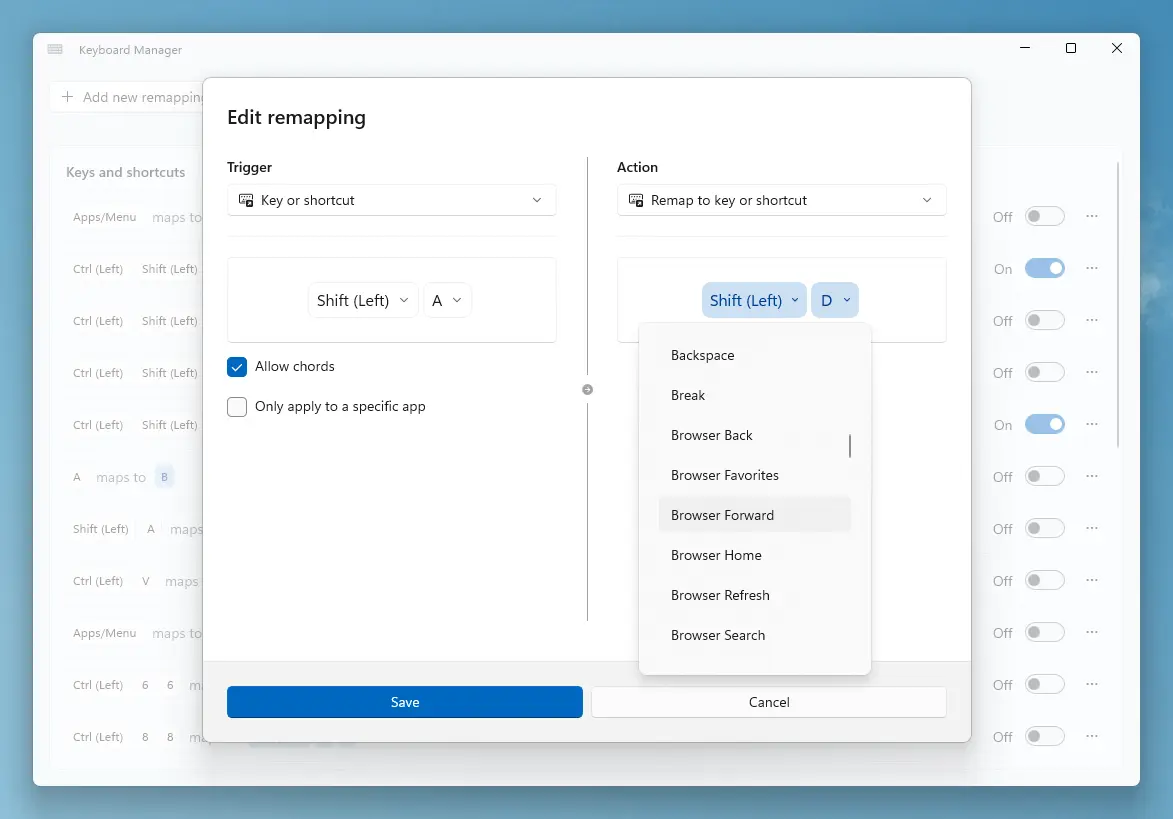
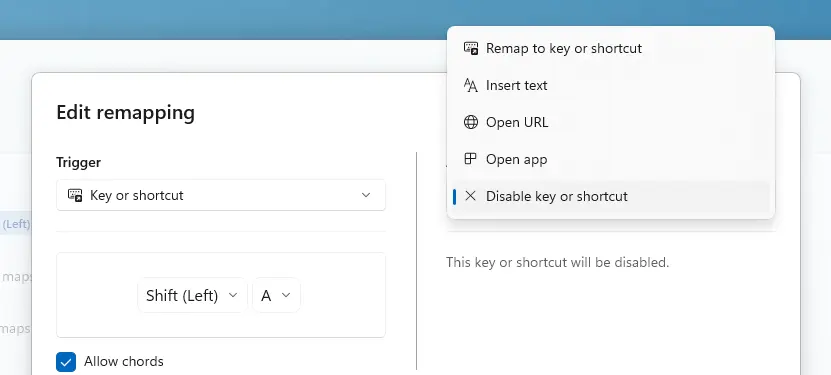
Keyboard Manager has also been updated, allowing users to manually adjust recorded remappings through dropdown menus and disable specific keys or shortcuts. ZoomIt has expanded its functionality with scrolling screenshots, making it easier to capture long pages.
Other modules have seen refinements as well. Image Resizer has migrated to WinUI 3, aligning with Windows 11’s design language (the whole OS is getting a performance upgrade in this regard). Advanced Paste should now work more reliably in Electron or Chromium-based apps such as Teams and Visual Studio Code.
You can read the full changelog below:
Advanced Paste
- Eliminated 13 XAML compiler warnings by switching x:Bind expressions on non-observable properties from OneWay to OneTime mode in #46726
- Fixed auto-copy failing on Electron/Chromium apps (e.g. Teams, VS Code) by releasing held modifier keys before injecting Ctrl+C in #46486
Always On Top
- Fixed the pin/unpin sound playing even when the operation failed by gating sound playback on whether SetWindowPos actually succeeded in #46910
Command Palette
Dock
- Added a new pin-to-Dock dialog that gives users more control over how commands are pinned, replacing the previous one-click pin behavior in #46436.
- Added a Compact Dock mode (28px tall, subtitle hidden) for Top/Bottom dock positions, and hid the Dock Size setting for Left/Right positions in #46699
- Made the Dock window stay on top of all other windows by default, automatically yielding when a full-screen app is detected in #46163.
- Decoupled the Dock context menu from the Command Bar's active item so it no longer updates when a different list item is selected, and made the Dock search box position follow the Dock position in #46420.
- Fixed duplicate dock bands caused by missing duplicate check when pinning in #46438
- Fixed a build-breaking merge inconsistency in DockWindow.xaml.cs in #46639.
- Fixed the Dock not reflecting pin/unpin changes until restart in #47169
- Fixed the Dock window showing a visible frame on startup by hiding the DWM border during window creation in #47187
Extensions & SDK
- Added plain text viewer and image viewer IContent types to the extension SDK in #43964.
- Added persistent calculator history with save, reuse, delete, and clear actions, configurable primary action, and replace-query-on-enter behavior in #45307.
- Added a NetworkSpeedUnit choice setting to the Performance Monitor extension (bits/s, decimal bytes/s, IEC binary bytes/s) in #46320.
- Enabled dock pinning of Windows Terminal profiles with per-profile icons, and hardened GUID parsing so a malformed profile entry no longer breaks the whole list in #46372
- Assigned stable IDs to FancyZones layout commands in the PowerToys extension so users can pin individual layouts to the dock in #46198.
- Hardened the Performance Monitor extension with exception handling and crash recovery via a sentinel file mechanism in #46541.
- Gave each built-in extension its own settings file with transparent one-time migration from the legacy shared settings.json in #46685.
- Shipped Copilot instructions and 5 skills (publish-extension, add-adaptive-card-form, add-extension-settings, add-dock-band, add-fallback-commands) inside the extension template in #46683.
- Fixed invisible/corrupted icons in newly created extensions by extracting template expansion into a dedicated service that no longer rewrites binary files in #46490.
- Fixed a Watson crash where a single extension in a bad state would kill the entire extension-loading loop in #47032
- Fixed right-click context menus failing to open on the first attempt for slow out-of-process third-party extensions in #46626.
- Fixed the Settings toggle for disabling fallback commands from out-of-process extensions by switching the type check from a concrete class to the WinRT interface in #47127
- Simplified the Time & Date extension page to recalculate results on every query rather than caching, breaking a potential infinite update loop in #46396.
- Fixed Calculator extension unit tests failing under non-English cultures in #46911.
Search & Indexer
- Improved indexer search with implicit filename broadening for plain free-text queries, retry-with-literal matching for punctuation-heavy searches, and a Windows Search availability indicator in #46907.
- Fixed a crash when converting large calculator results to hex/oct/bin by switching the secondary-results base conversion to BigInteger with a custom base converter in #46176.
- Split the full-screen shortcut guard into separate full-screen and busy checks with an opt-in IgnoreShortcutWhenBusy setting, added a live diagnostic InfoBar, and introduced an opt-in triple-press breakthrough to bypass suppression in #45891.
- Fixed the Window Walker Close window command to respect the "Keep open after closing window" setting and automatically refreshed the window list in #45721.
Reliability & UX
- Fixed a 100% reproducible crash when typing in the search box by adding a reentrancy guard around filtered-items mutations in #47148.
- Fixed a second typing crash that occurred when the indexer fallback was enabled by correcting a P/Invoke function signature in #47186
- Hardened ListViewModel item-fetch synchronization with copy-on-write cache publication, latest-fetch-wins semantics, and improved cancellation cleanup in #46429.
- Refactored settings and app state to be immutable end-to-end to eliminate concurrency race conditions in #46451.
- Added a CanGoBack guard to Frame.GoBack, preventing a crash when navigating back with an empty navigation stack in #46493.
- Fixed duplicate and contradictory Pin to Dock/Unpin from dock context menu entries appearing on top-level home-page items in #46458.
- Prevented PgUp/PgDown paging from landing on non-interactive entries like separators and section headers in #46439.
- Fixed keyboard focus restoration on the Extensions settings page so Shift+Tab returns to the previously selected extension card in #45903.
- Reverted focus-restoration on the Extensions settings page that was causing clicks to open the wrong extension item in #46642.
- Fixed inline code (backtick text) in the Details and Content panels being invisible on light-theme backgrounds in #46739.
- Fixed the Window Walker "Not Responding" tag being illegible in dark mode in #46924.
- Fixed a WinUI layout bug where the settings page content was visually offset when wrapped in a ScrollViewer with MaxWidth in #46568
- Fixed a regression in PinToDockDialogContent.xaml where a type rename was missed during a merge gap in #46599.
- Fixed a screen reader accessibility issue where the Alias text box announced "Enter Alias" instead of just "Alias" in #45906
- Added screen reader announcements for shortcut key information on the settings button in #46164.
- Removed redundant container-level tab stops in the details panel for improved keyboard accessibility in #46346.
Infrastructure & Code Quality
- Extracted persistence and file I/O logic from SettingsModel and AppStateModel into dedicated service classes in #46312.
- Introduced CmdPalLogger, CmdPalLoggerProvider, and an extension method integrating Microsoft.Extensions.Logging with ManagedCommon.Logger in #46768.
- Bumped all CommunityToolkit.WinUI packages from 8.2.250402 to 8.2.251219 and removed three SearchBar workaround hacks in #46027.
- Enabled telemetry event firing correctly in AOT builds by adding EventSourceSupport in #47121
- Updated the extension solution filter files to include new transitive dependencies and added a leaner SLNF for faster developer builds in #46896.
- Updated the Microsoft.CmdPal.Ext.PowerToys solution filter file to include missing project dependencies in #46136.
- Removed a legacy workaround for FontIconSource.CreateIconElement (fixed in WinAppSDK 1.8.4) in #45790.
- Moved developer documentation to doc/devdocs/modules/cmdpal to align with other PowerToys modules in #46926.
- Bumped Command Palette version to 0.10 in #47181
Image Resizer
- Migrated Image Resizer from WPF to WinUI 3, unblocking future AOT compilation and aligning with Windows 11 design language in #45288.
- Restored honoring the user-configured JPEG quality setting when resizing JPEGs, which had been silently ignored at a fixed ~Q90 default after the WinUI 3 migration in #47134
- Fixed missing PNG encoder settings by applying codec-specific encoder properties in the transcode path in #46695.
- Fixed a regression where JsonPropertyName attributes were not forwarded by the ObservableProperty generator, restoring correct JSON serialization in #47056
Keyboard Manager
- Reverted multiline text replacement back to character-by-character sending with Shift+Enter for newlines, fixing multiline replacements in chat apps and plain editors in #46794
- Addressed code review feedback on manual key selection: fixed localization, centralized VK_DISABLED constants, added validation for disable mappings, fixed dropdown revert logic, and plugged Process handle leaks in #46377
Light Switch
- Fixed Light Switch and PowerDisplay integration by re-enabling the Apply monitor settings expander and disabled-warning InfoBar in Settings, and ensuring every hotkey press notifies PowerDisplay instead of only every other press in #47190
Mouse Utilities
- Refactored PadImage in PowerOCR (Text Extractor) to improve memory management and nullability clarity in #44906.
Peek
- Added auto-detection of file name encoding when previewing zip files, fixing garbled text for archives created on non-UTF-8 systems in #44799.
Power Display
- Re-enabled the PowerDisplay module with a new icon/logo, DPI fixes, UI/UX improvements, and installer integration in #46489
- Cleaned up the PowerDisplay module by fixing resource leaks, removing dead code, converting a recursive parser to iterative, and changing the default activation shortcut to Win+Ctrl+Shift+P in #46979
- Fixed thread safety by marking shared fields as volatile, guarding color temperature writes behind a capability check, and correcting a misleading log message in #47008
- Fixed PowerDisplay startup restore, volume initialization, and Identify window lifecycle in #47051
- Introduced a shared flyout positioning helper used by PowerDisplay and Quick Access, fixing taskbar overlap at 100% scaling and off-screen rendering after DPI changes in #47097
- Polished Power Display by standardizing the module name, shrinking the flyout slightly, and removing dead code in #47163
PowerToys Run
- Fixed a command breakout in the Shell plugin by escaping double quotes in the command string, while still allowing environment variables to expand in #45554.
- Removed unused XAML namespace declarations from PowerLauncher XAML files in #46221.
Quick Accent
- Added subscript and superscript Unicode characters to the Special Characters set for keys 0-9, A, E, N, X, Y, Z, and math operators in #45540.
- Added the missing Icelandic accented letter í to the VK_I key definition in #46424.
- Added Shift+N capitalization support for superscript Latin small letter n in #46571.
- Restored the en-dash character under the VK_MINUS key in the Special Characters set in #47106
- Fixed the default "All available" language setting silently falling back to a small character set due to parsing issues, added case-insensitive parsing with invalid-entry warnings, and added two new Hungarian character mappings in #47117.
Settings
- Fixed the Settings shortcut/key visuals so arrow glyphs (up/down/left/right) render as proper FontIcon glyphs instead of literal text in #46454.
- Formatted the last checked for updates timestamp as friendly relative strings (Today at 1:22 PM, Yesterday at 3:45 PM) in #46923
- Fixed Dashboard layout issues by removing excessive empty scroll space, restoring responsive behavior, and correcting a 1-pixel vertical alignment mismatch in #46922
- Fixed the Quick Accent character-sets grid being clipped and showing an inner horizontal scrollbar, so the list reflows from 3 to 2 to 1 columns on resize in #45986.
- Renamed the shortcut conflict checkbox label from "Ignore shortcut" to "Ignore conflict" for clarity in #46318
- Fixed the backup folder path being visually clipped on the General and Image Resizer pages in #46920
- Refreshed Settings UI assets and copy: fixed a ZoomIt page regression, updated the Command Palette settings page with current links and screenshots, and added missing overview screenshots in #47132
- Fixed missing images in the Settings UI by adjusting the project file so image assets are packaged correctly in #47165
- Tweaked wording on a handful of Settings strings for clarity and consistency in #47164
Text Extractor
- Removed the third-party WPF-UI library in favor of native WPF Fluent theming with custom control templates in #46218
Window Manager (Grab And Move)
- Added the Grab And Move module enabling Alt+Left Click window dragging and Alt+Right Click window resizing, without needing to target title bars in #47024
- Unstuck the Alt key after Ctrl+Alt+Del or Alt+Tab into an admin process, made Win selectable as the move/resize activation modifier, and made the window geometry readout opaque in #47052.
- Updated Grab And Move Settings strings to be modifier-agnostic now that Win is selectable alongside Alt in #47178
ZoomIt
- Added panoramic/scrolling screenshot capture, text extraction when snipping, and break timer improvements with screen saver mode and optional computer lock in #46506.
- Fixed ZoomIt x86 build compatibility by emulating the _mm_cvtsi128_si64 intrinsic with _mm_storel_epi64 for 32-bit targets in #46529.
To download PowerToys version 0.99.0, head over to Neowin software stories or its official GitHub repo here.
Hope you enjoyed this news post. Feedback welcome.
Posted Wednesday 29 April 2026 at 7:34 am AEST (my time).
News posts: 2023 5,800+ | 2024 5,700+ | 2025 5,700+ | 2026 (to end of March) 1,297
- flash13
-
 1
1
Recommended Comments
There are no comments to display.
Join the conversation
You can post now and register later. If you have an account, sign in now to post with your account.
Note: Your post will require moderator approval before it will be visible.