



A Windows tool for productivity.
When I’m deep into a story it’s good to have zero distractions on my desktop. That way I can give my full attention to what I’m doing. To do that, I turn on Windows Focus. Focus is a Windows feature designed to help you stay on track by minimizing distractions. It can be a useful tool if you’re working or studying and need absolute radio silence.
It works by blocking notifications, sounds, and alerts from apps and contacts. You can also customize settings to allow certain notifications to come through if you need to.
What to do:
- You can start a focus session in the Settings app. Just navigate to Settings > System > Focus.
- Under Focus select the options you want to apply to future focus sessions. You can choose the session duration, show the timer in the Clock app, hide badges on taskbar apps, hide flashing on taskbar apps and to turn on do not disturb.
- Then all you have to do is start your focus session by clicking on the play button.
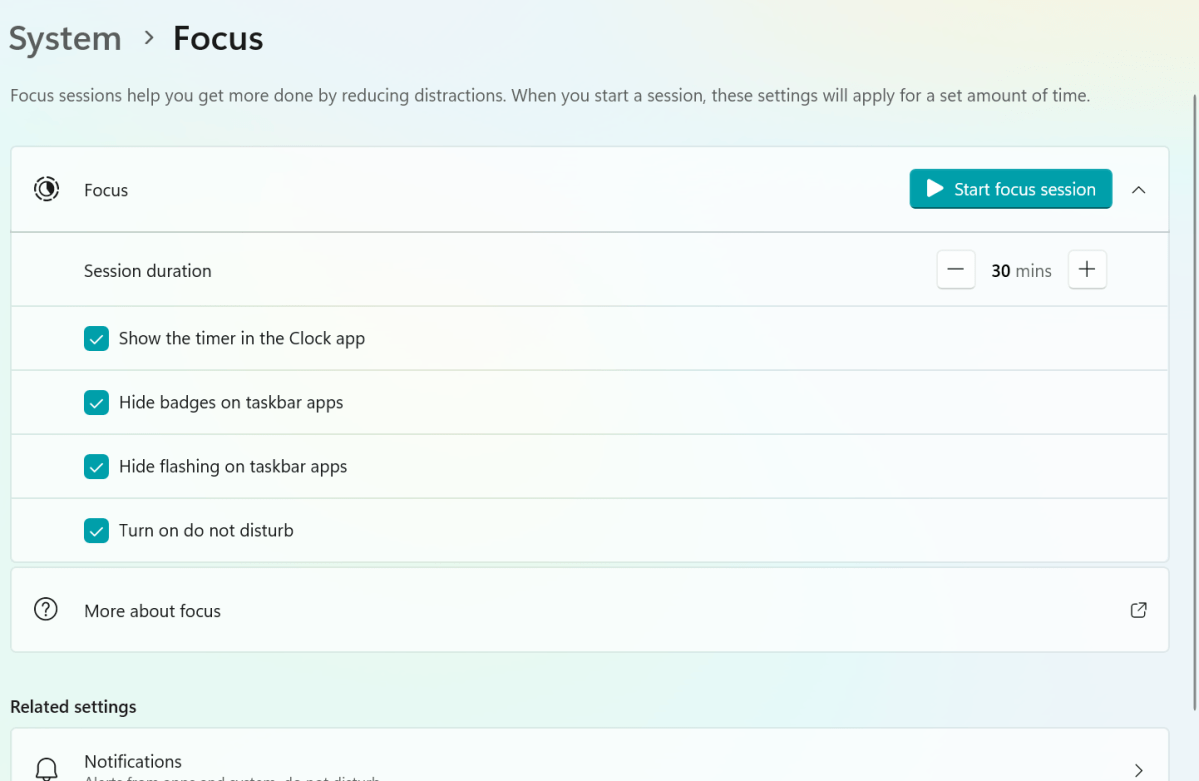
Image: Dominic Bayley / Foundry
When you start a focus session, a focus timer appears on screen. You can use additional focus tools in the Clock app. Do not disturb is turned on by default when you start a focus session, which automatically silences your notifications.
- Adenman
-
 1
1
Recommended Comments
There are no comments to display.
Join the conversation
You can post now and register later. If you have an account, sign in now to post with your account.
Note: Your post will require moderator approval before it will be visible.