Microsoft Edge version 138 started rolling out last week, and users quickly noticed it's missing an important visual design that was originally introduced specifically for Windows 11.
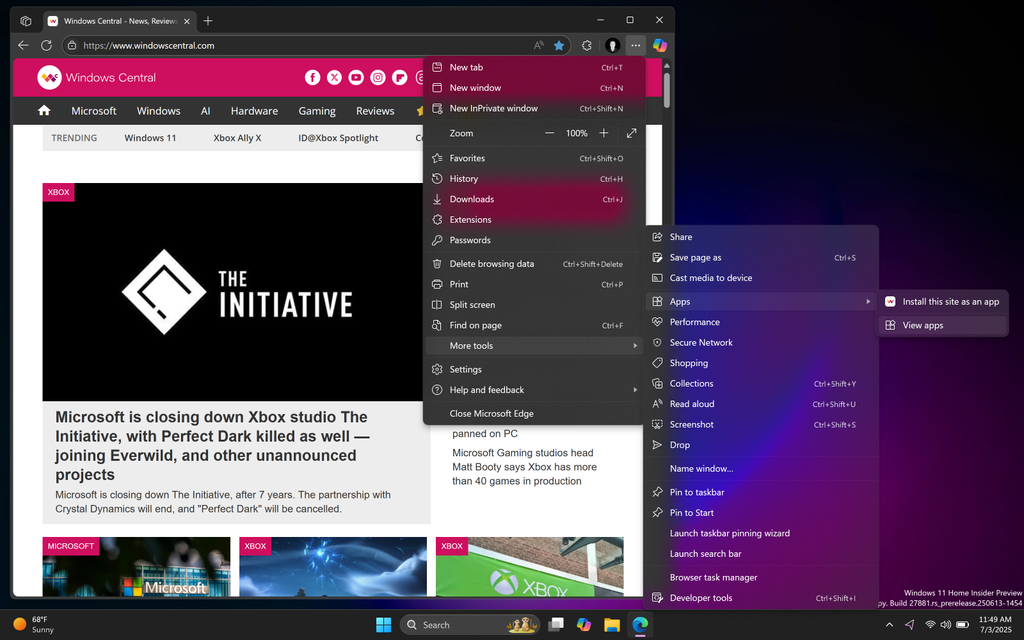
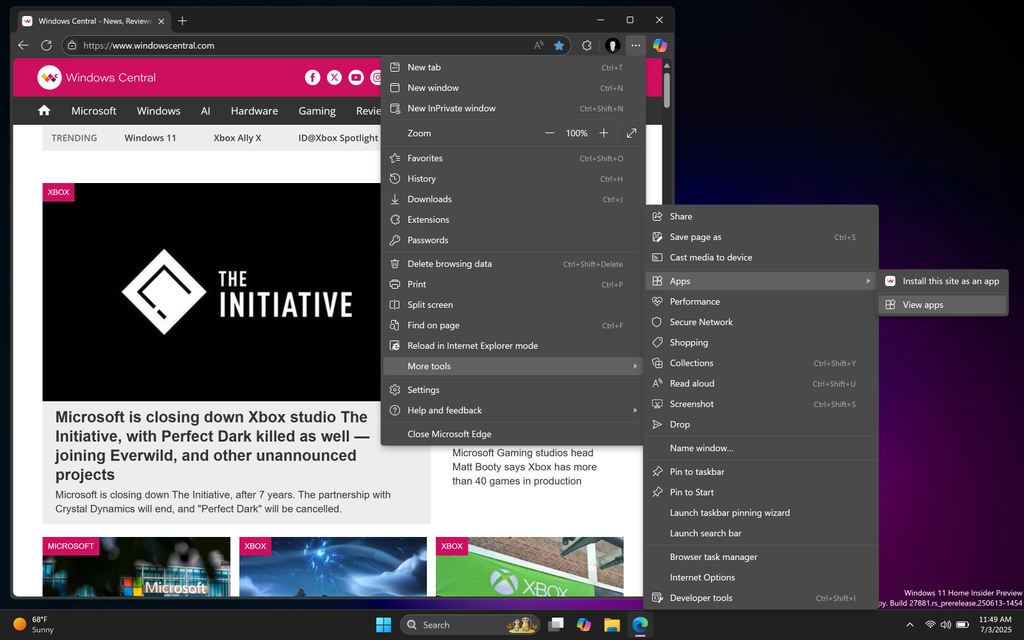
If you're a fan of Microsoft Edge because of its simplistic design that adheres to Microsoft's own design guidelines, the latest release is going to disappoint you. As of Microsoft Edge version 138, the "enable Windows 11 visuals" setting is no longer functional, meaning all of the blur effects that were introduced specifically for Windows 11 are no longer present.
This makes the browser much uglier than it was before, and it looks broken as a result. The rest of the Windows 11 interface still support translucent blur effects, including first-party apps like the File Explorer, Notepad, and the general OS interface. Microsoft Edge is now missing out on this crucial design aesthetic, making it stick out like a sore thumb and appear unfinished.
The acrylic and mica blur effects used to be present in the Microsoft Edge title bar and context menus. It was a subtle but very important design addition that helped aligned the app with the rest of the Windows 11 interface, and generally made it look a lot nicer. But with the blur effects seemingly broken with version 138, the whole browser just looks worse as a result.
Now, if you don't have an eye for app design, you'll likely never even notice this change. But if you do have a keen eye for consistent design and eye candy, you will immediately notice the missing blur effects across the app.
Microsoft Edge version 137 with working blur effects
(Image credit: Windows Central)
Microsoft Edge version 138 with broken blur effects
(Image credit: Windows Central)
It's unclear how the breaking such an important design cue wasn't addressed and fixed before version 138 rolled out. Hopefully it is just broken, and this isn't one of those situations where Microsoft has decided to remove one of Edge's standout design features that differentiates it from the rest of the competition. Very few other browsers are doing anything to align with Windows 11's design language, hopefully Edge doesn't follow suit.
Microsoft has actually backpaddled on a number of bold and innovative Edge UI changes in the past year. The company had originally planned to roll out a radical new design for Edge, which featured floating tabs and more translucency across the interface. However, the company later canceled this plan for unknown reasons, keeping Edge as an almost one to one copy of Chrome instead.
This was a huge shame to me, as I do daily drive Edge and really did love how the company wanted to give it its own identity. Instead, Edge still looks like Chrome, and now with the missing blur effects, it looks dull and out of place on Windows 11. Frustratingly, Microsoft doesn't mention whether the removal of blur effects in the browser is a bug or deliberate change in the changelog for version 138.
It's also likely that the blur effects are broken on Windows 10 devices too, though we were unable to check this.
In recent months, Microsoft Edge has come under fire for the amount of bloat Microsoft has added to it. Everything from Copilot integration to AI generated themes and shopping assistants have bogged down the Edge experience, to the point that users have created scripts to debloat the experience. For many, Microsoft Edge's Windows 11-inspired design was one of its standout features.
Unfortunately, there doesn't appear to be a fix or workaround to restore the blur effects on the latest version of the web browser. Your only choice is to downgrade back to Edge 137, or make do with the much uglier interface until a fix comes along.
In the meantime, do you use Microsoft Edge as your daily browser on Windows 11? Let us know in the comments.
Source
Hope you enjoyed this news post.
Thank you for appreciating my time and effort posting news every day for many years.
News posts... 2023: 5,800+ | 2024: 5,700+ | 2025 (till end of June): 2,864
RIP Matrix | Farewell my friend


3175x175(CURRENT).thumb.jpg.b05acc060982b36f5891ba728e6d953c.jpg)
Recommended Comments
Join the conversation
You can post now and register later. If you have an account, sign in now to post with your account.
Note: Your post will require moderator approval before it will be visible.