

3175x175(CURRENT).thumb.jpg.b05acc060982b36f5891ba728e6d953c.jpg)
Microsoft Excel is the tool of choice in most environments when it comes to data crunching, analysis, and basic visualization needs. The Redmond tech firm regularly updates the software with new capabilities and fixes, making the lives of personal users, students, and professionals across the globe easier. Today, it has revealed a new feature that may solve a major annoyance for Windows customers.
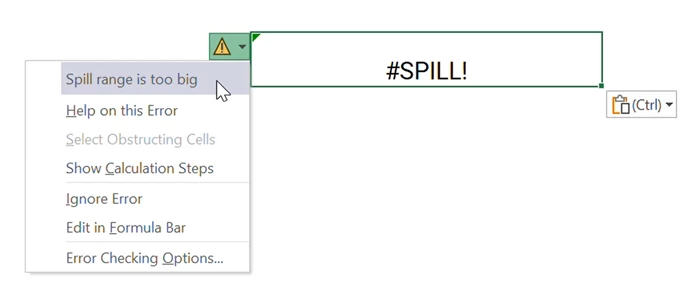
If you use Excel for Windows actively, you may have come across errors like #VALUE! and #SPILL! in cells. If you hovered over this error, you'd get a very brief error message that prompted a web search to try and figure out a fix. This wasn't a very convenient way and resulted in lost productivity. Here is what it currently looks like in the stable Excel release for Windows:
Six years ago, Microsoft fixed this issue for Excel for the web by introducing descriptive error cards that explained more details about the error you're encountering. Now, Microsoft is finally bringing this feature to Excel on Windows too. Here is what it now looks like in the Microsoft 365 Insider version of Excel for Windows:
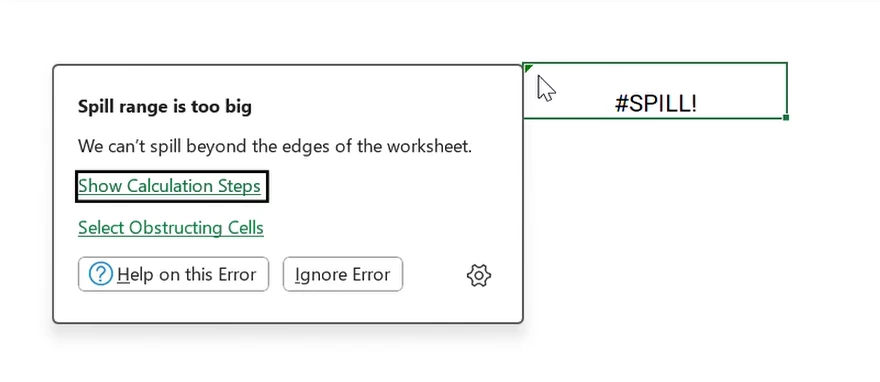
If you're on the Beta Channel running Version 2512 (Build 19502.20000) or later of Excel for Windows, you can give this updated error card a go by opening the application, navigating to a cell, and then intentionally putting in an error value like =SQRT(-1). This will trigger a #NUM! warning, after which you can click the Show Calculation Steps option to debug the problem.
There is no word yet on when this enhancement will be rolled out to the Current Channel, but it should be fairly soon, considering it's been on the web for a while and is quite useful. In the meantime, Microsoft has recommended filing feedback about this feature and Excel in general through the Help > Feedback menu inside the application.
Hope you enjoyed this news post. Feedback welcome.
Posted Thursday 4 December 2025 at 4:59 am AEST (my time).
News posts... 2023: 5,800+ | 2024: 5,700+ | 2025 (till end of November): 5,412
Recommended Comments
There are no comments to display.
Join the conversation
You can post now and register later. If you have an account, sign in now to post with your account.
Note: Your post will require moderator approval before it will be visible.