


3175x175(CURRENT).thumb.jpg.b05acc060982b36f5891ba728e6d953c.jpg)
Recently, we reported on Karton, a native virtual machine manager for the KDE Plasma desktop being developed by Derek Lin.
Now, another GSoC project is on the way that aims to port the KDE ISO Image Writer's UI to Kirigami, add the ability to download operating system images directly, and address a bunch of other issues. The project is led by Akki (@Holychicken), who has been working on it for a while now as part of Google Summer of Code 2025.
The existing ISO Image Writer gets the job done, but it is not without its faults. As Akki notes, the current application is plagued with UI inconsistencies, especially when compared to newer KDE applications.
There are also other issues. For example, broken drag and drop functionality and poor cross-platform progress indication. On Windows, downloads from a URL have no progress bar, and the feature is simply broken on Linux.
They hope to fix these problems and introduce some much-needed updates as outlined below:
| Feature | Description |
|---|---|
| Kirigami-based UI | Port the interface using Kirigami components to ensure a responsive layout |
| Pre-authentication | Allow users to authenticate in advance, select an ISO, and run unattended |
| Downloadable Image Listing | Add the ability to list and download ISO images from within the app |
| Cross-platform Compatibility | Ensure consistent behavior across Linux, Windows, and macOS |
| Improved Error Handling | Provide clearer error messages and improve feature reliability |
| Improved Documentation | Offer clear, user-friendly documentation about the app’s features |
The work is already showing promising results. In Akki's latest update, they managed to successfully port the initial ISO selection window to QML, a significant first step. The developer mentioned that moving to QML was not a simple copy-paste operation, as it required a deep dive into KDE's own design guidelines to ensure the new interface actually felt native to the ecosystem.
The new UI (image below) deliberately avoids a radical redesign, instead iterating on the old one to feel familiar while adopting modern Kirigami components and dropping outdated elements like gradients.
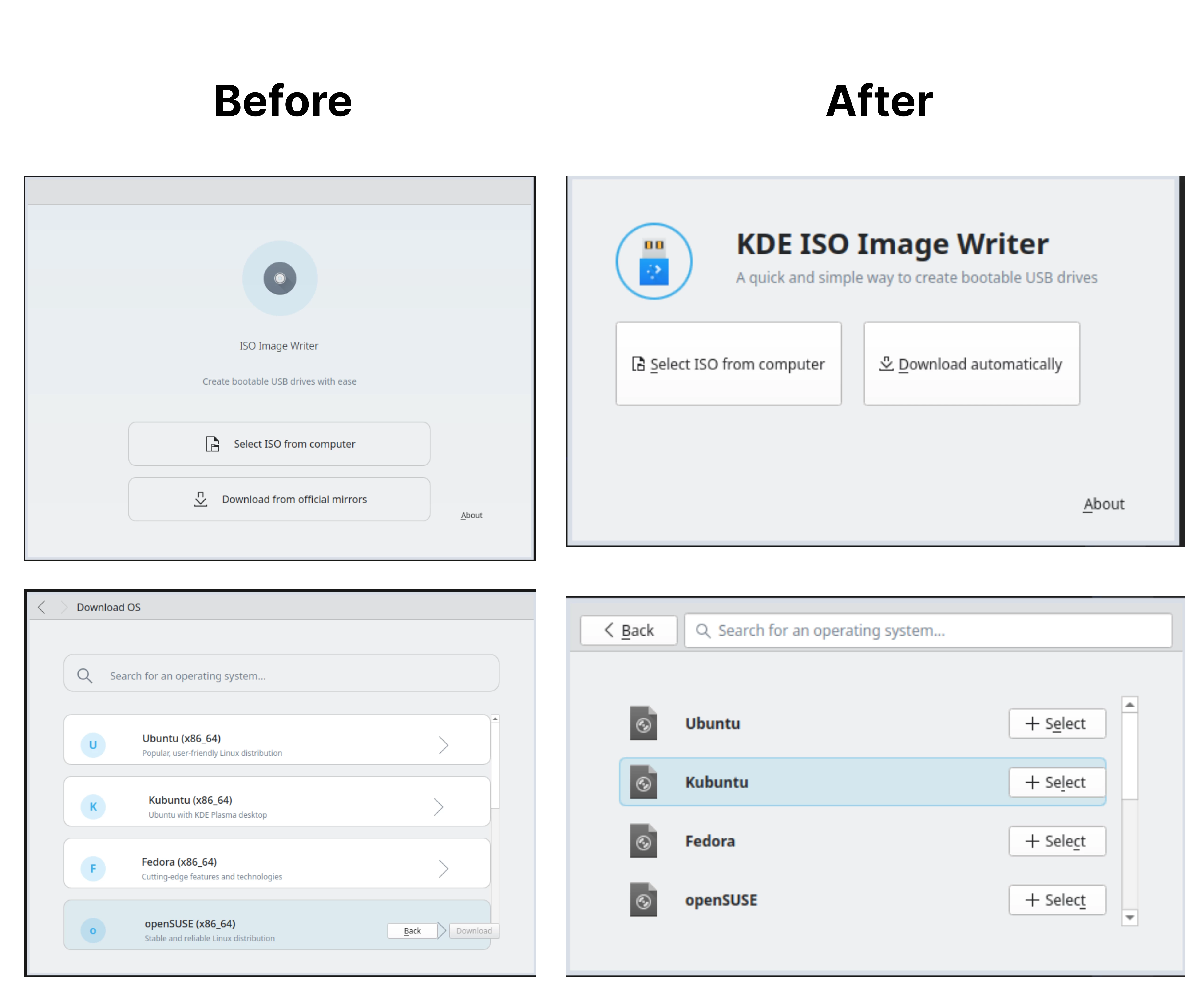
As major part of this project involves creating a new page for downloading ISO images directly within the application, a feature reminiscent of what you might find in the Fedora Media Writer.
Some inspiration for what not to do came early, as the initial plan to list over one hundred distributions available from Quickemu was scaled back.
After feedback from KDE developer Nate Graham, who suggested a massive list could overwhelm users, the plan is now to present a curated list of popular distributions. On the technical side, getting the existing CMake build system to correctly process the new QML files required some effort, but that has since been sorted out.
There are still some rough edges that need to be ironed out, particularly with integrating the application's C++ backend logic with the new QML-based frontend. That connection is exactly what Akki plans to work on next.
Hope you enjoyed this news post.
News posts... 2023: 5,800+ | 2024: 5,700+ | 2025 (till end of June): 2,864
RIP Matrix | Farewell my friend
Recommended Comments
There are no comments to display.
Join the conversation
You can post now and register later. If you have an account, sign in now to post with your account.
Note: Your post will require moderator approval before it will be visible.