


3175x175(CURRENT).thumb.jpg.b05acc060982b36f5891ba728e6d953c.jpg)
We're exactly one month away from the release of KDE Plasma 6.5, and the KDE team's recent entry in its "This Week in KDE" series shows the developers hard at work, with a lot of focus on the upcoming feature release.
Starting with KDE Frameworks, KDE's collection of foundational libraries, version 6.18 promises to let you do something with that "dumb" Microsoft Copilot key found on many new laptops. The developers will soon allow you to set up keyboard shortcuts using this new key, and the team plans to let you remap it to another key in the future.
If you're curious, one user on KDE's bug tracker noted that on GNOME, the key combination shows up as "Meta+Shift+Touchpad Disable" and is fully remappable. Back in KDE land, Frameworks 6.18 will also make thumbnail generation faster across all KDE applications and Plasma, and includes a bug fix for System Monitor Sensor widgets that were causing panels to resize themselves incorrectly.
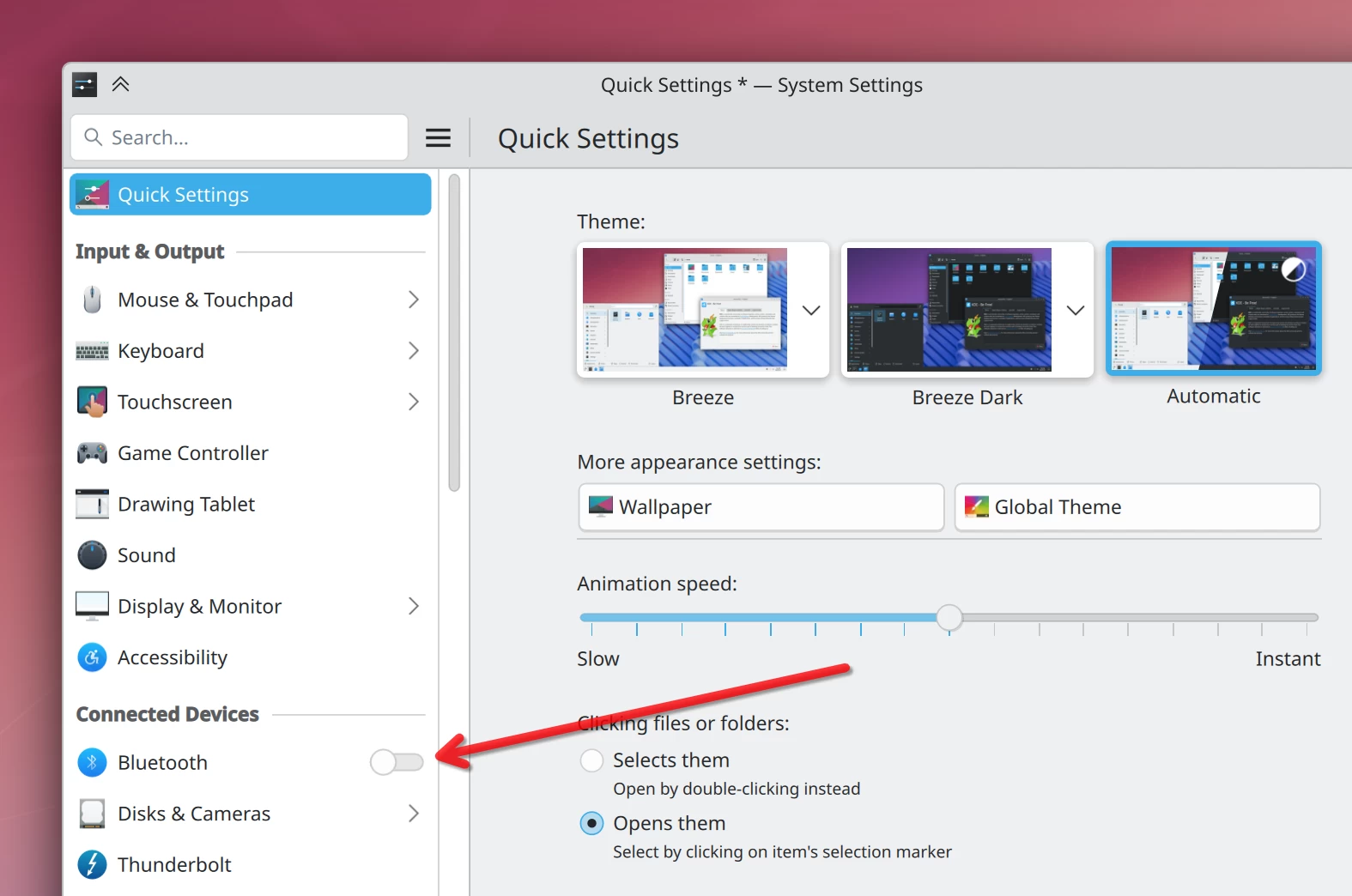
Moving on to Plasma Desktop, the upcoming Plasma 6.5 is getting some nice touches. In the System settings app, you'll see new quick toggles for things like Bluetooth and Wi-Fi directly in the sidebar. This is possible because pages in the System Settings are using KCModuleData to export actions, so expect more pages to get this treatment in the future.
When you try to install a Flatpak from a website like Flathub in 6.5, Discover now has proper support for flatpak+https:// URLs, so it opens automatically. 6.5 is also bringing a much stricter window activation policy on Wayland to stop applications from rudely stealing your focus. And now, when you mute your microphone with a shortcut, the "Mute Microphone" button will mute all input sources, not just the active one.
Since Firefox does not block the system from sleeping during a download, the Plasma Browser Integration extension for Firefox has gotten an update to handle that job itself.
You can also now see detected wireless networks directly on the relevant System Settings page, where you can connect to them too. Another notable feature 6.5's getting is that shortcuts for moving a window to another virtual desktop are now shown in the window's titlebar context menu.
As for bug fixes, the recent Plasma 6.4.4 released this Tuesday brings a few, like fixing a visual glitch in the Kicker App Menu's search field and making System Settings' Tablet page properly scrollable. The upcoming 6.4.5 is set to bring fixes for the following issues:
- The crash that could happen when opening the Notifications history.
- Dragging a Flatpak app's icon from the Kickoff launcher or Task Manager incorrectly moves the app's desktop file instead of creating a copy.
- Selecting "Copy" when dragging a Flatpak app to the desktop produces a broken file.
- Desktop icons shifting around on their own, especially with multiple screens or near vertical panels.
- Task Manager theme previews use the wrong color scheme.
Plasma 6.4.5 will drop on the 9th of next month.
Hope you enjoyed this news post.
Posted Sunday 10 August 2025 at 3:28 am AEST (my time).
News posts... 2023: 5,800+ | 2024: 5,700+ | 2025 (till end of July): 3,458
RIP Matrix | Farewell my friend
Recommended Comments
Join the conversation
You can post now and register later. If you have an account, sign in now to post with your account.
Note: Your post will require moderator approval before it will be visible.