

3175x175(CURRENT).thumb.jpg.b05acc060982b36f5891ba728e6d953c.jpg)
Ex-Microsoft CTO details how decades of GUI shifts created confusion and fragmentation for Windows developers.
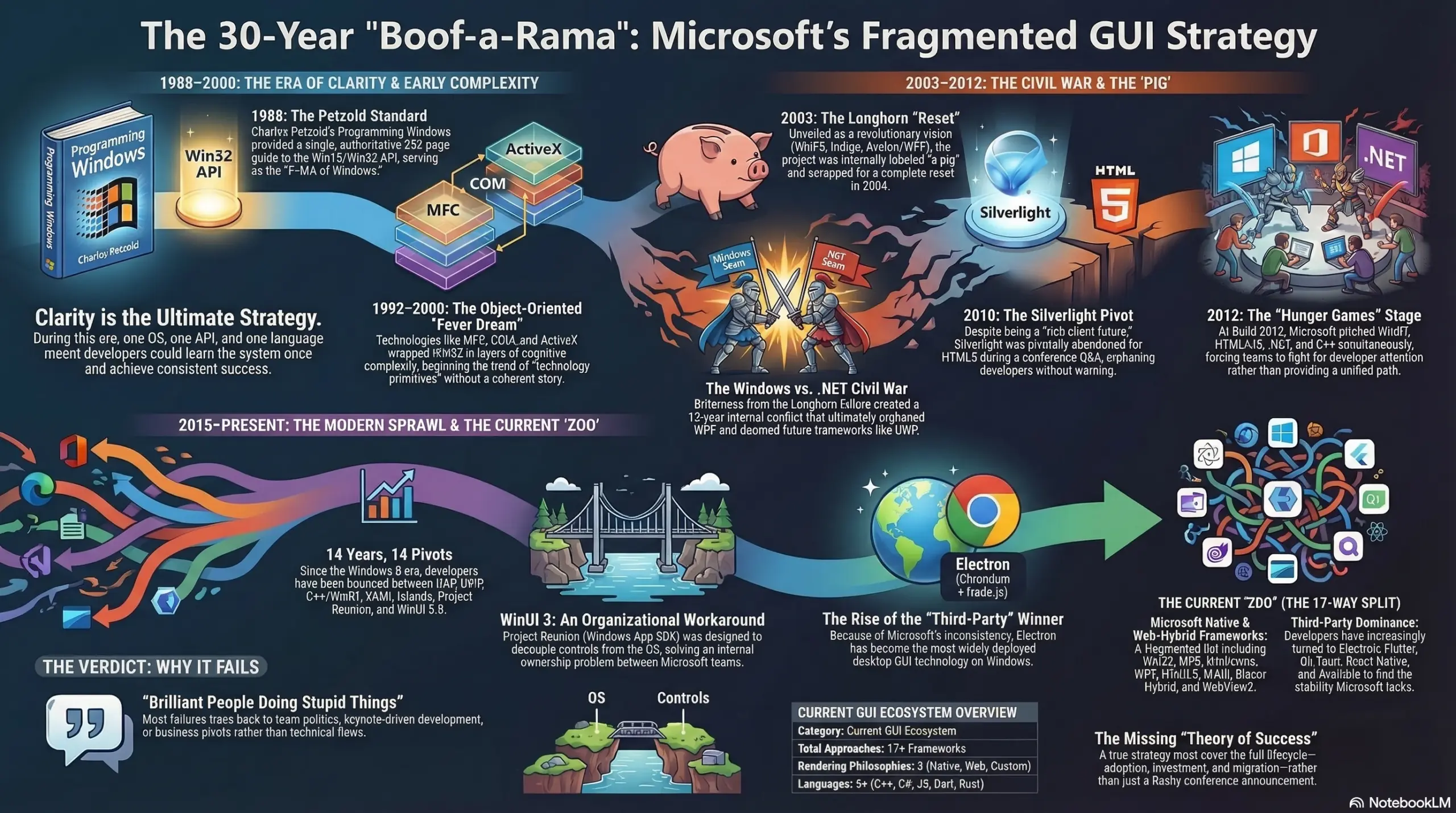
In the past, we have talked about how the Windows 11 GUI is inconsistent because some outdated interfaces still use legacy elements. However, there is a bigger problem as well, and that relates to Microsoft's confusing GUI strategy for developers, which has led to a very fragmented tech stack.
Through a recent blog post by ex-Microsoft CTO Jeffrey Snover, we have some more insights into how Microsoft's GUI strategy has gone wayward over the past couple of decades. Snover goes back to the 1980s, to the days of Win16 and Win32 APIs written in C, which could be used by all Windows developers in a consistent way. He also references the 852-page-long Programming Windows book by technical author Charles Petzold, which could be leveraged by people as the holy grail for desktop application development.
Then, in the 1990s, Microsoft tried to work around the limitations of Win32 with MFC, COM, OLE, ActiveX, and while these aren't GUI frameworks, they are component architectures that "infected every corner of Windows development and introduced a level of cognitive complexity", according to Snover. The executive claims that this caused massive confusion in developer keynotes as well, as Microsoft wasn't telling a coherent story about technologies, just trying to impress executives through an event Snover describes as a "keynote clusterf*ck".

In 2003, Microsoft showed off Windows Longhorn with an impressive technical vision and Avalon (later known as WPF), which is powered by a GPU-accelerated, vector-based UI subsystem called XAML. In August 2004, Microsoft pivoted from this too and the latest directive was to use C++ for all new development. WPF would ship with Windows Vista, but the shell itself would not use it. This led to bitterness in the Windows engineering team against the .NET team, which caused internal conflicts that eventually led to WPF being orphaned, Silverlight dying, and Universal Windows Platform (UWP) being dead on arrival.
By 2006, it was clear that WPF was an extremely powerful technology, but rather than making it the definitive answer for those asking about Windows development, Microsoft pivoted yet again and announced Silverlight in 2007. Then, in 2010, the company blindsided Sliverlight developers by suddenly announcing that the technology isn't meant for cross-platform initiatives and that HTML5 was the way forward in that area. Silverlight was meant only for Windows phone development.

Fast-forward to 2012 to the announcement of Windows 8, which had a native C++ runtime in WinRT. The Windows team's bitterness towards .NET had resulted in a decade worth of investment in the technology to be suddenly dropped too. Snover eloquently describes the situation in the following words:
There were actually two stories being told simultaneously inside Microsoft. The Windows team was building WinRT. The .NET team was still evangelizing WPF. Different buildings, different VPs, different road maps.
What developers heard at //Build 2012: the future is WinRT, and also HTML+JS is first-class, and also .NET still works, and also C++ is back, and also you should write Metro apps, and also your WPF code still runs fine. That is not a strategy. That is a Hunger Games stage where six teams are fighting for your attention.
Enterprise developers took one look at UWP’s sandboxing, its Store deployment requirement, and its missing Win32 APIs, and walked away. The framework designed to win them into the modern era had been optimized for a tablet app store that never materialized.
Now, we arrive in the current era, which began in 2015 according to Snover's timeline. UWP had a compelling vision but Microsoft's own products weren't leveraging it. Redmond's messaging remained confusing, hopping across WPF, UWP, Project Reunion, WinUI 2, WinUI 3, and more. In the past 14 years, Microsoft has pivoted 14 times in terms of recommending GUI frameworks and technologies to use for Windows development.
As a result, Windows now ships with 17 GUI technologies powered by five different programming languages:
-
Microsoft native frameworks:
- Win32 (1985) – Still here. Still used. Petzold’s book still applies.
- MFC (1992) – C++ wrapper on Win32. Maintenance mode. Lives in enterprise and CAD.
- WinForms (2002) – .NET wrapper on Win32. “Available but discouraged.” Still fastest for data-entry forms.
- WPF (2006) – XAML, DirectX-rendered, open source. No new Microsoft investment.
- WinUI 3 / Windows App SDK (2021) – The “modern” answer. Uncertain roadmap.
- MAUI (2022) – Cross-platform successor to Xamarin.Forms. The .NET team’s current bet.
-
Microsoft web-hybrid:
- Blazor Hybrid – .NET Razor components in a native WebView.
- WebView2 – Embed Chromium in a Win32/WinForms/WPF app.
-
Third-party:
- Electron – Chromium + Node.js. VS Code, Slack, Discord. The most widely deployed desktop GUI technology on Windows right now – and Microsoft had nothing to do with it.
- Flutter (Google) – Dart, custom renderer, cross-platform.
- Tauri – Rust backend, lightweight Electron alternative.
- Qt – C++/Python/JavaScript. The serious cross-platform option.
- React Native for Windows – Microsoft-backed port of Facebook’s mobile framework.
- Avalonia – Open source WPF spiritual successor. Used by JetBrains, GitHub, Unity – developers who stopped waiting for Microsoft.
- Uno Platform – WinUI APIs on every platform. More committed to WinUI than Microsoft is.
- Delphi / RAD Studio – Still alive. Still fast. Still in vertical market software.
- Java Swing / JavaFX – Yes, still in production. The enterprise never forgets.

Jeffrey Snover has described the current situation as a "boof-a-rama", a term coined by himself where "brilliant people are doing stupid things". The former executive has emphasized that the technology being touted by Microsoft was rarely bad. It was often killed off either because of internal politics, a developer conference prematurely announcing a pivot, or a confusing business strategy that orphaned developers. This unpredictable fragmentation is probably the reason why Petzold stopped writing Programming Windows after its sixth edition covered Windows 8/WinRT in 2012.
It is worth noting that while some incidents described in his lengthy blog post are anecdotal, Snover is probably accurate in his descriptions considering his deep knowledge of Microsoft's internal working patterns. He was at the company for 23 years, climbing from Partner Architect to Distinguished Engineer in 2009, Technical Fellow and Chief Architect in 2015, and CTO in 2019. The former Microsoft executive resigned from Redmond in 2022 and joined Google. This continued until 2025, with Snover now officially retired.
Hope you enjoyed this news post. Feedback welcome.
Posted Wednesday 25 March 2026 at 5:31 am AEST (my time).
News posts: 2023 5,800+ | 2024 5,700+ | 2025 5,700+ | 2026 (to end of February) 854
- phen0men4
-
 1
1
Recommended Comments
There are no comments to display.
Join the conversation
You can post now and register later. If you have an account, sign in now to post with your account.
Note: Your post will require moderator approval before it will be visible.