

3175x175(CURRENT).thumb.jpg.b05acc060982b36f5891ba728e6d953c.jpg)
Microsoft has started testing a new Copilot-powered search box on the Taskbar on Windows 11. It's better in some ways, but worse in others. Let's take a look.
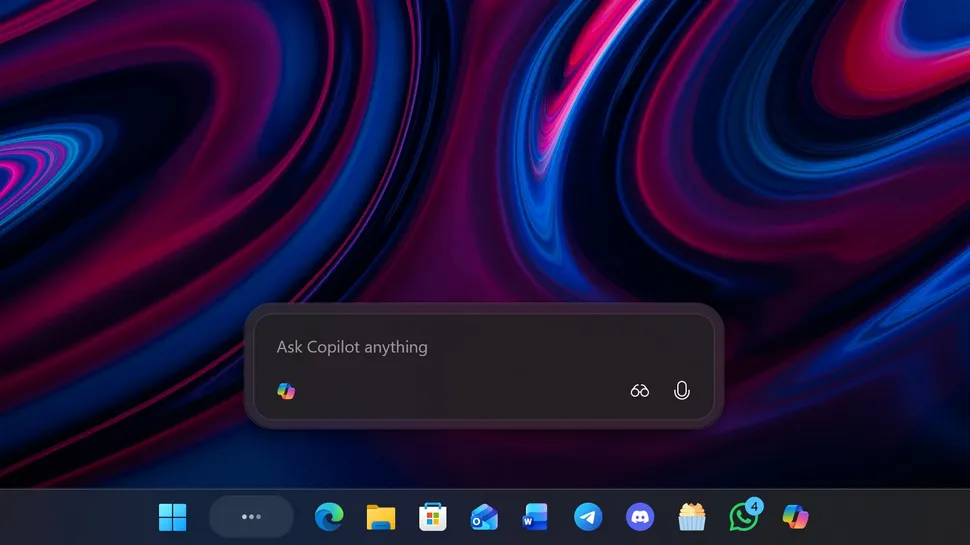
Microsoft has released the first Windows 11 preview build that includes the company's new upcoming Copilot powered Taskbar search box, which replaces the traditional Windows Search interface with a floating Copilot interface that houses both search results and AI chatbot capabilities.

The search box floats above the Taskbar now.
(Image credit: Windows Central)
The interface itself is very fast and responsive, and typing into the box will begin to immediately surface results like it always has. Unlike the old Windows Search pane however, it doesn't have two columns or the ability to filter between different search categories. It's just one simplified list showing all the relevant things related to your query.
That means you no longer get unwanted internet search results in the list, instead prioritizing apps and files at the very top, before suggesting sending the query to Copilot instead of conducting an internet search. In all scenarios, if there's an app or file related to your query, it'll appear above any Copilot chat suggestions.
The Copilot chat suggestions are clearly labeled under "Ask Copilot," and clicking them will open the full Copilot app to begin a conversation. This experience is a little clunky, especially if you don't have the Copilot app set to run at startup, as it means you'll have to wait a few beats for the Copilot app to spin up in the background before you see the conversation come to life.

The search results look really clean.
(Image credit: Windows Central)
I would much prefer if the Copilot Chat interface was integrated into this floating pane, with an option to open it in the full Copilot app if desired, as the current implementation of handing off to the main app feels very unpolished. Lastly, I noticed that the new interface always offers the option to hand-off to the old Windows Search pane via a "see more search results" button, which is handy if you want to quickly go back to the old view for whatever reason.
When the Copilot search mode is activated, the Taskbar search box gains two new buttons: Vision and Voice. These two buttons act as shortcuts into the Copilot Vision and Copilot Voice chat modes that you've always been able to access via the Copilot app.
Clicking on them at any moment will instantly launch into either mode, but frustratingly Copilot Vision will always ask for confirmation about what you want to share on your screen before actually activating. I wish there was an option to just set it to always share your whole screen to help streamline things, because that's usually why I'm even invoking Copilot Vision to begin with.

You get two new Copilot Vision and Copilot Voice buttons within the search box.
(Image credit: Windows Central)
Curiously, you can also enable the old Windows Search pane icon in addition to the new Ask Copilot text box if you want to have both on the Taskbar for whatever reason. I'm not sure if this is a bug, but it's interesting nonetheless. You can also still access the old Windows Search pane by clicking the search box in the Start menu, at least for now.
I do hope Microsoft is planning to consolidate these interfaces at some point, as now there are two search interfaces that are easily accessible by the user, which might cause confusion. It's still early in testing, so there's time for Microsoft to fix this, hopefully.
For now, the new Copilot search UI is optional, and appears to be an opt-in experience meaning you won't get it automatically unless you turn it on first in the Windows Settings app. You also must have the Copilot app installed for it to function, so if you've uninstalled the Copilot app you won't even see this option presented to you.

Clicking this will bring you back to the old Windows Search pane.
(Image credit: Windows Central)
Unfortunately, the new Copilot search interface doesn't do anything to improve the reliability and consistency of search results. It's still using the old Windows Search pane APIs, which basically means it's as reliable as it always has been, which is to say hit or miss.
Overall, this early implementation of a new search UI for Windows 11 is promising, but it's not without issues. There definitely needs to be a focus on improving the hand-off between the search pane and Copilot app, and the hybrid approach offering both new search UI and old search UI at the same time can be confusing.
I do much prefer the look of the new UI, but I'd like to be able to access it from more than the Taskbar. I don't normally show the search box on my Taskbar, as I prefer opening Start and typing into there to search instead. Currently, there's no way to access the new Search UI via the Start menu.
Is the new Ask Copilot search box optional?
Yes, the Ask Copilot search box on the Taskbar is optional and is an opt-in experience.
Can I change how many items are shown in the search results list?
No, the current version will show up to 7 results, 5 of which are apps or files, and 2 are Ask Copilot suggestions.
Does the new Ask Copilot search UI require the Copilot app to be installed?
Yes, if you don't have the Copilot app installed, you won't see the option to enable the Ask Copilot search box on the Taskbar.
Does the new Ask Copilot Taskbar box require a Copilot+ PC?
No, Ask Copilot on the Taskbar will be available to all Windows 11 PCs with the Copilot app installed. A Copilot+ PC is not required.
Hope you enjoyed this news post. Feedback welcome.
Posted Wednesday 5 November 2025 at 4:14 am AEST (my time).
News posts... 2023: 5,800+ | 2024: 5,700+ | 2025 (till end of October): 5,009
- pintas
-
 1
1
Recommended Comments
Join the conversation
You can post now and register later. If you have an account, sign in now to post with your account.
Note: Your post will require moderator approval before it will be visible.