


3175x175(CURRENT).thumb.jpg.b05acc060982b36f5891ba728e6d953c.jpg)
When you think about it, one of the most used parts of any browser is the address bar. In all major browsers, this component behaves the same: you start typing and get search suggestions.
Over time, the address bar gained the ability to handle some queries directly instead of sending you to a search page. For example, the address bar in Chrome, called the Omnibox, can handle unit and currency conversions and even perform small calculations.
Firefox does that as well with its Awesome Bar. But now, Mozilla says it is taking things a step further by providing rich results or direct answers right in the address bar, so you can "skip the search" page altogether.
According to Mozilla, it tried to pull this off several years ago but stopped short. The problem was privacy. Any design that could deliver these kinds of answers required sending whatever you are typing in the address bar to a server for processing.
The Firefox maker claims it has a "high standard for privacy" and was not satisfied with any system that would send your raw queries directly to its own servers. An experimental version that users could enable in settings never gained traction, and a small set of locally-matched suggestions was not very useful.
In the upcoming "smart suggestions" (US only for now), you can do things like check a flight's status or find a business. If you type "AC 8170" in the address bar, Firefox will show you the flight's route, departure and arrival times, and current status.
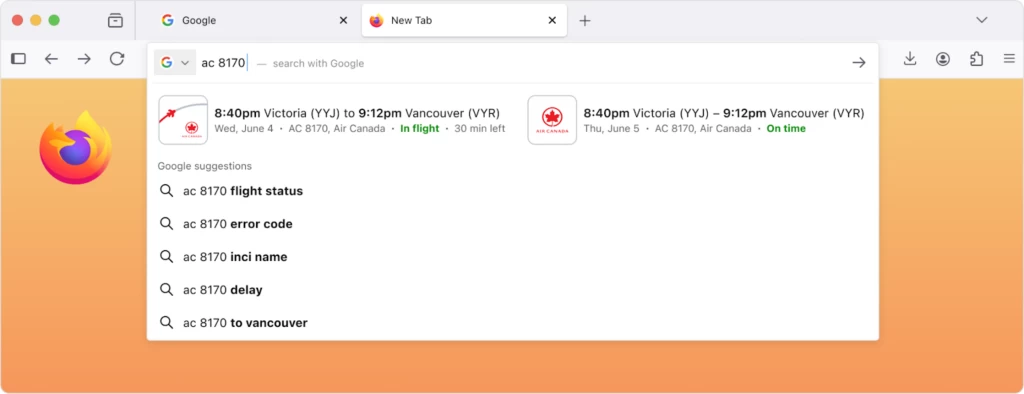
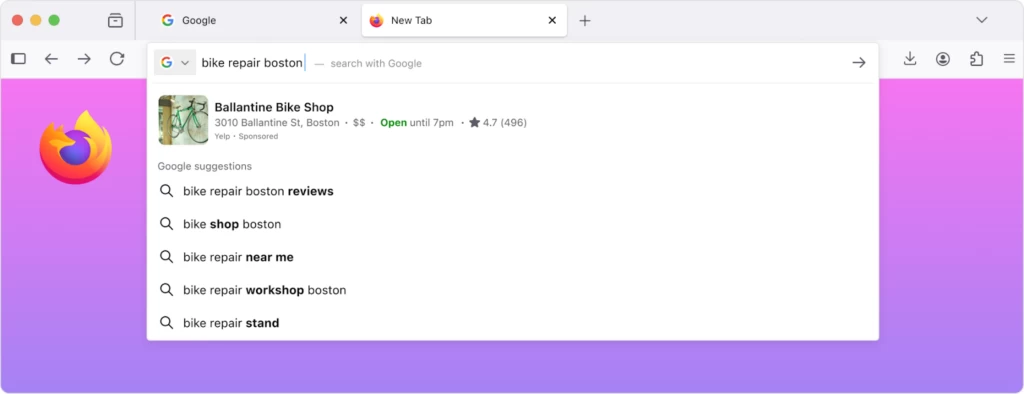
Typing a common abbreviation like "mdn" could bring up a direct link to the Mozilla Developer Network. Searching for "bike repair boston" might show a highly-rated local shop with its address and hours listed directly in the suggestions.
As for the privacy concerns Mozilla had earlier, it now has a "technical architecture" that allows Mozilla to see the query while protecting your IP address. It uses a protocol called Oblivious HTTP. Your encrypted request first goes to a relay operated by Fastly, which can see your IP address but not the query itself.
The relay then forwards the request to Mozilla, which can see the query but not your IP. Neowin took a look, and it appears that this feature is powered by Merino, the "privacy-preserving" web service behind the existing Firefox Suggest feature.
Mozilla also adds that you might get ads in the suggestions, but because of the OHTTP system, neither Mozilla nor the sponsor knows who is seeing the result.
When Mozilla ships this feature, you will have the option to turn it off. You can disable it by unchecking "Retrieve suggestions as you type" in the Search settings. For users who want to preemptively disable it, you can set browser.urlbar.quicksuggest.online.enabled to false in the about:config page.
Hope you enjoyed this news post. Feedback welcome.
Posted Tuesday 28 October 2025 at 1:04 pm AEST (my time).
News posts... 2023: 5,800+ | 2024: 5,700+ | 2025 (till end of September): 4,533
- dabourzannan
-
 1
1
Recommended Comments
There are no comments to display.
Join the conversation
You can post now and register later. If you have an account, sign in now to post with your account.
Note: Your post will require moderator approval before it will be visible.