


3175x175(CURRENT).thumb.jpg.b05acc060982b36f5891ba728e6d953c.jpg)
Mozilla is testing a new feature in Firefox Nightly, which adds Microsoft Copilot to the sidebar. Cue the pitchforks!
That gecko's up to something.
Firefox already has 4 chatbots: Anthropic Claude, ChatGPT, Google Gemini, and Le Chat Mistral. Windows Report's Venkat (the Techdows guy), spotted the addition of Copilot in the side panel of Firefox Nightly. Mozilla has been working on bringing Copilot to Firefox for nearly a year.

When you select Copilot on the sidebar, the panel describes the AIs features briefly. You can use Copilot in Firefox without an account, but there are some restrictions like daily limits, no personalization, sync chats, shorter responses, etc. The chatbot can be used to generate text, images, code, and analyze images. Users with a premium subscription can access more features.

Click on a new chat, and you should see "Quick response", click on this button to switch between 3 modes.
The default option, Quick Response, is the fastest as the AI responds in a couple of seconds, and is suited for daily conversations. Think Deeper, as the name suggests, makes the AI think longer (about 10 seconds). The final option is Smart, which uses GPT-5, and automatically thinks deeply or quickly based on the task. You can also use voice mode to interact with Copilot, or upload images and documents that you want it to analyze.
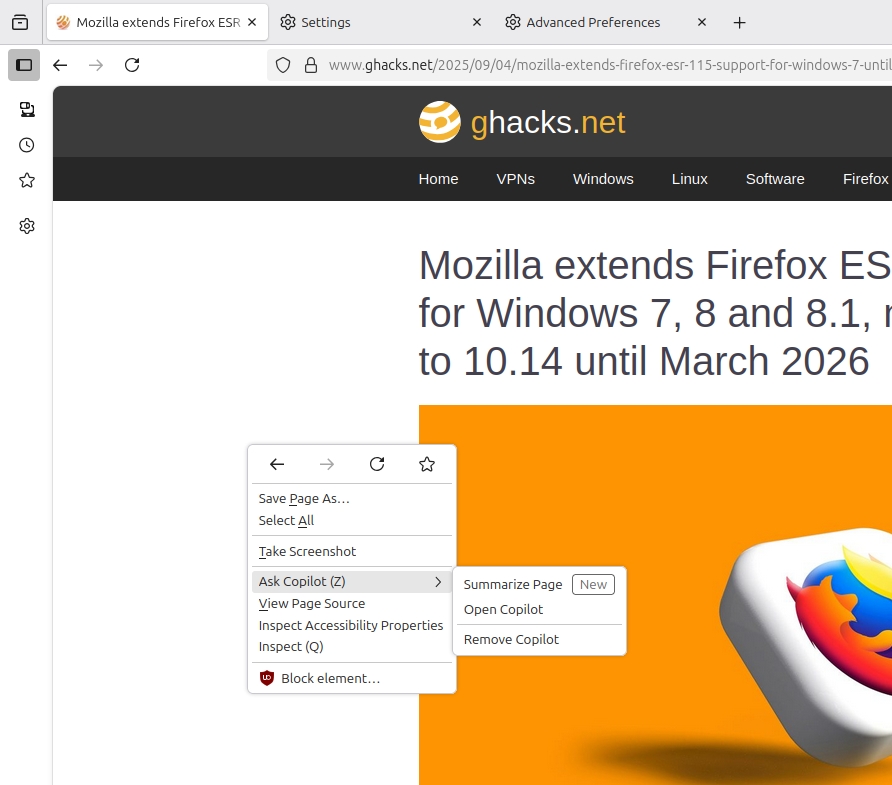
It can also summarize pages. Right-clicking on a web page, or a tab on the tab bar also offers access to Copilot's summarization features. You can also access Copilot's menu by selecting text.

Don't want these shortcuts? Just click on Remove copilot. Right-click again, and it will replace the option with "Ask a chatbot", this can also be removed.
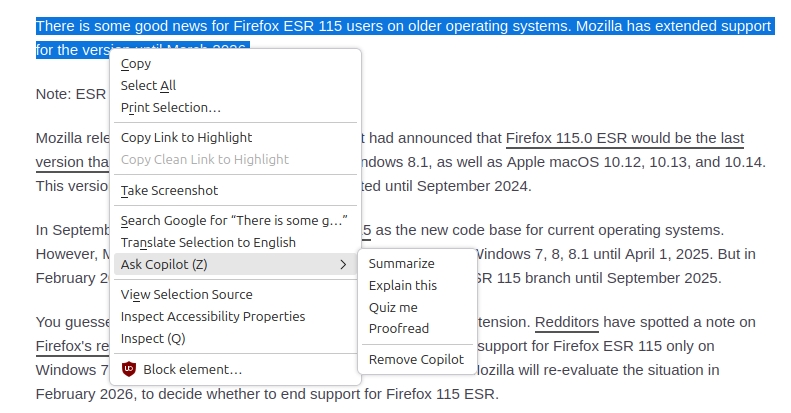
I'm not going to defend Mozilla's decision, it's up to the user to decide whether they want to use AI or not. Copilot in Firefox (and the other AIs), can all be turned off permanently. They don't run in the background, constantly monitoring you. Click on the AI's shortcut in the sidebar to access it, use it and close it. That's it. It's basically a shortcut to the AI service's website, but in a sidebar to provide quick access, which may be of value to some people. I'm not one of those people, and that's perfectly okay.
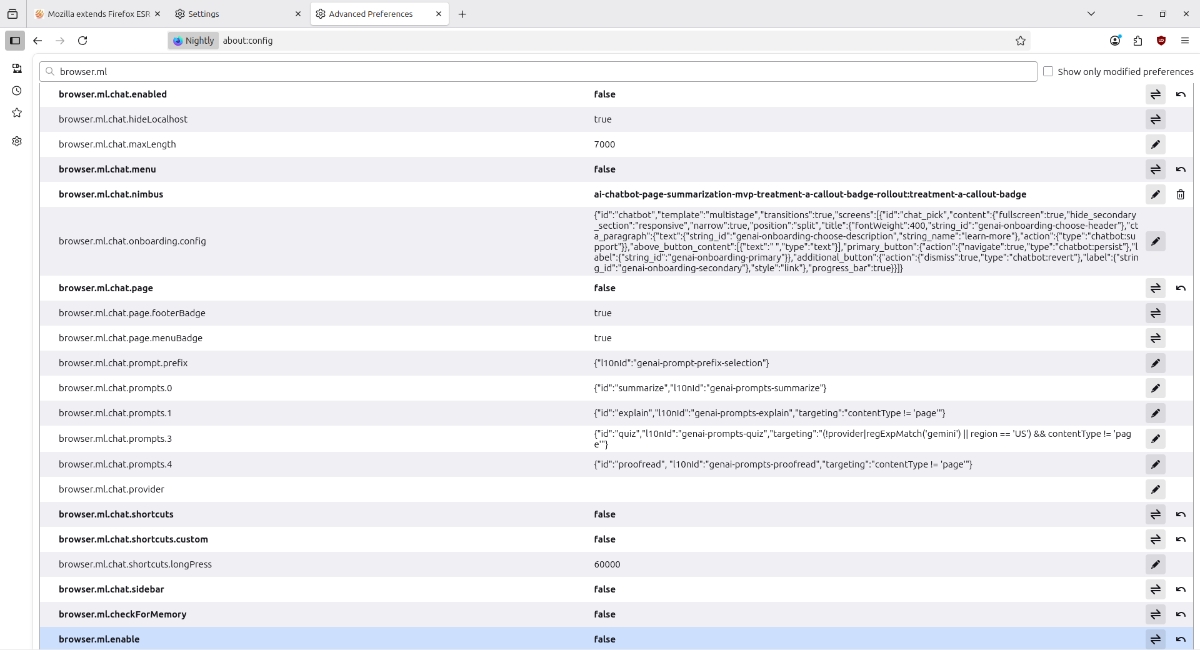
I have kept all AI features disabled in my main Firefox. If you want to disable AI features in Firefox, open about:config, accept the risks.
Paste these in the text field, one at a time:
browser.ml.enable browser.ml.chat.enabled browser.ml.chat.menu browser.ml.chat.page browser.ml.chat.shortcuts
Set their value to false. There you go, no AI features for you.
In addition to this, you can also disable Smart Tab Groups, and Link Previews using the following preferences.
browser.tabs.groups.smart.enabled browser.ml.linkPreview.enabled
Just search for browser.ml and you will see a lot of options.
For those of you who want to try Copilot, download Firefox Nightly from Mozilla's FTP servers.
As a reminder, Vivaldi recently announced it won't be adding any AI features to its browser.
Hope you enjoyed this news post. Feedback welcome.
Posted Friday 5 September 2025 at 5:24 pm AEST (my time).
News posts... 2023: 5,800+ | 2024: 5,700+ | 2025 (till end of August): 4,048
Recommended Comments
There are no comments to display.
Join the conversation
You can post now and register later. If you have an account, sign in now to post with your account.
Note: Your post will require moderator approval before it will be visible.