


3175x175(CURRENT).thumb.jpg.b05acc060982b36f5891ba728e6d953c.jpg)
The Microsoft 365 suite of software is a vital part of any organization that has decided to go with Microsoft's tech stack to meet its needs. As such, it's critical for the Redmond firm to continue upgrading the capabilities of its tools to retain its existing customers and attract new ones. And now, Microsoft has done just that by adding a very welcome new feature to some of its applications.
Microsoft has announced that viewers of an Excel, PowerPoint, or Word file on the web can now directly request edit access to it. Previously, customers were forced to resort to workarounds to achieve the same purpose. One of these was to download a view-only file and make edits in a copy and reshare, while the other was to manually reach out to the owner of the file and ask them to give you edit access. Microsoft rightly acknowledged that these methods are too cumbersome and slow, so now it has integrated the option to directly request edit access in its web applications.
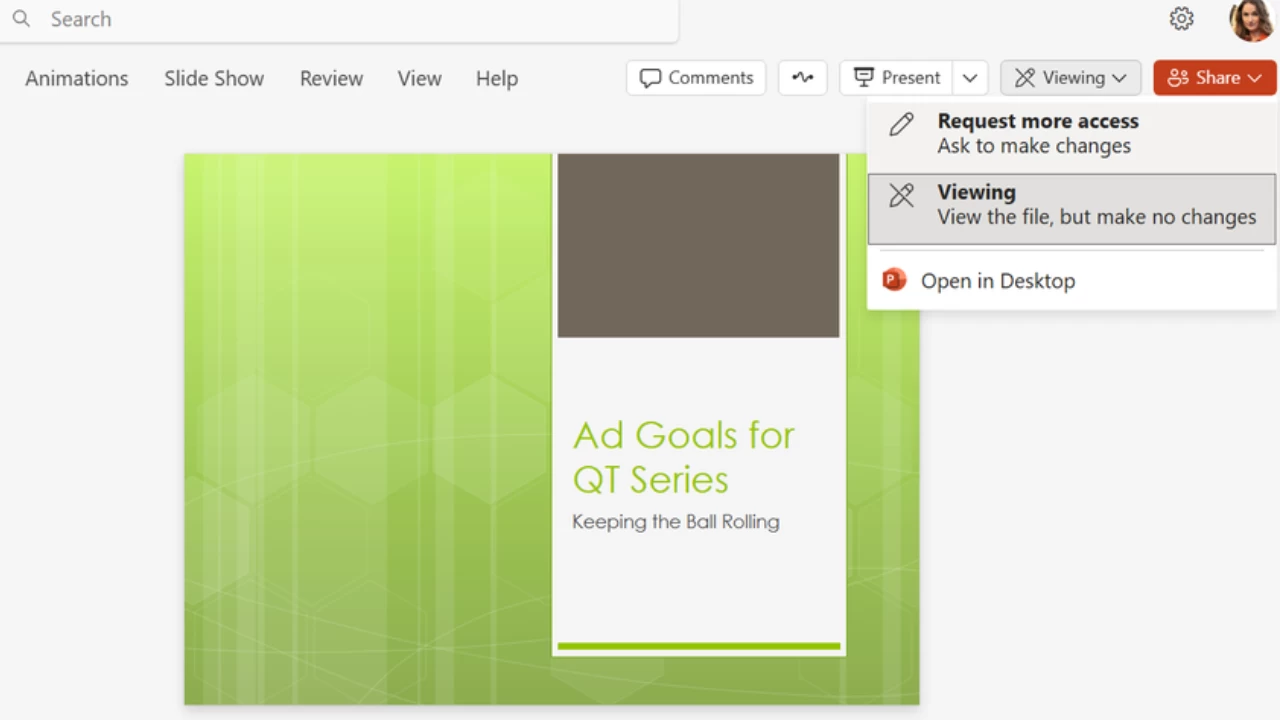
In order to leverage this capability, customers need to do the following:
- Open the Excel, Word, or PowerPoint file on the web
- Click on the Viewing icon on the top-right
- Select Request more access
- Select the Ask to edit or Ask to review option, depending upon what you need
- You can optionally write a note to the file owner too; this can be used to provide more context about why you need additional rights
- Click send
File owners will then receive an email with the request change in access along with the optional note, and they will be able to accept or deny the request directly from within the email. If they do the former, the requestor can refresh the file in order to get take advantage of increased access.
That said, Microsoft has cautioned that the propagation of access elevation may take some time to reflect in large or complex documents, or those with many co-authors. Additionally, the capability is not supported in Classic View in Word for the web. However, it is available to all enterprise customers with Microsoft 365 and a stable internet connection as long as the file they are requesting elevated privilege for is available on OneDrive or SharePoint.
Hope you enjoyed this news post.
Thank you for appreciating my time and effort posting news every day for many years.
News posts... 2023: 5,800+ | 2024: 5,700+ | 2025 (till end of June): 2,864
RIP Matrix | Farewell my friend
Recommended Comments
There are no comments to display.
Join the conversation
You can post now and register later. If you have an account, sign in now to post with your account.
Note: Your post will require moderator approval before it will be visible.