


3175x175(CURRENT).thumb.jpg.b05acc060982b36f5891ba728e6d953c.jpg)
Microsoft Excel is a highly popular spreadsheet software across personal, enterprise, and education environments. Those familiar with the tool know that it does not only allow data crunching, but also offers other capabilities on top of it, such as visualizations, Python support in Excel, Copilot integration, and more. But what good is all of that if you can't efficiently fetch the data that you actually want for your analysis? Microsoft is now working around this problem in its Insider channels.
Excel currently has a Get Data option under the Data tab that allows customers to connect to external data sources such as files, databases, and cloud platforms and transform the data in Power Query. However, this drop-down menu for sources is not really intuitive and you need to figure out the nesting criteria to get to the sub-menu item that you actually need.
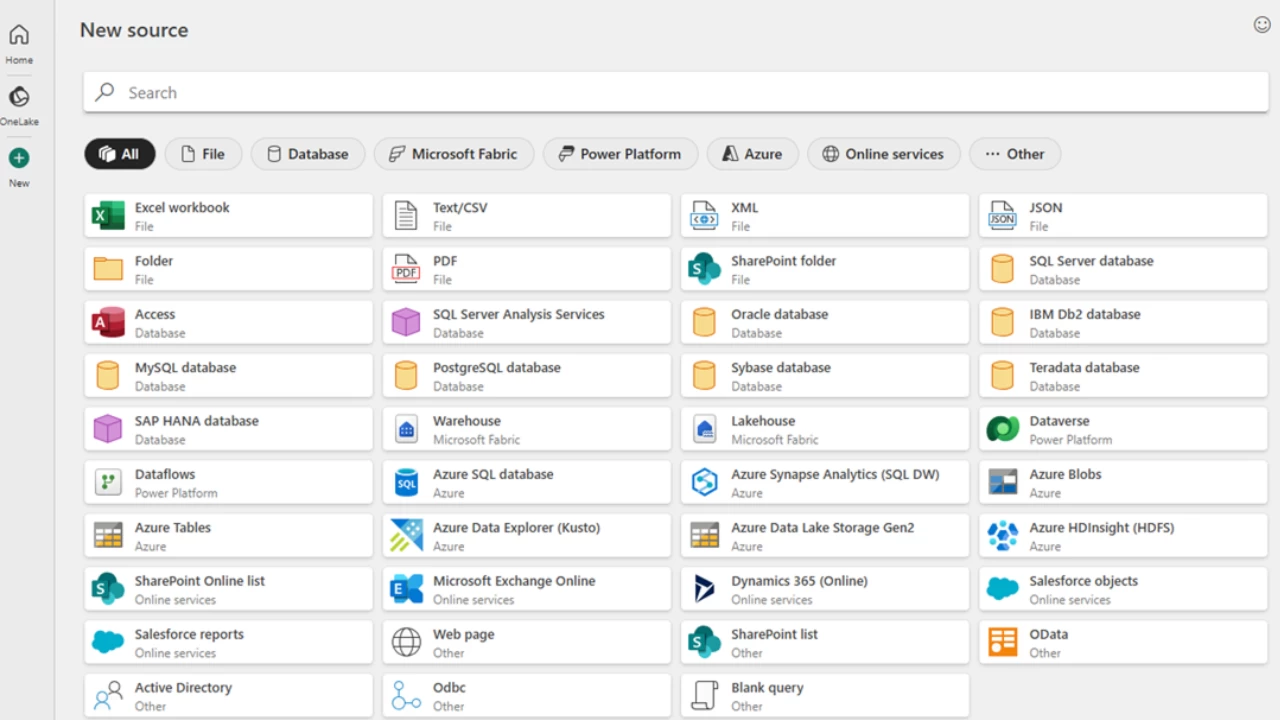
Microsoft realizes that this is a significant problem and is impacting workflows, and as such, it is now implementing a solution. The new mechanism features a revamped dialog box under Get Data (Preview). It offers popular and recommended data sources in the default view, but customers can also click the New button in the navigation pane on the left to view all available data sources.
Additionally, OneLake data artifacts on the Fabric platform can be accessed through the OneLake button in the same navigation panel. There is also a handy search bar functionality, which means that you don't need to scroll through a seemingly endless list of data sources to find what you actually need.
This is certainly a welcome change and makes the retrieval of data from external sources much more streamlined. The revamped dialog box is currently available to Beta Channel customers running Version 2505 (Build 18829.20000) or later in Excel for Windows. Microsoft has cautioned that the OneLake catalog currently supports Lakehouses and Warehouses, but other artifacts are coming soon too.
Hope you enjoyed this news post.
Thank you for appreciating my time and effort posting news every day for many years.
News posts... 2023: 5,800+ | 2024: 5,700+ | 2025 (till end of June): 2,864
RIP Matrix | Farewell my friend
Recommended Comments
There are no comments to display.
Join the conversation
You can post now and register later. If you have an account, sign in now to post with your account.
Note: Your post will require moderator approval before it will be visible.