

3175x175(CURRENT).thumb.jpg.b05acc060982b36f5891ba728e6d953c.jpg)
Microsoft is finally fixing some of the biggest frustrations with the Windows 11 Start menu, including resizing and better customization controls.
On Windows 11, as part of Microsoft's broader "" initiative to improve the operating system and rebuild user trust, the company has the first wave of Start menu changes that will soon begin rolling out through the Windows Insider Program.
The upcoming improvements focus heavily on customization and usability. Some of the most notable changes include the ability to resize the Start menu, show or hide individual sections, and separate file recommendations from recent activities.
Start menu gets long-requested improvements
When the software giant introduced Windows 11, the company replaced the classic Windows 10 Start menu with a completely redesigned experience. The new design removed Live Tiles and the secondary pane layout in favor of a simplified, centered menu that only included traditional app icons.

(Image credit: Mauro Huculak)
While the redesign modernized the interface, it also reduced functionality and customization options compared to Windows 10. Since launch, users have consistently criticized the Start menu for feeling restrictive and less flexible.
Now, Microsoft appears ready to address many of those complaints.
Resizing support is finally coming to Windows 11
One of the biggest additions is support for manually resizing the Start menu.
Until now, the Start menu automatically adjusted its dimensions based on screen size and resolution, offering virtually no control over its appearance. In future updates, users will be able to choose between smaller and larger layouts.
Unlike Windows 10, Windows 11 still won't allow freeform resizing by dragging the edges of the menu or enable a full-screen Start experience. However, the new option is still a major improvement over the current fixed layout.

(Image credit: Microsoft)
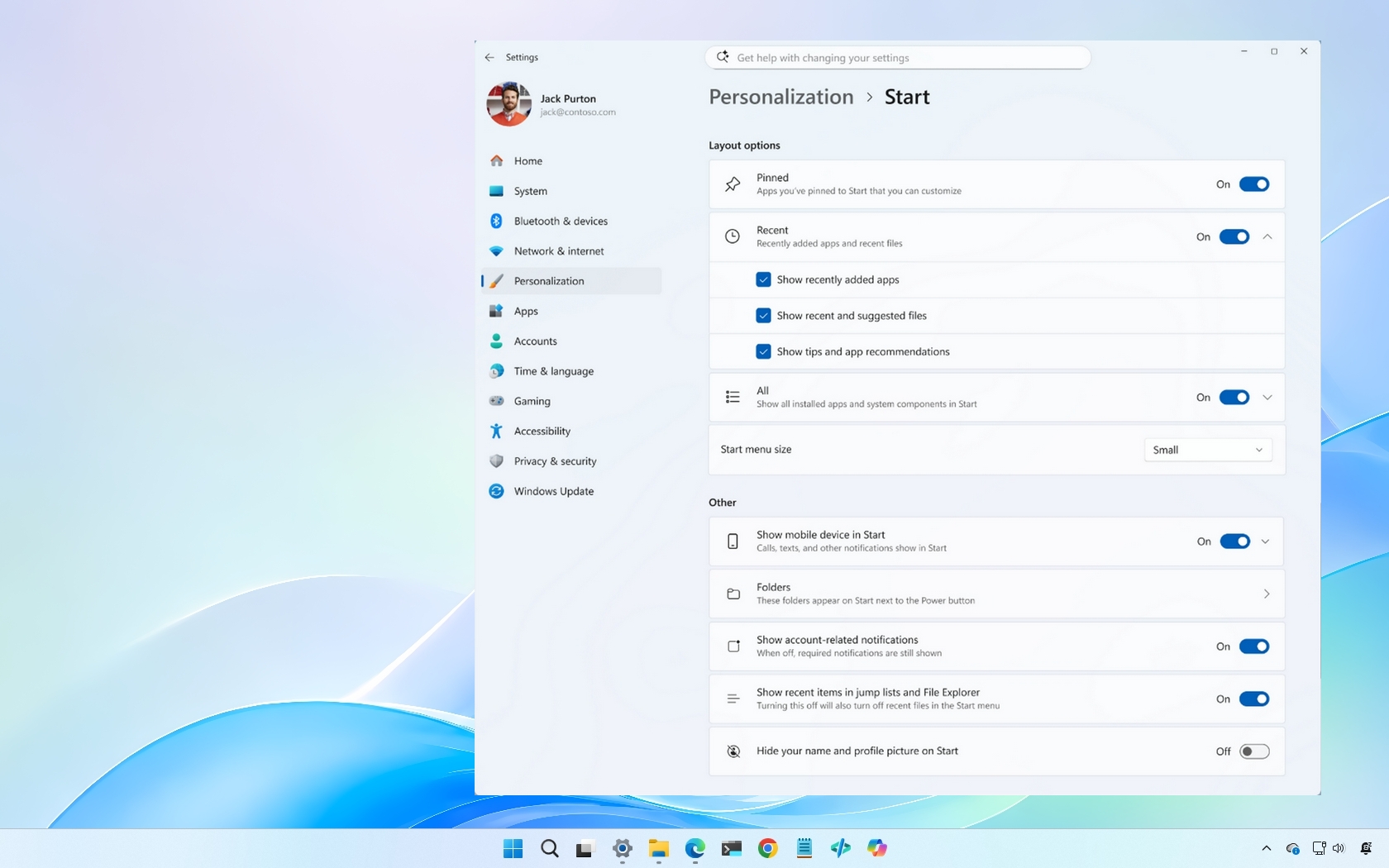
Microsoft is expected to add the feature through a new "Start menu size" setting available from Settings > Personalization > Start.
Microsoft is also adding new privacy controls
Microsoft is also introducing privacy-focused improvements for users who frequently share their screens during meetings, presentations, or live streams.
The company plans to add a new option called "Hide your name and profile picture on Start." When enabled, the Start menu will no longer display the account name and profile image.

(Image credit: Microsoft)
The setting will appear under Settings > Personalization > Start > Other.
Start menu customization to become more flexible
Originally, the Windows 11 Start menu separated content into multiple areas, including "Pinned," "Recommended," and the separate "All apps" list.
One of the most common complaints after launch was the inability to remove the "Recommended" section entirely. Microsoft eventually added a workaround, but it required turning off several unrelated settings before the section disappeared.
More recently, the company redesigned the Start menu by merging the "All apps" list into the main interface. However, customization still remained limited.
As part of the Windows K2 effort, Microsoft has now confirmed that users will soon get dedicated toggles to individually show or hide the "Pinned," "Recommended," and "All" sections.

(Image credit: Microsoft)
In addition, Microsoft plans to separate file recommendations from system recommendations. This means users will finally be able to disable recommendations on the Start menu without also disabling recent files and Jump Lists across the Taskbar and File Explorer.
Windows Central's take
These changes may seem small at first glance, but they address some of the most persistent complaints about the Start menu since the operating system launched back in 2021.
The lack of customization has always been one of Windows 11's weakest aspects. Microsoft simplified the Start menu too aggressively, and in the process, removed many of the features Windows 10 users relied on daily.
I think the new resize option and dedicated section toggles are long overdue. The separation between recommendations and recent files is also an important improvement because users should have more granular control over privacy and personalization settings.
If Microsoft continues down this path and keeps restoring flexibility without overcomplicating the interface, the Start menu could finally become good on Windows 11 instead of one of its biggest frustrations.
What are your thoughts on the new Start menu changes? Let me know in the comments.
Hope you enjoyed this news post. Feedback welcome.
Posted Thursday 28 May 2026 at 7:58 am AEST (my time).
News posts: 2023 5,800+ | 2024 5,700+ | 2025 5,700+ | 2026 (to end of April) 1,700
- Matt
-
 1
1
Recommended Comments
There are no comments to display.
Join the conversation
You can post now and register later. If you have an account, sign in now to post with your account.
Note: Your post will require moderator approval before it will be visible.