

3175x175(CURRENT).thumb.jpg.b05acc060982b36f5891ba728e6d953c.jpg)
Take this with a grain of salt, but users have reported another privacy transgression by Microsoft. According to the report by users from the Resetera forum and elsewhere, Copilot Gaming, an AI specially for gaming-related AI tasks, is taking screen captures of your gameplay for training.
While that would be fine if the user knew about it and enabled it willingly, it appears to be turned on automatically and without informing users about the data collecting and use of the data.
According to the user who noticed it first by monitoring network traffic, the AI is using OCR technology to identify text in the screenshots. If that reminds you of Microsoft's Recall feature, which it had to pull over similar privacy concerns and redo, you are not mistaken.
Note: Gaming Copilot is a beta feature. It is unclear if the recording happens in all regions or only in some. I checked on a recent Windows 11, version 24H2 system and did not have a Privacy settings section. However, the colleagues over at WCCFTech checked and they had it and confirmed that it was enabled by default.
How to turn this off
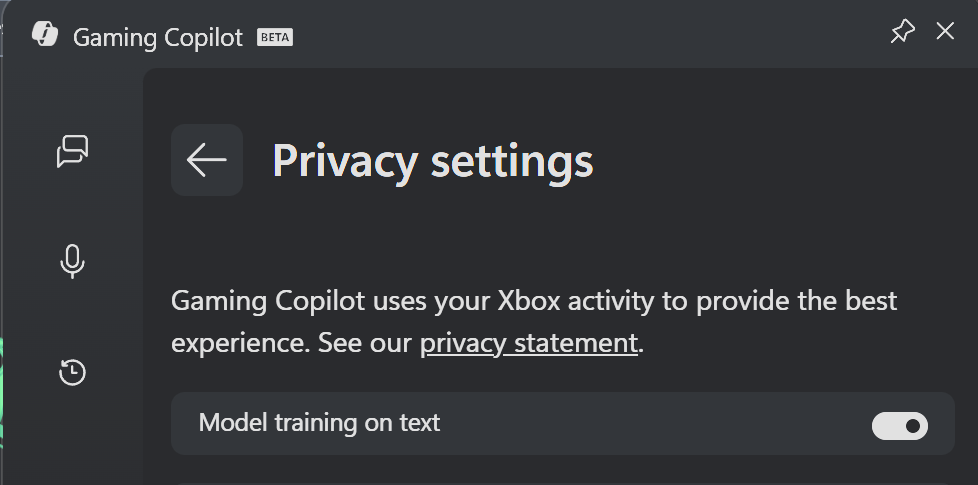
The privacy settings of Gaming Copilot.
(screenshot by RedbullCola / Resetera)
If you are a gamer on Windows 11, you may want to check if Gaming Copilot is being trained by monitoring what and how you play.
- Open the Start menu.
- Type Game Bar and press the Enter-key. You may also use the shortcut Windows-G to get there directly.
- Select the Settings gear.
- Switch to Privacy settings.
- Toggle "Model training on text" to off.
- Go back.
- Open Capture settings.
- Toggle "Enable screenshots (experimental)".
It is probably a good idea to check if the setting exists, even if you do not play games on the Windows 11 system. Unless you really, really want to help Microsoft train its gaming AI, you might want to turn it off immediately.
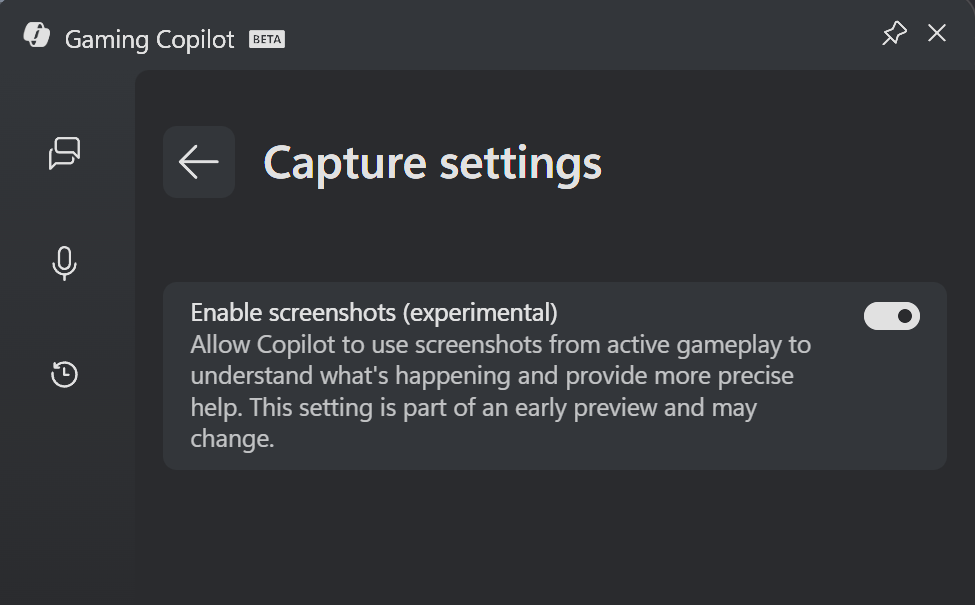
Gaming Copilot Capture settings
(Screenshot by RedbullCola / Resetera)
The original thread starter posted another screenshot of another setting. Found under Capture settings, the preference "enable screenshots (experimental)" was enabled as well.
Microsoft did not display any onboarding or consent prompts to the user either, reportedly.
We asked Microsoft for comment, but have not heard back yet. We will update the article, if we get feedback from the company.
Hope you enjoyed this news post. Feedback welcome.
Posted Saturday 25 October 2025 at 4:30 am AEST (my time).
News posts... 2023: 5,800+ | 2024: 5,700+ | 2025 (till end of September): 4,533
Recommended Comments
There are no comments to display.
Join the conversation
You can post now and register later. If you have an account, sign in now to post with your account.
Note: Your post will require moderator approval before it will be visible.