

3175x175(CURRENT).thumb.jpg.b05acc060982b36f5891ba728e6d953c.jpg)
So, Google went ahead with a major change of the extensions system that Chromium uses. Chromium is the open source core of Google Chrome and many other browsers, including Microsoft Edge, Brave, Vivaldi, and Opera. Most AI-based browsers will also use Chromium.
If you used the content blocker uBlock Origin in Chrome, or some other extensions, you may have noticed that Chrome disabled them after installation of a recent update. If you did not notice it yet, you will shortly as this is a change that is affecting all Chrome users.
Technically, Google is disabling support for the old extension system. While there were tricks to restore it for the time being, these are also pulled by Google from Chrome.
In the end, it means that you won't be able to install those extensions anymore in the Google browser. Did Google kill ad blocking? No, it did not. It changed ad blocking in Chrome and for most Chromium-based browsers. Content blockers continue to work, but they may not be as efficient anymore as before.
As a quick remedy, install uBlock Origin Lite
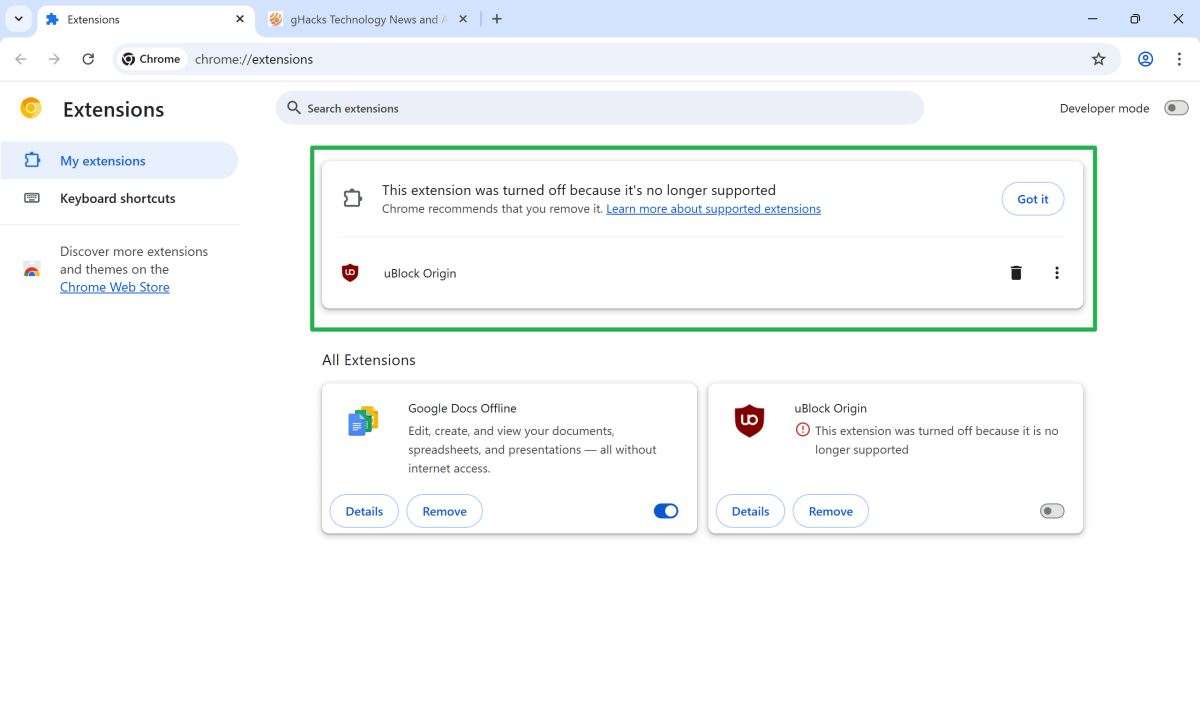
Now, with uBlock Origin disabled by Google and seemingly no option to enable the extension again in the browser, you may wonder what you should do now. As an immediate fix, you may install uBlock Origin Lite by the same developer. It contains core functionality that made uBlock Origin great and you may not notice a difference. Whether you do depends on your use of the extension.
The lite version of uBlock Origin lacks several features of the full version. You find a full list of features that the new extensions system does not support on the official GitHub website.
As a rule of thumb: if you used the base configuration of uBlock Origin, meaning you did not change preferences or used specific blocking or filtering features, then it is very likely that you won't notice a difference after installing the lite version.
So, if Google Chrome just disabled uBlock Origin, head over to the Chrome Web Store to install the Lite version.
Different browser, another option
You could also consider switching browsers. Either to another Chromium-based browser that continues to support uBlock Origin, or a Firefox-based browser.
- Chromium-based browser: Several browser makers announced that they will continue to support (some) classic extensions for Chrome. Means, you could install Brave Browser or Opera to continue using uBlock Origin. The verdict is still out whether support is going to be permanent, as it will bind development resources.
- Firefox-based browsers: Firefox continues to support classic extensions, including uBlock Origin. So, you could use Firefox or any of its fork, e.g., Mullvad Browser, and install the extension. Raymond Hill, the developer of uBlock Origin, said some time ago that the Firefox version of uBlock Origin offers the best protection. That is something to consider.
Now it is your turn: Are you affected by the change? Did Google turn off some of the extensions that you installed in your browser? Feel free to leave a comment down below.
Hope you enjoyed this news post.
News posts... 2023: 5,800+ | 2024: 5,700+ | 2025 (till end of June): 2,864
RIP Matrix | Farewell my friend
- UberGeek
-
 1
1
Recommended Comments
Join the conversation
You can post now and register later. If you have an account, sign in now to post with your account.
Note: Your post will require moderator approval before it will be visible.