


3175x175(CURRENT).thumb.jpg.b05acc060982b36f5891ba728e6d953c.jpg)
If you have ever visited the Settings page in Google Maps for Android, it might have felt overwhelming and messy. Google has finally addressed user concerns and rolled out a completely redesigned Settings page for Google Maps on Android.
It's a big leap from the old Settings page, which looked as if Google used it as a dumping ground to add whatever options and controls it has for Google Maps in a long list. Thankfully, that's no longer the case; the updated settings page categorizes Google Maps settings in the following:
- App & display for settings related to themes, map controls, and accessibility
- Navigation for settings related to driving, walking, and public transport
- Your vehicles for settings related to engine type and connected vehicles
- Location & privacy for settings related to Timeline, Maps history, and profile
- Offline maps for download options and updates to existing maps.
- Notifications to manage reminders and recommendations
You can access these options on Google Maps for Android by tapping on the profile picture icon in the top-right corner, then scrolling down and tapping "Settings."
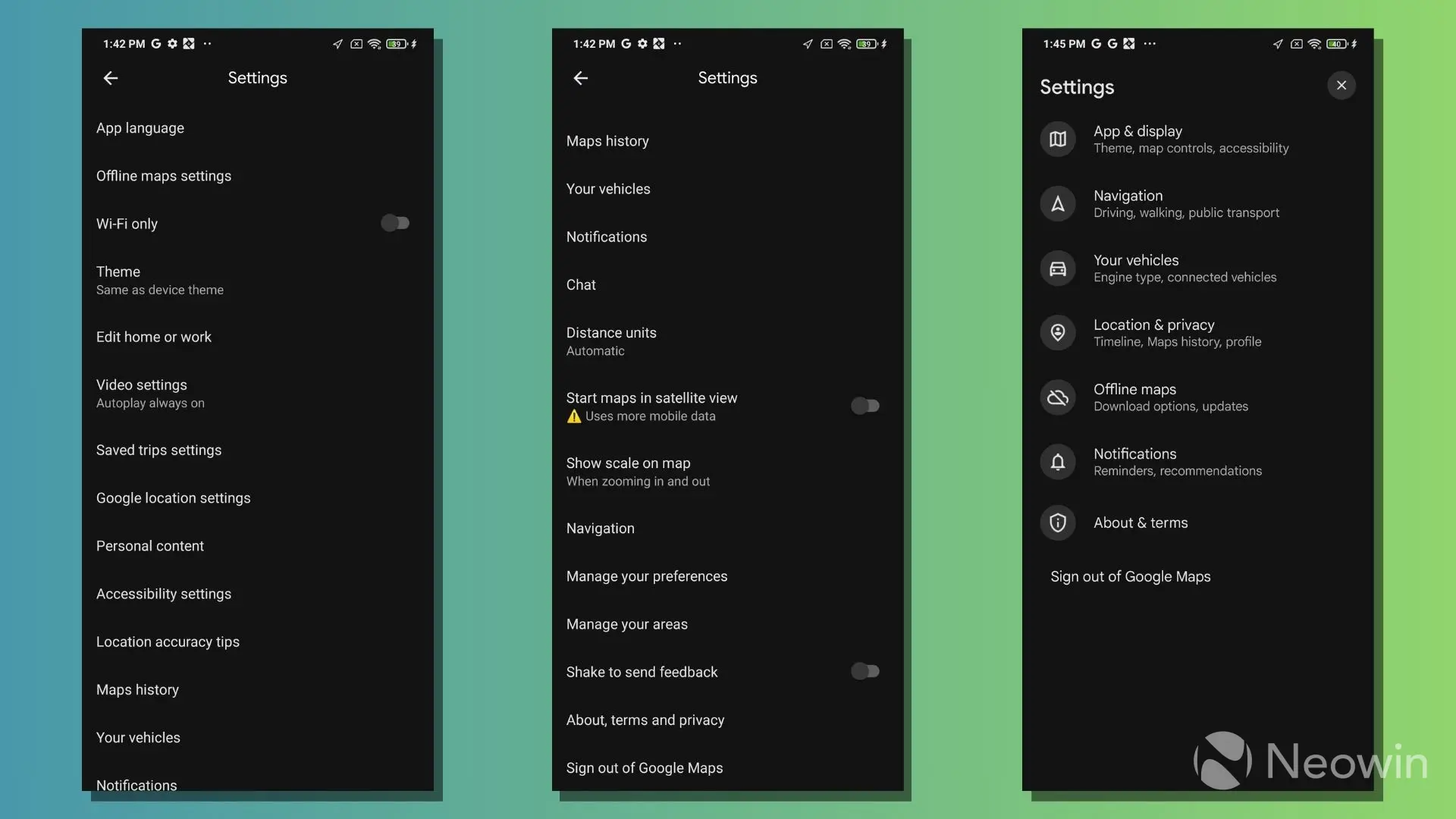
The redesigned Settings page was spotted by 9to5Google, which notes that the user interface now resembles that of the Google app, with settings aligned to the left and an "x" in the top-right corner to close the menus.
While the sub-menus for Your Vehicles, Navigation, and Offline maps are largely unchanged, you might notice differences in others. The new Google Maps changes are rolling out as part of version 25.9 in the stable channel via a server-side update and have not yet become widely available, according to the publication.
The redesigned Settings page is also rolling out to Google Maps for iOS, looking almost the same as its Android sibling. However, it might not be as significant in fixing the clutter as iOS already has a comparatively cleaner user interface.
Image via DepositPhotos.com
Hope you enjoyed this news post. Feedback welcome.
Posted Sunday 11 January 2026 at 5:25 am AEST (my time).
News posts... 2023: 5,800+ | 2024: 5,700+ | 2025: 5,700+
- Nuclear Fallout
-
 1
1
Recommended Comments
There are no comments to display.
Join the conversation
You can post now and register later. If you have an account, sign in now to post with your account.
Note: Your post will require moderator approval before it will be visible.